16
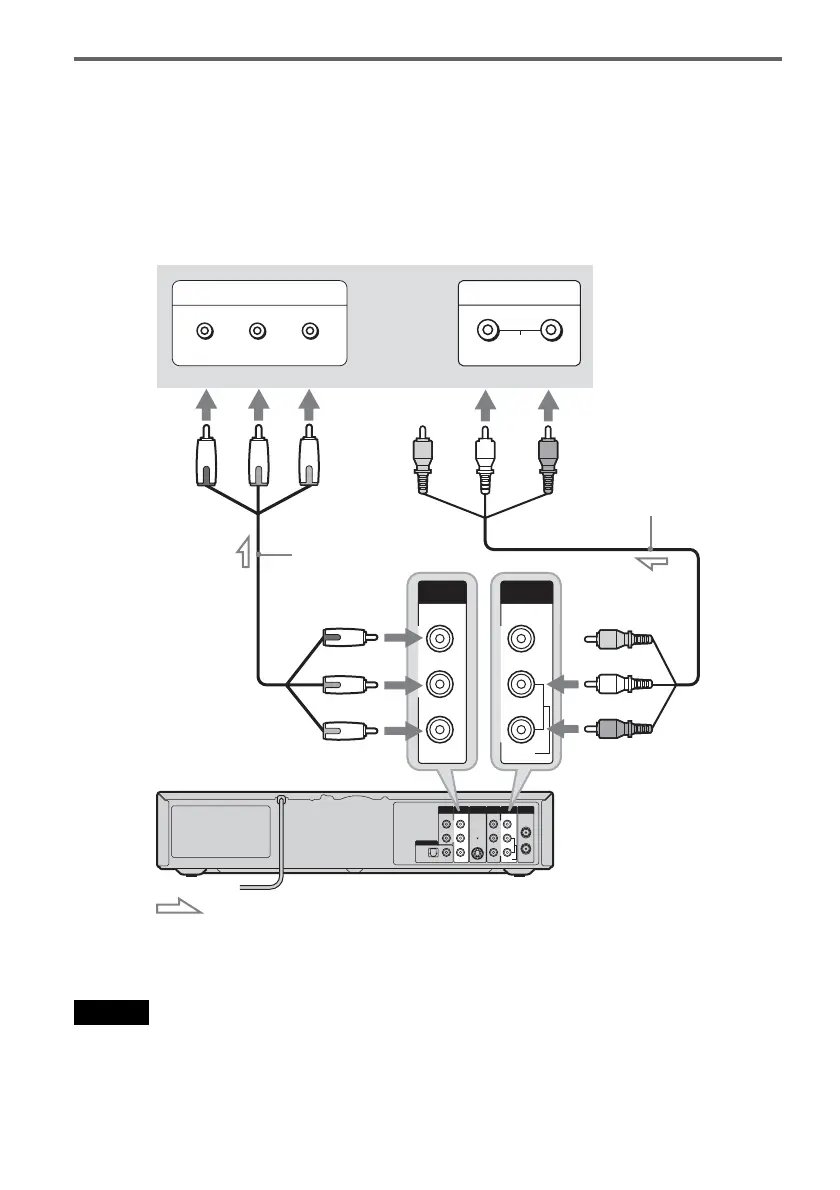
If your TV has component video input jacks
Connect the COMPONENT VIDEO OUT jacks using a component video cord (not supplied) or three
video cords (not supplied) of the same kind and length. You will enjoy accurate color reproduction and
high quality images.
If your TV accepts progressive 480p format signals, you must use this connection and then set
“Progressive” of “Video” to “On” in the “Setup” display (page 96). The PROGRESSIVE indicator lights
up when the recorder outputs progressive signals.
When using this connection, be sure to connect the audio cord to the LINE OUT (AUDIO L/R) jacks.
z Hint
Video signal can also be output from the COMPONENT VIDEO OUT jack when playing a VHS tape.
Note
During DVD recording, you cannot watch VHS pictures by pressing VIDEO, as the COMPONENT VIDEO OUT jacks
will output DVD video signals only.
IN
L
R
VIDEO
AUDIO
OUT
VHF/UHFLINE OUT
VIDEO
YL
P
B
R
P
R
AUDIO
LINE 1 IN
AUDIO OUT S VIDEO OUT
COMPONENT
VIDEO OUT
DIGITAL AUDIO OUT
OPTICAL COAXIAL
Y
P
B
P
R
COMPONENT
VIDEO OUT
COMPONENT VIDEO IN
P
B
P
R
Y
AUDIO
LR
INPUT
L
R
VIDEO
AUDIO
LINE OUT
(red)
(blue)
(green)
(green) (blue) (red)
Component video cord
(not supplied)
: Signal flow
TV or projector
Audio/video cord (supplied)
(white) (red)
(white)
(red)
to LINE OUT (AUDIO L/R)
to COMPONENT VIDEO OUT
VCR-DVD recorder


 To Next Page