46
Unrecordable pictures
Pictures with copy protection cannot be recorded
on this recorder. Recording stops when a copy
guard signal is detected.
* The recorded disc can be played only on CPRM
compatible equipment (page 29).
DVD Recording Without the
Timer
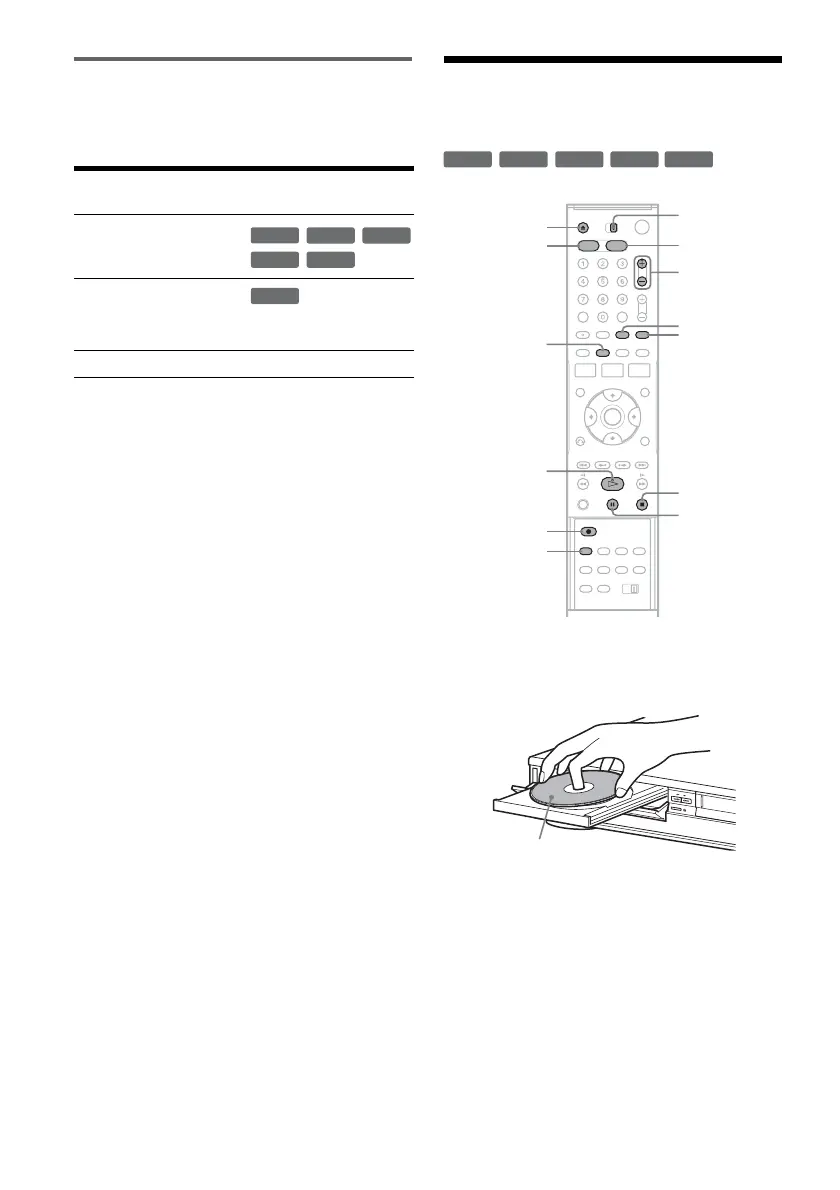
1 Press DVD to operate the DVD recorder.
2 Press Z OPEN/CLOSE, and place a
recordable disc on the disc tray.
3 Press Z OPEN/CLOSE to close the disc
tray.
Wait until “LOAD” disappears from the front
panel display.
Unused DVD-RWs are formatted in VR mode
automatically. To format in Video mode, see
page 100.
4 Press CH +/– or INPUT SELECT repeatedly
to select the channel or input source you
want to record.
Copy control
signals
Recordable discs
Copy-Free
Copy-Once
Ver.1.1 with CPRM*
Ver.1.2 with CPRM*
Copy-Never None
+
RW
-
RWVR
-
RW
Video
+
R
-
R
-
RWVR
+
RW
+
R
-
RWVR
-
RW
Video
-
R
REC MODE
X PAUSE
x STOP
CH +/–
TV/VIDEO
z REC
Z OPEN/
CLOSE
H PLAY
VIDEODVD
DISPLAY
INPUT
SELECT
TV/DVD·VIDEO
switch
Recording side facing down


 To Next Page