52
Changing or Canceling DVD
Timer Settings (Timer List)
You can change or cancel timer settings using the
Timer List menu.
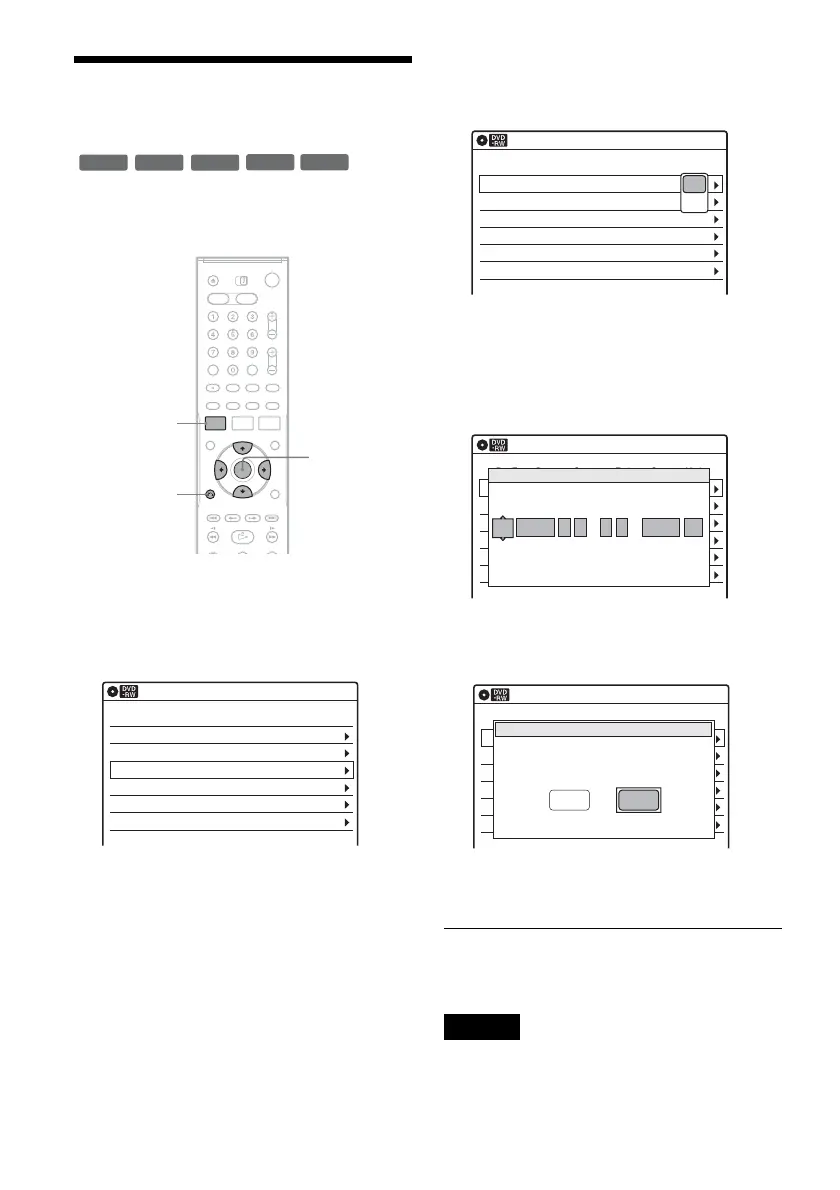
1 Press SYSTEM MENU.
The System Menu appears.
2 Select “Timer,” and press ENTER.
3 Select “Timer List,” and press ENTER.
Timer information displays the recording
date, time, recording mode, etc.
If there are more than six timer settings, press
m to display the next page.
4 Select the timer setting you want to change
or cancel, and press ENTER.
The sub-menu appears.
5 Select one of the options, and press
ENTER.
“Edit”: Changes the timer setting.
Select an item using </, and adjust using
M/m. Press ENTER.
“Del”: Erases the timer setting.
Select “OK” and press ENTER when asked
for confirmation.
6 Press SYSTEM MENU to turn off the Timer
List.
To return to the previous display
Press O RETURN.
Notes
• Even when correctly set, the program may not be
recorded if another recording is underway, or other
prioritized timer setting overlaps. For priority, see
page 49.
+
RW
+
R
-
RWVR
-
RW
Video
-
R
SYSTEM
MENU
M/m/</,,
ENTER
O RETURN
01 DVD 04/15 09:00PM 10:00PM CH8
--- --/-- --:-- --:-- ---- ---04
--- --/-- --:-- --:-- ---- ---05
--- --/-- --:-- --:-- ---- ---06
03 --- --/-- --:-- --:-- ---- ---
02 DVD 04/30 09:15PM 09:45PM CH11
10:10 AM
SP
SP
Timer List
No RecTo Date Start Stop CH Mode Edit
01 DVD 04/15 09:00PM 10:00PM CH8
--- --/-- --:-- --:-- ----
---04
--- --/-- --:-- --:-- ---- ---05
--- --/-- --:-- --:-- ---- ---06
03 --- --/-- --:-- --:-- ----
---
02 DVD 04/30 09:15PM 09:45PM CH11
10:10 AM
Timer List
No RecTo Date Start Stop CH Mode Edit
Edit
Del
01 DVD 04/15 09:00PM 10:00PM CH8
--- --/-- --:-- --:-- ---- ---04
--- --/-- --:-- --:-- ---- ---05
--- --/-- --:-- --:-- ---- ---06
03 --- --/-- --:-- --:-- ---- ---
02 DVD 04/30 09:15PM 09:45PM CH11
10:10 AM
No Rec To Date Start End Source Mode Edit
Timer – Standard
No.1
: PM
DVD
PM
:
04/15 09 00 10 00 CH 8 SP
RecTo Date Start Stop CH Mode
01 DVD 04/15 09:00PM 10:00PM CH8
--- --/-- --:-- --:-- ----
---04
--- --/-- --:-- --:-- ---- ---05
--- --/-- --:-- --:-- ---- ---06
03 --- --/-- --:-- --:-- ----
---
02 DVD 04/30 09:15PM 09:45PM CH11
10:10 AM
No Rec To Date Start End Source Mode Edit
Timer List
Do you want to erase ‘No.01’?
OK Cancel


 To Next Page