To
purchase or download eBooks, install eBook Library software
on
your
computer and register to the eBook store.
When the Reader
is
connected to your
PC,
the AutoPlay window appears
on the screen.
1 Click "Install eBook Library"
in
the "Installer for Reader" window,
and then follow the on-screen instructions.
Q Installer for Reader
(f;)
~
C
Alway..;,
do
this for
softwar~
and
game\:
in'.tall or n.ln pfQgram
W~::~~:~
Generaloptlcn;;
~
OpMfoIderto\.'le.wfies
~"'··'c.c
.•. "
.•
,·.,·.
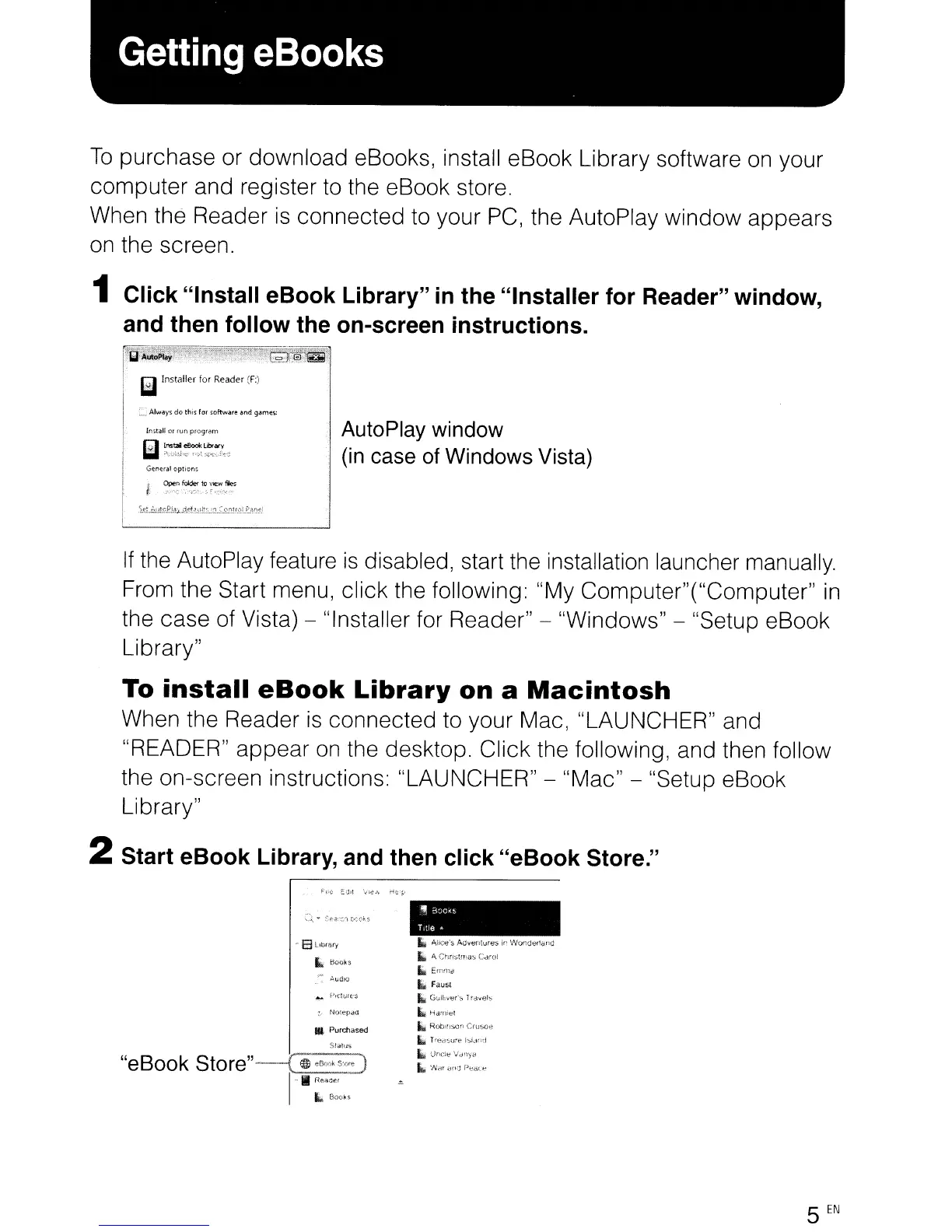
. AutoPlay window
(in
case of Windows Vista)
If
the AutoPlay feature
is
disabled, start the installation launcher manually.
From the Start menu, click the following: "My Computer"("Computer"
in
the case of Vista) - "Installer for Reader" - "Windows" - "Setup eBook
Library"
To
install
eBook
Library
on
a
Macintosh
When the Reader
is
connected to your Mac, "LAUNCHER" and
"READER" appear
on
the desktop. Click the following, and then follow
the on-screen instructions: "LAUNCHER" - "Mac" - "Setup eBook
Library"
2 Start eBook Library, and then click "eBook Store."
..
Purchased
Status
"eBook
Store"--(
~
eBoeHm)
I
-iii
I1
..
oe,
L-"
" Alice's
A(Jv~ntvre:-;
II'
WO!'ldel1cwc
Iii
A,
Clln~!~!las
C,:lwl
14M
EmnJd
..
Faus,
..
G\)ll;vt"'~
T
ra"el~
Iii Hct'llft=t
Ii.
ROOltlscn
Cr~JSO~
Ii.
Tre(;l~ur€
j~ldnd
L
llnct'
....
·d·\yv
..
'l"(il
31'"
Pi::'ac~
5
EN
To
purchase or download eBooks, install eBook Library software
on
your
computer and register to the eBook store.
When the Reader
is
connected to your
PC,
the AutoPlay window appears
on the screen.
1 Click "Install eBook Library"
in
the "Installer for Reader" window,
and then follow the on-screen instructions.
Q Installer for Reader
(f;)
~
C
Alway..;,
do
this for
softwar~
and
game\:
in'.tall or n.ln pfQgram
W~::~~:~
Generaloptlcn;;
~
OpMfoIderto\.'le.wfies
~"'··'c.c
.•. "
.•
,·.,·.
. AutoPlay window
(in
case of Windows Vista)
If
the AutoPlay feature
is
disabled, start the installation launcher manually.
From the Start menu, click the following: "My Computer"("Computer"
in
the case of Vista) - "Installer for Reader" - "Windows" - "Setup eBook
Library"
To
install
eBook
Library
on
a
Macintosh
When the Reader
is
connected to your Mac, "LAUNCHER" and
"READER" appear
on
the desktop. Click the following, and then follow
the on-screen instructions: "LAUNCHER" - "Mac" - "Setup eBook
Library"
2 Start eBook Library, and then click "eBook Store."
..
Purchased
Status
"eBook
Store"--(
~
eBoeHm)
I
-iii
I1
..
oe,
L-"
" Alice's
A(Jv~ntvre:-;
II'
WO!'ldel1cwc
Iii
A,
Clln~!~!las
C,:lwl
14M
EmnJd
..
Faus,
..
G\)ll;vt"'~
T
ra"el~
Iii Hct'llft=t
Ii.
ROOltlscn
Cr~JSO~
Ii.
Tre(;l~ur€
j~ldnd
L
llnct'
....
·d·\yv
..
'l"(il
31'"
Pi::'ac~
5
EN












 To Next Page