@B
1m
Continue
Reading
Books
Home menu
is
"C~nslmUC:"IOI
displayed.
•
[ID
~
m
All Notes
Collections
~I@JI~·~
lext
Memo
Handwriting
Mont
No rrlIImO'O
No
Of..mgs
[I]
<
an
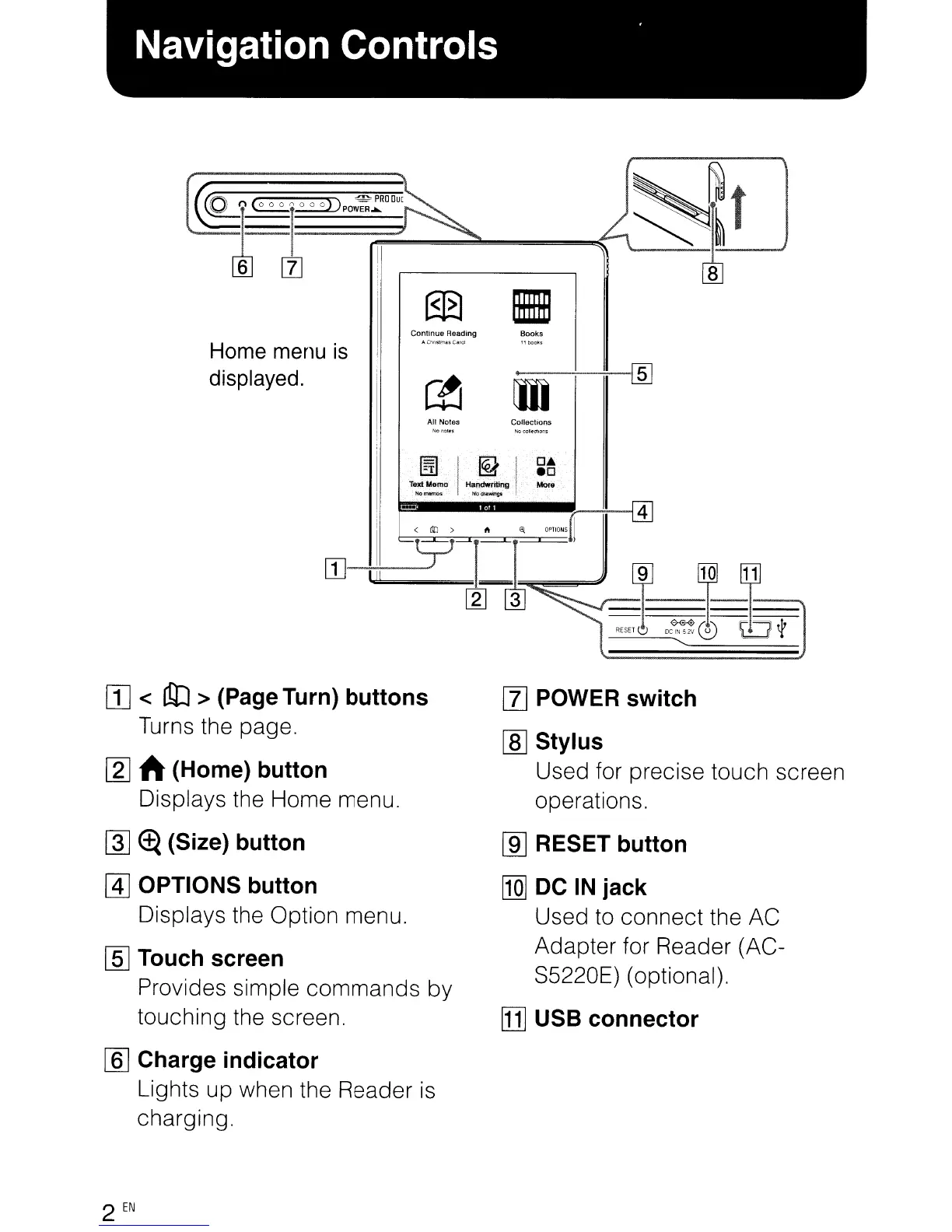
> (Page Turn) buttons
Turns the page.
~
ft (Home) button
Displays the Home menu.
~
~
(Size) button
@]
OPTIONS button
Displays the Option menu.
[§]
Touch screen
Provides simple commands by
touching the screen.
[[]
Charge indicator
Lights up when the Reader
is
charging.
2
EN
[Z]
POWER switch
[ID
Stylus
Used for precise touch screen
operations.
[ill
RESET button
[Q]
DC
IN
jack
Used
to
connect the AC
Adapter for Reader (AC-
S5220E) (optional).
[1]
USB connector
@B
1m
Continue
Reading
Books
Home menu
is
"C~nslmUC:"IOI
displayed.
•
[ID
~
m
All Notes
Collections
~I@JI~·~
lext
Memo
Handwriting
Mont
No rrlIImO'O
No
Of..mgs
[I]
<
an
> (Page Turn) buttons
Turns the page.
~
ft (Home) button
Displays the Home menu.
~
~
(Size) button
@]
OPTIONS button
Displays the Option menu.
[§]
Touch screen
Provides simple commands by
touching the screen.
[[]
Charge indicator
Lights up when the Reader
is
charging.
2
EN
[Z]
POWER switch
[ID
Stylus
Used for precise touch screen
operations.
[ill
RESET button
[Q]
DC
IN
jack
Used
to
connect the AC
Adapter for Reader (AC-
S5220E) (optional).
[1]
USB connector












 To Next Page