6
RM-AV3000
Adjusting the clock after
setting the clock
1 While pressing COMMANDER
OFF, press MUTING.
“SET” appears on the Mode Display
key.
2 Press the Mode Display key (SET)
twice.
MENU EXIT
COMMANDER
OFF
MORE321
TV STB VCR DVD CD AMP
OTHER
TIMER LIGHT
MUTING RECALL
CHANNELVOLUME
SYSTEM CONTROL
OK
2
3
1
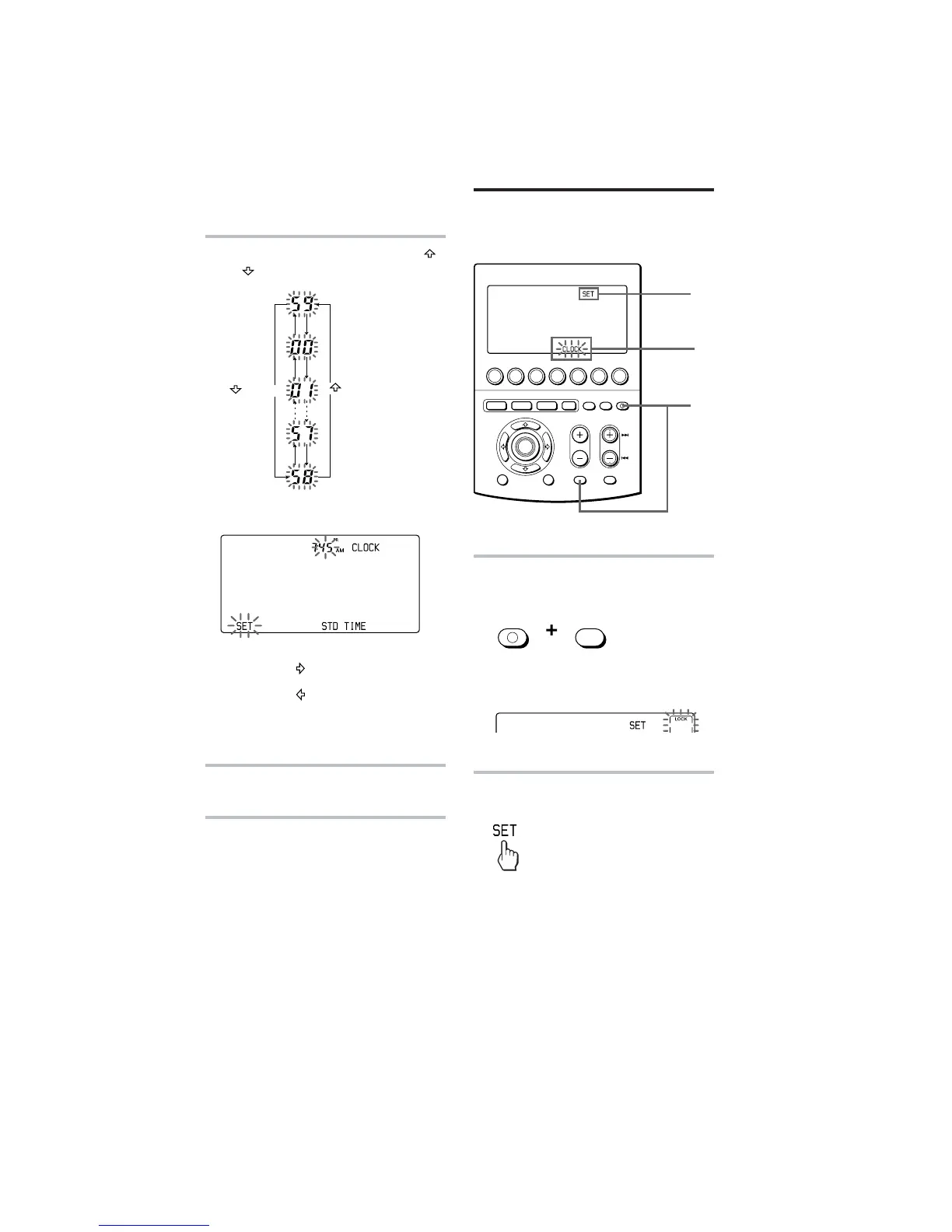
4 Set the minute by pressing the
or button.
The selected minute flashes.
Notes
• If you press the button, the minute is set
and the setting mode returns to Step 2.
• If you press the
button, the minute is set
and the setting mode returns to Step 3.
• If you want to finish the clock setting, go to
Step 5.
5 Press the SET key.
The clock starts from 0 second.
Note
If you press the SET key in any step above, the
clock is set then. The clock starts from 0
seconds.
COMMANDER
OFF
MUTING
Setting the Clock (continued)
button
10
button



 To Next Page