32
Names and Functions of Parts
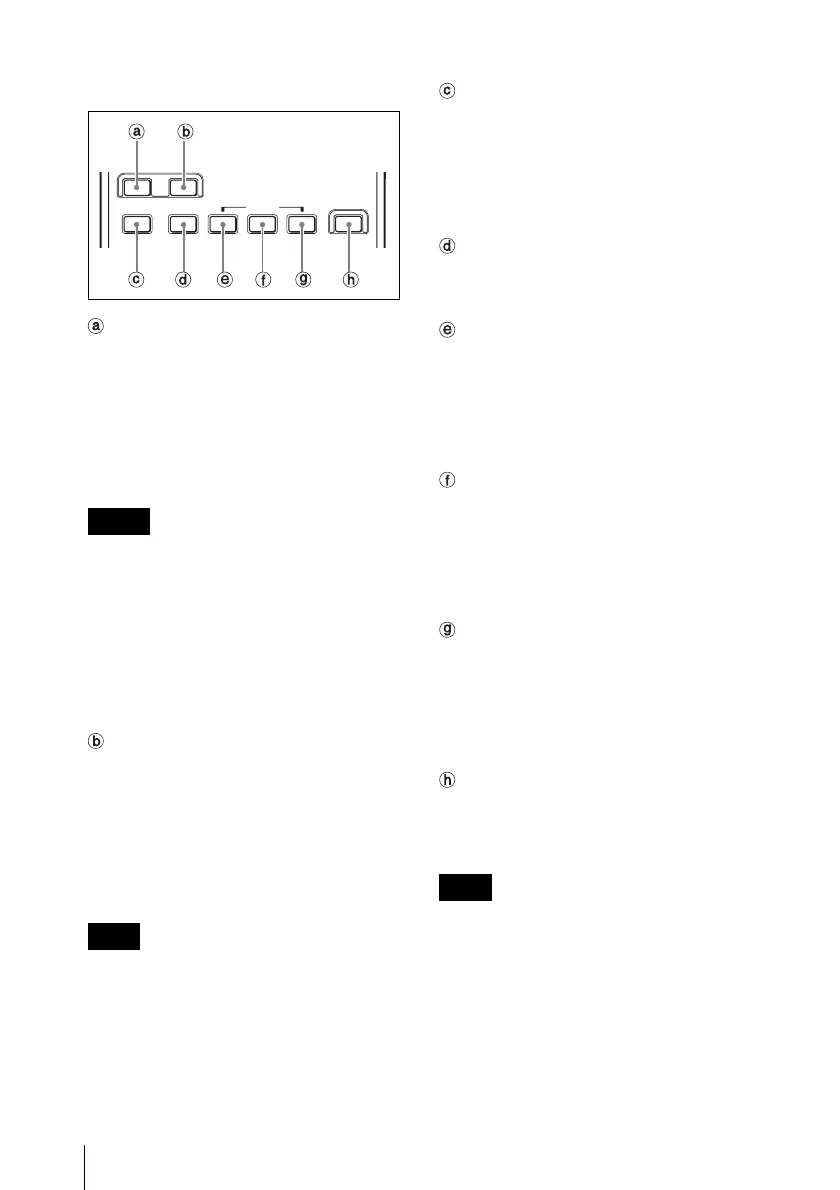
b Function operation block
AWB (Auto White Balance) button
Press this button to start auto white balance
adjustment. It lights during adjustment and
goes dark when adjustment is completed.
If you press the button during adjustment,
the automatic adjustment is canceled and
the button flashes. To turn the button dark,
press it again.
• In Preset mode, manual white balance
adjustment with the WHITE controls and
auto white balance adjustment with the
AWB button are disabled.
• When the control mode of the WHITE
controls is set to Absolute mode, the
memory A and B buttons and the AWB
button are disabled.
ABB (Auto Black Balance) button
Press this button to start auto black balance
adjustment. It lights during adjustment and
goes dark when adjustment is completed.
If you press the button during adjustment,
the automatic adjustment is canceled and
the button flashes. To turn the button dark,
press it again.
When the control mode of the BLACK
controls is set to Absolute mode, auto black
balance adjustment with the ABB button is
disabled.
Assignable 1 button
Various functions can be assigned to this
button.
For the functions assignable to this button, see
“Basic Menu” in “Settings on the RM Configuration
Menu” (page 41).
AUTO KNEE button
This button turns the auto knee function
ON/OFF.
A (memory A) button
Press and light this button to obtain the
white balance setting stored in memory A
of the camera (Memory A mode).
Press and turn the button dark to release
Memory A mode.
B (memory B) button
Press and light this button to obtain the
white balance setting stored in memory B of
the camera (Memory B mode).
Press and turn the button dark to release
Memory B mode.
PRESET button
Press and light this button to set the white
balance to the preset value of the camera
(Preset mode).
Press and turn the button dark to release
Preset mode.
BARS (color bar output) button
Press and light this button to run the color-
bar signal generator on the camera and
output the specified signal.
The function of the BARS button has
priority when it is lit. To output the test
signal, press and turn the BARS button
dark.
Notes
Note
WHITE
AWB ABB
AUTO KNEE
A B PRESET BARS
Note











 To Next Page