33
Names and Functions of Parts
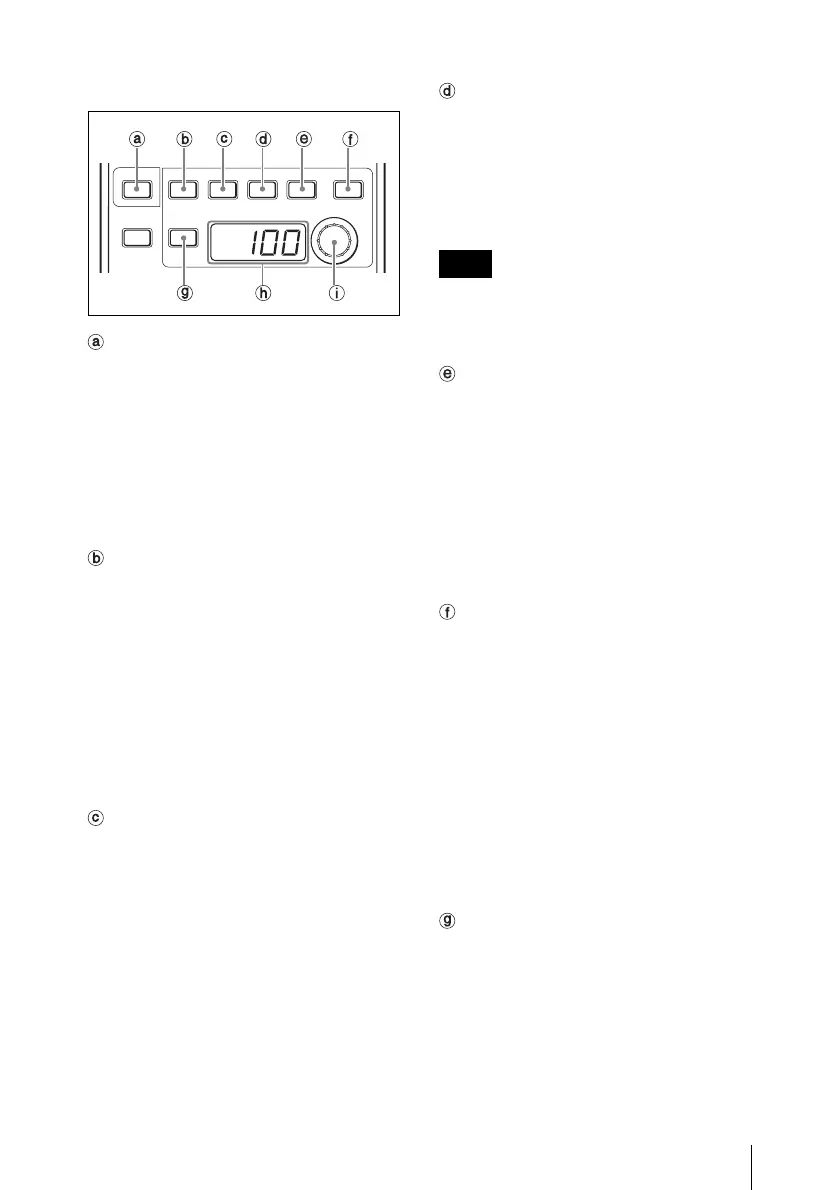
c Function/menu operation block
CHARACTER select button
When the button is not lit, the unit is in RM
Function Operation mode.
Press and light this button to set the unit to
Camera Menu mode. In Camera Menu
mode, the menu displayed on the
viewfinder or on the video signal output
from the monitor connector can be
controlled from this unit.
DETAIL/MENU button
In RM Function Operation mode, press and
light this button to enable the Detail
function. The current detail level is
displayed on the adjustment value indicator
and the detail level can be adjusted with the
adjustment knob (rotary encoder).
In Camera Menu mode, press and light this
button to display the camera’s menu on the
monitor connected via the MONITOR
connector.
SHUTTER/DISPLAY button
In RM Function Operation mode, press and
light this button to enable the Shutter
function. The current shutter speed is
displayed on the adjustment value indicator
and the shutter speed can be adjusted with
the adjustment knob (rotary encoder).
In Camera Menu mode, press and light this
button to enable the character display
function on the camera.
ECS (Extended Clear Scan) button
In RM Function Operation mode, press and
light this button to enable the ECS function.
The current ECS frequency is displayed on
the adjustment value indicator and the ECS
frequency can be adjusted with the
adjustment knob (rotary encoder).
An ECS frequency of 5 digits or more is
expressed in scientific E notation.
Example: 12000 Hz t 1.2E4
SLS (Slow Shutter)/CANCEL button
In RM Function Operation mode, press and
light this button to enable the SLS function.
The currently set number of accumulated
frames is displayed on the adjustment value
indicator and the number of accumulated
frames can be adjusted with the adjustment
knob (rotary encoder).
In Camera Menu mode, press and light this
button to cancel the set value.
Assignable 2/ENTER button
In RM Function Operation mode, press and
light this button to enable the function
assigned to this assignable button. The
currently set value is displayed on the
adjustment value indicator and the value
can be adjusted with the adjustment knob
(rotary encoder).
In Camera Menu mode, press and light this
button to confirm the set value.
For the functions assignable to this button, see
“Basic Menu” in “Settings on the RM Configuration
Menu” (page 41).
ON button
In RM Function Operation mode, press this
button to turn ON/OFF the function(s) of
the DETAIL, SHUTTER, ECS, SLS, and
assignable 2 buttons that are enabled (that
is, the buttons that are lit).
MENU
DETAIL
ONSHOT
MARK
ECS SLS
SHUTTER
DISPLAY CANCEL ENTER
CHARACTER
Note











 To Next Page