Connections and Operations
Connections
GB
16
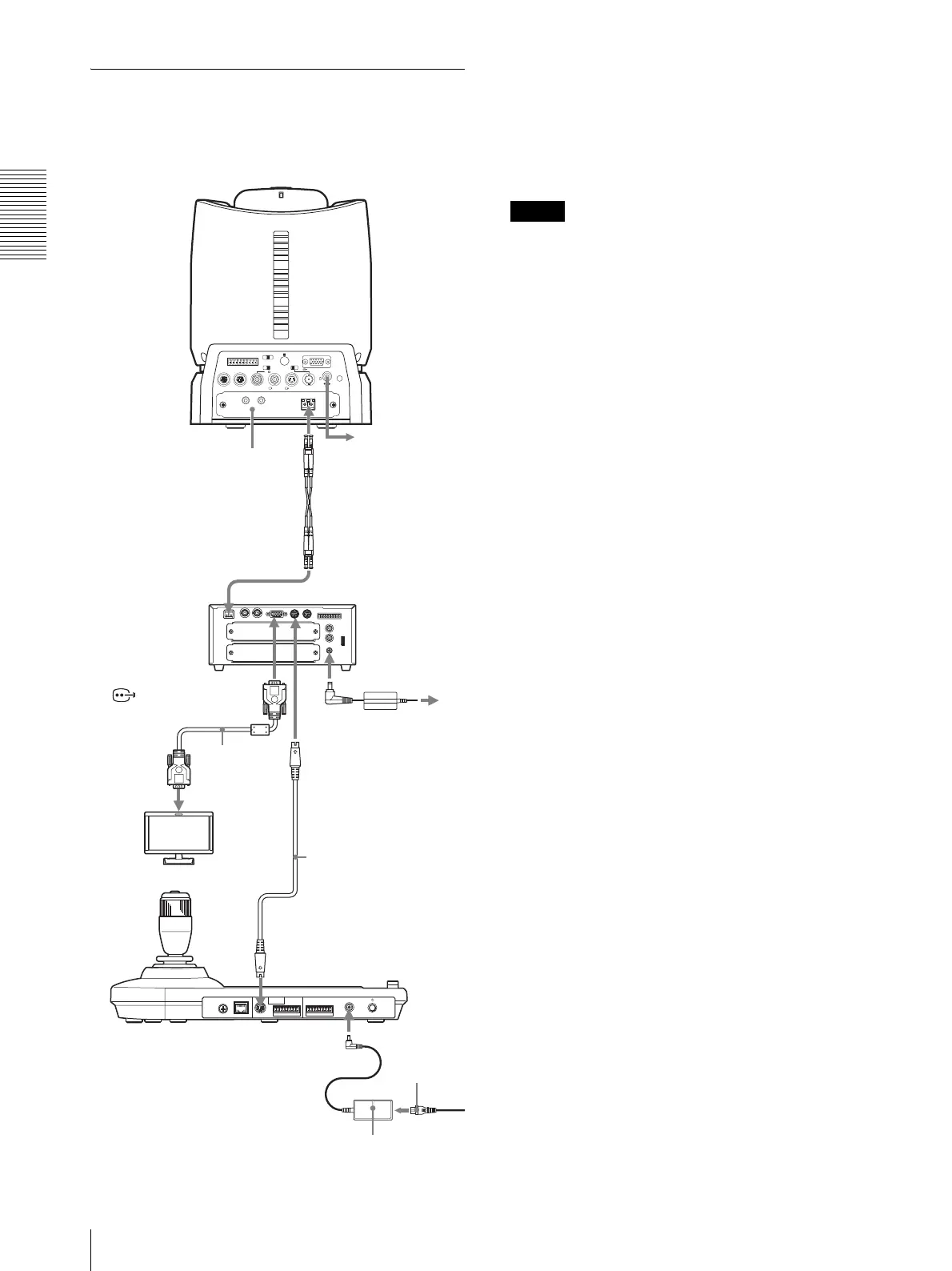
Connecting the BRU-SF10 Optical
Multiplex Unit
You can control the camera using this unit via the BRU-
SF10 Optical Multiplex Unit (not supplied).
* The VISCA RS-422 connection is also available if you use the
VISCA RS-422 connectors.
For other cameras, you can also use a matching Optical
Multiplex Unit to control the camera with this unit. For
details on connection, refer to the Operating Instructions
supplied with your camera.
Notes
• When using the VISCA RS-232C connectors or
VISCA RS-422 connectors, check the VISCA
FUNCTION switch on the rear of the Optical
Multiplex Unit and the DIP switch on the bottom of
this unit (page 9) are set correctly.
• The BRU-SF10 and BRU-H700 Optical Multiplex
Units are not compatible with the IP connection. Use
them for the RS-232C or RS-422 connection only.
RGB/COMPONENT
VISCA RS-422
1 2 3 4 5 6 7 8 9
EXT SYNC IN
IR SELECT
75
1 2 3
OFF ON HD SD
IN VISCA RS-232 OUT SDI OUT
DC IN 12V
R
VIDEO S VIDEO
CAMERA
IN
IN
VISCAEXT SYNC
OUT
RS232C
OUT
RGB/COMPONENT
VISCA RS422
FUNCTION
L
1
10
AUDIO OUT
DC IN 12V
R
123456789
MODE
VISCA
1919
RS-422
TALLY/CONTACT
RS-232C
!
DC 12V
LAN
to the AC adaptor
BRBK-SF1 HD Optical
Multiplex Card
CCFC-S200 Optical
Fiber Cable
VISCA RS-232C IN
CAMERA
BRU-SF10
HD Optical
Multiplex Unit
RGB/COMPONENT
connecting cable
with D-sub 15-pin
connectors
(commercially
available)
HD monitor, etc.
RS-232C cable
(supplied with the
BRU-SF10)*
VISCA RS-232C
Optical connector
to RGB/
component
input
to AC outlet
HD camera
BRC-H900
AC power adaptor
(supplied)
to AC
outlet
AC power
cord
(supplied)












 To Next Page