10
Customizing Your Monitor
You can make numerous adjustments to your monitor using the
on-screen menu.
Navigating the menu
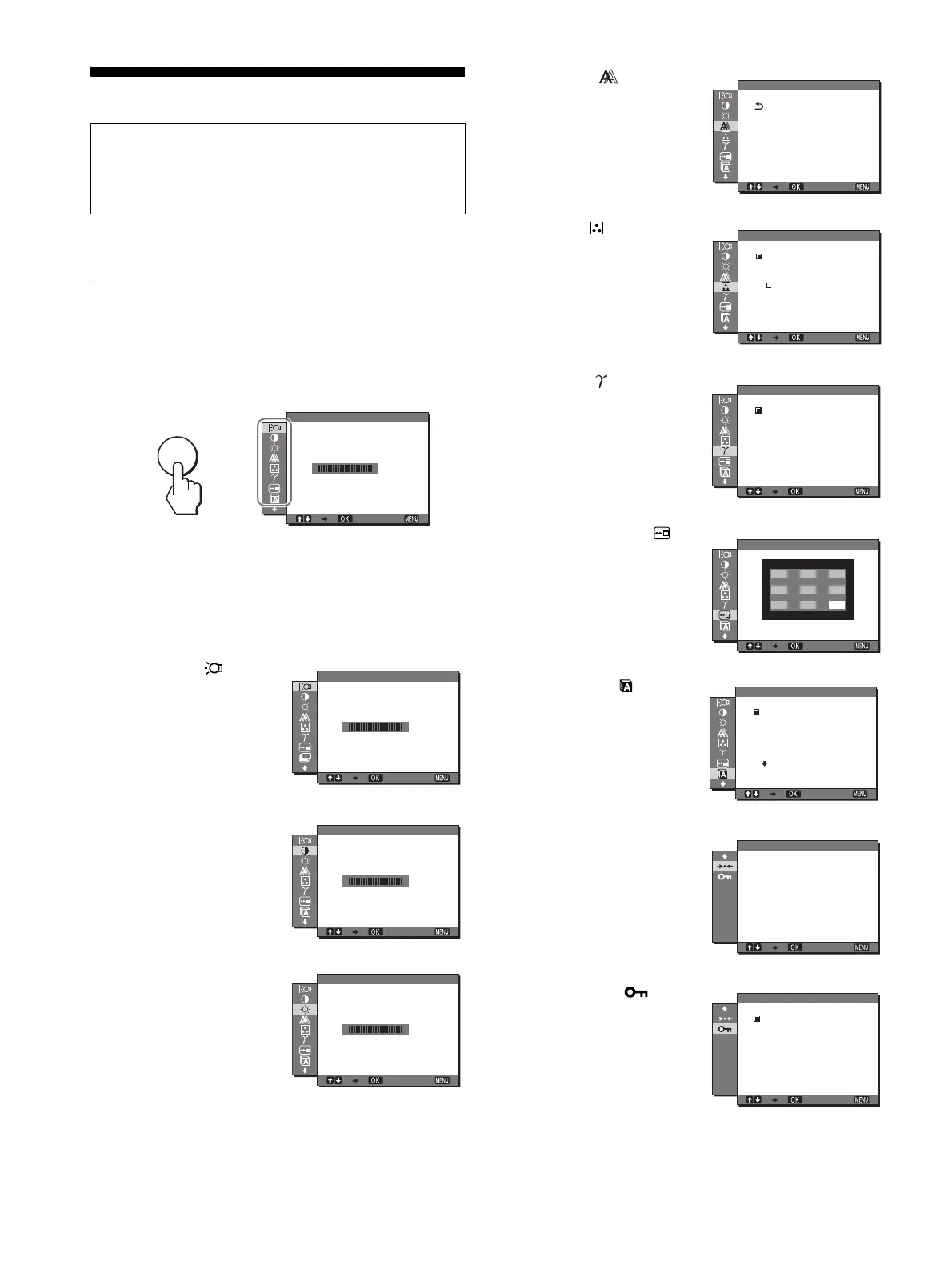
Press the MENU button to display the main menu on your screen.
See page 11 for more information on using the MENU button.
Use the M/m and OK buttons to select the icons in the above main
menu illustration. The following 1~9 menu appears. Keep
pressing m to scroll down until the icons in menu 9 appear. See
page 11 for more information on using the M/m and OK buttons.
Before making adjustments
Connect the monitor and the computer, and turn them on.
For the best results, wait for at least 30 minutes before making
adjustments.
1 BACKLIGHT
(page 11)
Select the BACKLIGHT
menu to adjust the brightness
of the backlight.
2 CONTRAST 6 (page 11)
Select the CONTRAST
menu to adjust the picture
contrast.
3 BRIGHTNESS 8
(page 11)
Select the BRIGHTNESS
menu to adjust the picture
brightness (black level).
MENU
,
100
1280 1024 60Hzx
/
EX I T
BACKL GHTI
100
1280 1024 60Hzx
/
EX I T
ZZ...
BACKL GHTI
100
1280 1024 60Hzx
/
EX I T
CONTRAST
100
1280 1024 60Hzx
/
EX I T
BR GHTNESSI
4 SCREEN (page 12)
Select the SCREEN menu to
adjust the picture’s sharpness
(phase/pitch) or its centering
(horizontal/vertical
position).
5 COLOR (page 13)
Select the COLOR menu to
adjust the color temperature
of the picture. This adjusts
the tone of the screen.
6 GAMMA (page 14)
Select the GAMMA menu to
change the picture’s color
shade setting.
7 MENU POSITION
(page 14)
Select the MENU
POSITION to change the on-
screen menu position.
8 LANGUAGE (page 14)
Select LANGUAGE to
change the language used on
menus or messages.
9 RESET 0 (page 14)
Reset the adjustments to the
default settings.
q; MENU LOCK
(page 14)
Lock the control of buttons to
prevent accidental
adjustments or resetting.
1280 1024 60Hzx /
EX I T
AUTO
PHASE
P I TCH
H CENTER
V CENTER
SCREEN
1280 1024 60Hzx /
EX I T
9300K
6500K
USER
ADJUST
COLOR
1280 1024 60Hzx /
EX I T
GAMMA 1
GAMMA 2
GAMMA 3
GAMMA
1280 1024 60Hzx /
EX I T
MENU POS T ONI I
1280 1024 60Hzx /
EX I T
LANGUAGE
ENGL I SH
FRANÇA I S
DEUTSCH
ESPAÑOL
I TAL I ANO
1280 1024 60Hzx /
EX I T
OK
CANCEL
RESET
1280 1024 60Hzx /
EX I T
ON
OFF
MENU LOCK



 To Next Page