5
GB
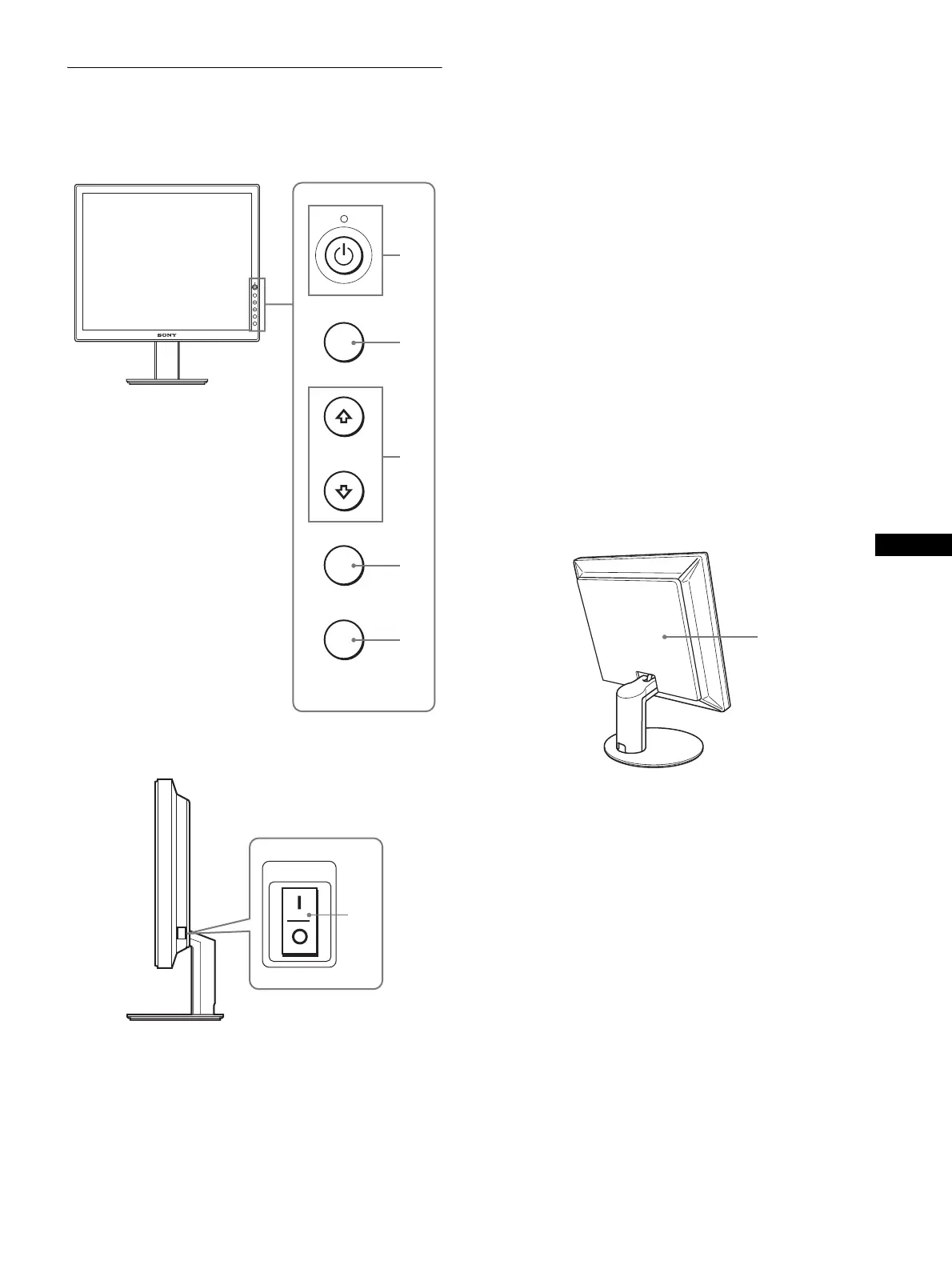
Identifying parts and controls
See the pages in parentheses for further details.
1 1 (Power) switch and 1 (power) indicator
(pages 8, 15, 20)
This switch turns the monitor on when the 1 (power)
indicator lights up in red. To turn the monitor off, press this
switch again.
If the 1 (power) indicator does not light up, press the MAIN
POWER switch (6).
2 MENU button (pages 10, 11)
This button turns the menu screen on and off.
3 M/m buttons (page 11)
These buttons are used to select the menu items and make
adjustments.
4 OK button (page 11)
This button activates the selected menu item and adjustments
made using the M/m buttons (3).
5 ECO button (page 15)
This button is used to reduce the power consumption.
6 MAIN POWER switch (page 8)
This switch turns the monitor’s main power on and off.
Rear of the LCD display
7 Back cover (page 8)
Remove this cover when you connect cables or cords.
MENU
OK
ECO
MENU
OK
ECO
1
2
3
4
5
Front of the LCD display
Side view of the LCD display
MAIN POWER
6
7
(continued)



 To Next Page