Playing in Random Order
(Shuffle Play)
Using the Front Panel
Display
The system "shuffles" titles or tracks and plays them in a
random order. The playing order may differ from the
previous "shuffling."
You can check information about the disc, such as the total
number of the titles or the tracks or remaining time, using
the front panel display.
2
,n
o
1 While in stop mode, press R MODE on the remote
repeatedly until "SHUF" appears on the front panel
display.
2 PressIP_.
To cancel Shuffle Play, press CLEAR on the remote.
Note
You may not be able to do Shuffle Play depending on the DVD.
To change the dimmer level of the front panel
display
1 Press AMP MENU repeatedly on the remote to display
<<CUSTOMIZE>> on the front panel display.
2 Select "DISPLAY DIMMER" using the t/,l_ buttons.
3 Press 4-/,,,_ repeatedly to adjust the dimmer level.
The brighhless of the message "DISPLAY DIMMER"
changes as follows:
High _ Low ---+Off ("DISPLAY OFF" appears)
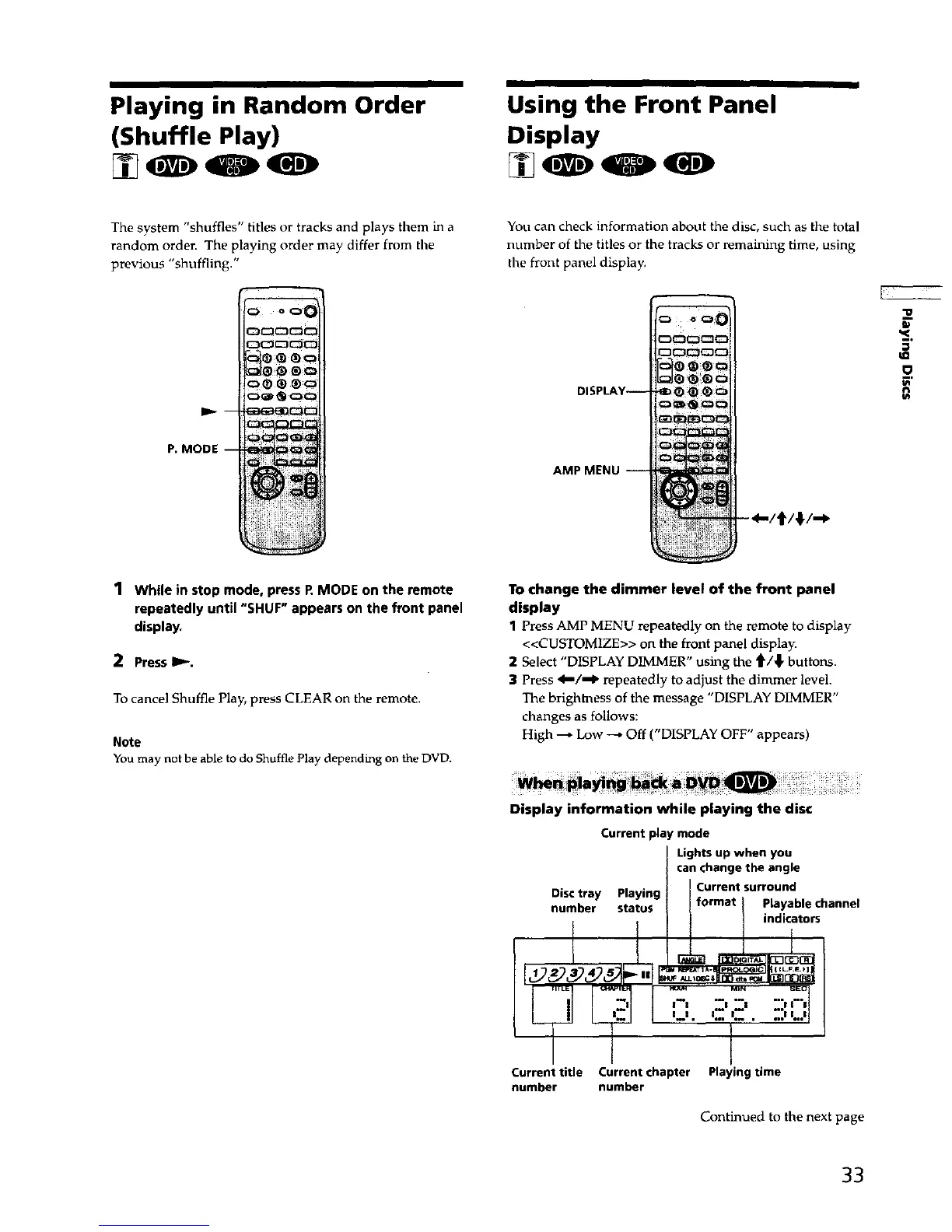
Display information while playing the disc
Current play mode
Disctray Playing
number status
Currenttitle
number
Lightsup when you
canchangethe angle
Current surround
format Playablechannel
i I indicators
_ MIN SEO
l--I 21 R* I 2 ' |'l
I--I ° I*o i *_ ' n, I I_,1
Current chapter Playingtime
number
Continued to the next page
33



 To Next Page