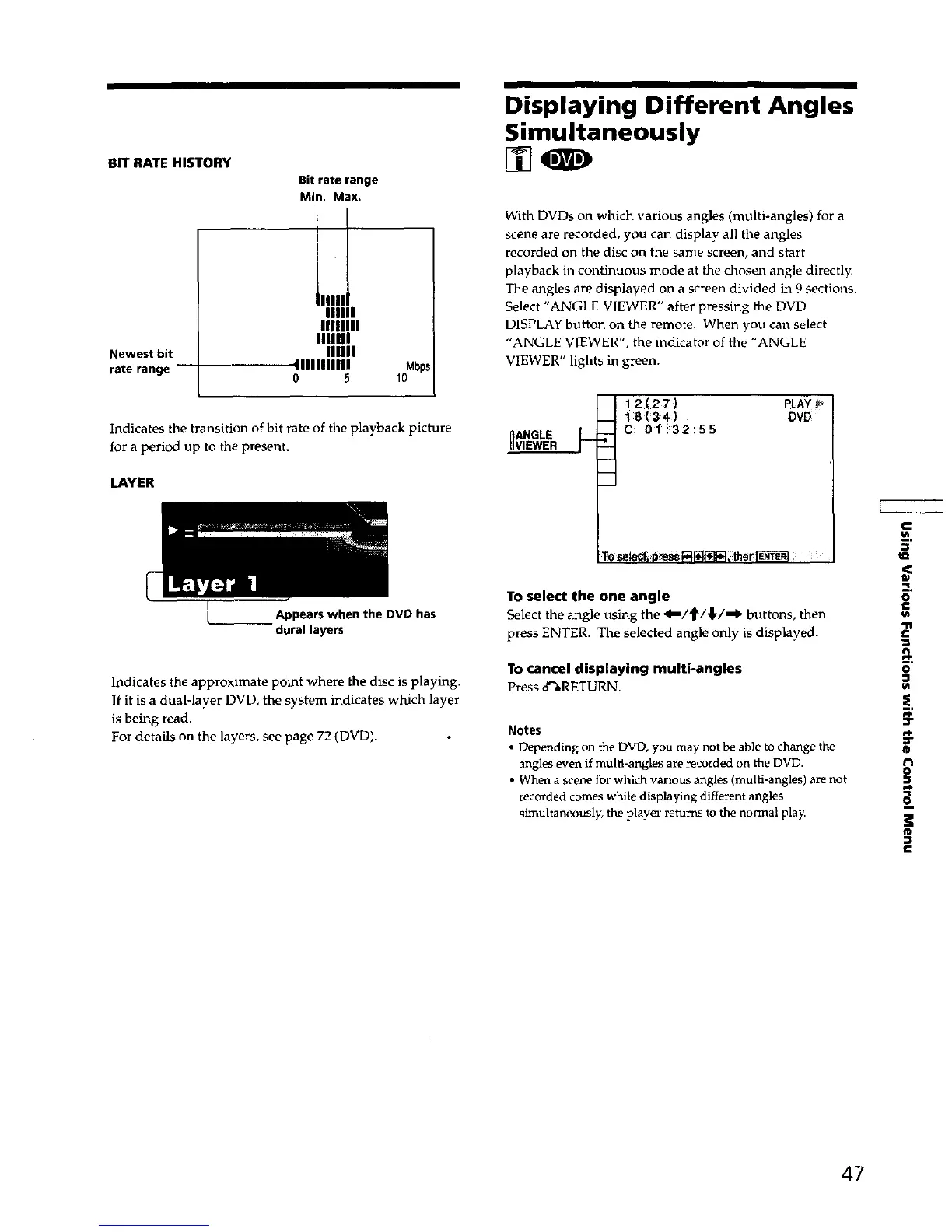
BIT RATE HISTORY
Newest bit
rate range
Bitrate range
Min, Max.
Ilnll
IIIIIIII
IIIIIII
IIIIII
41111111111
o 5
Indicates the transition of bit rate of tile playback picture
for a period up to the present.
LAYER
Appears when the DVD has
dural layers
Indicates the approximate point where the disc is playing.
If it is a dual-layer DVD, the system indicates which layer
is being read.
For details on the layers, see page 72 (DVD).
Displaying Different Angles
Simultaneously
With DVDs on which various angles (multi-angles) for a
scene are recorded, you can display all the angles
recorded on the disc on the same screen, and start
playback in continuous mode at the chosen angle directly.
The angles are displayed on a screen divided in 9 sections.
Select "ANGLE VIEWER" after pressing the DVD
DISPLAY button on the remote. When you can select
"ANGLE VIEWER", the indicator of the "ANGLE
VIEWER" lights in green.
nANGLE L
I 12(27)
18 (34)
C 0i !32:55
PLAY
DVP
To select the one angle
Select the angle using the 4--/'_/,1,/-,€' buttons, then
press ENTER. The selected angle only is displayed.
To cancel displaying multi-angles
Press 8%RETURN
Notes
• Depending on the DVD, you may not be able to change the
angles even it multi-angles are recorded on the DVD.
• When a scene for which various angles (multi-angles) are not
recorded comes while displaying different angles
simultaneously, the player returns to the normal play.
,<
o
€
£
E
o
I/t
-}
¢r
®
o
]I
®
€
47



 To Next Page