SDM-X82(E) 2-2
2-2. Uses of Service Mode
1. Turn off the power with the POWER button in the front panel. The red POWER
LED lights on.
2. Press the POWER button in the front panel with pressing the UP (↑) and
DOWN (↓) buttons, and the system enters the service mode.
When no signal is input to the selected input terminal, the following functions are
disabled.
3. Press the MENU button, and the main menu is displayed. Then go to page 2 of the
main menu with the UP (↑) or DOWN (↓) button, then select the MAINTAIN icon
on the bottom line, and then press the OK button.
4. In this menu screen, the version number and released date of the internal software
can be checked.
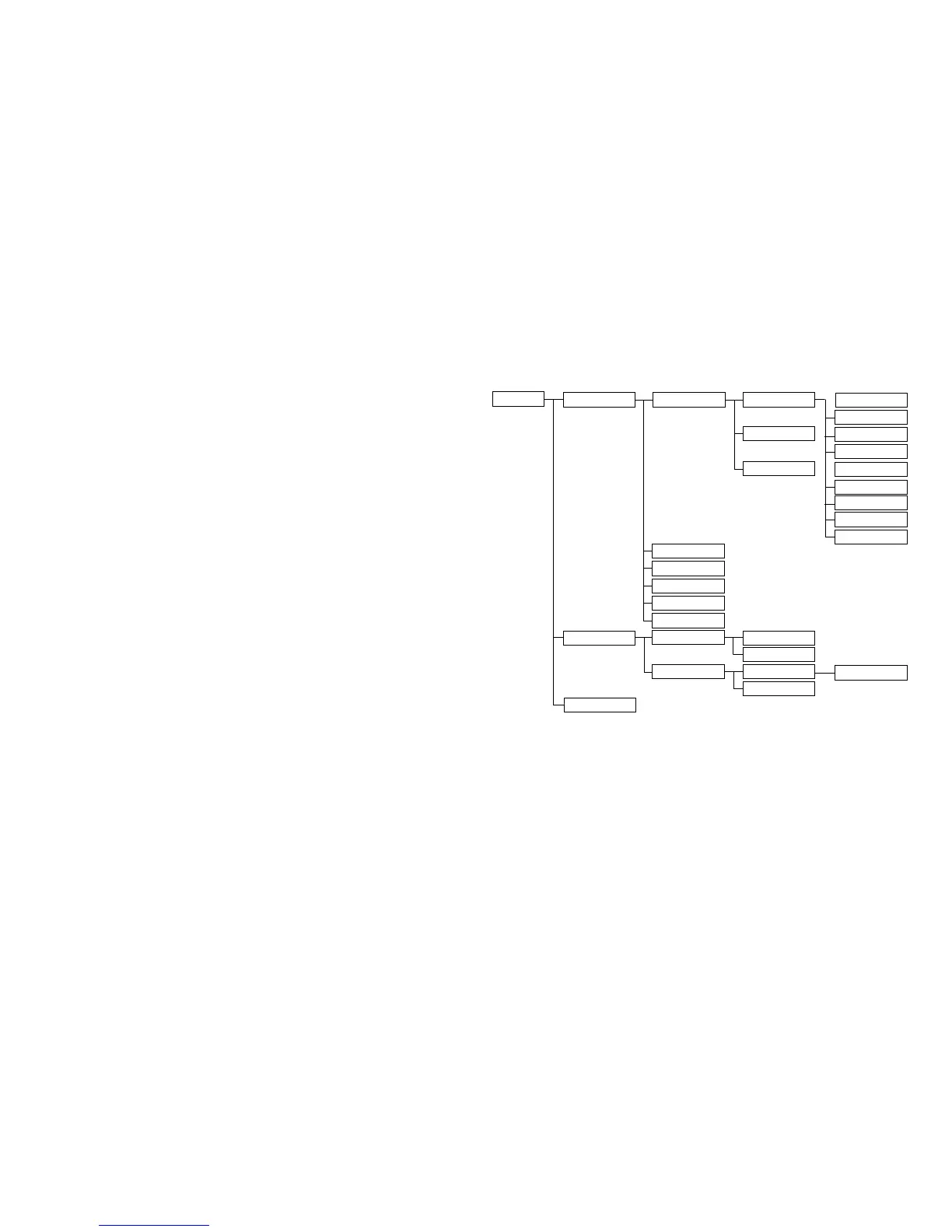
5. The structure of the MAINTAIN menu is shown below.
The operation procedure is basically same as that of the ordinary user controls.
The function of each menu is explained in next section.
MAINTAIN
CONFIGURATION
CHIPS
EXIT
COLOR TEMP
INITIAL EEPROM
CLEAR ETI TIME
EEPROM TEST
RGB RESET
EXIT
AGING MODE
REGISTERS VALUE
9300K
6500K
EXIT
ON
OFF
CONTROL REG
EXIT
SUB-BRIGHTNESS
R
G
B
SUB-CONTRAST
R
G
B
EXIT
000~1FF



 To Next Page