EasyManua.ls Logo

Sony SEN-280 - Page 14

Sony SEN-280
16 pages
Print Icon
To Next Page IconTo Next Page
To Previous Page IconTo Previous Page
Loading...
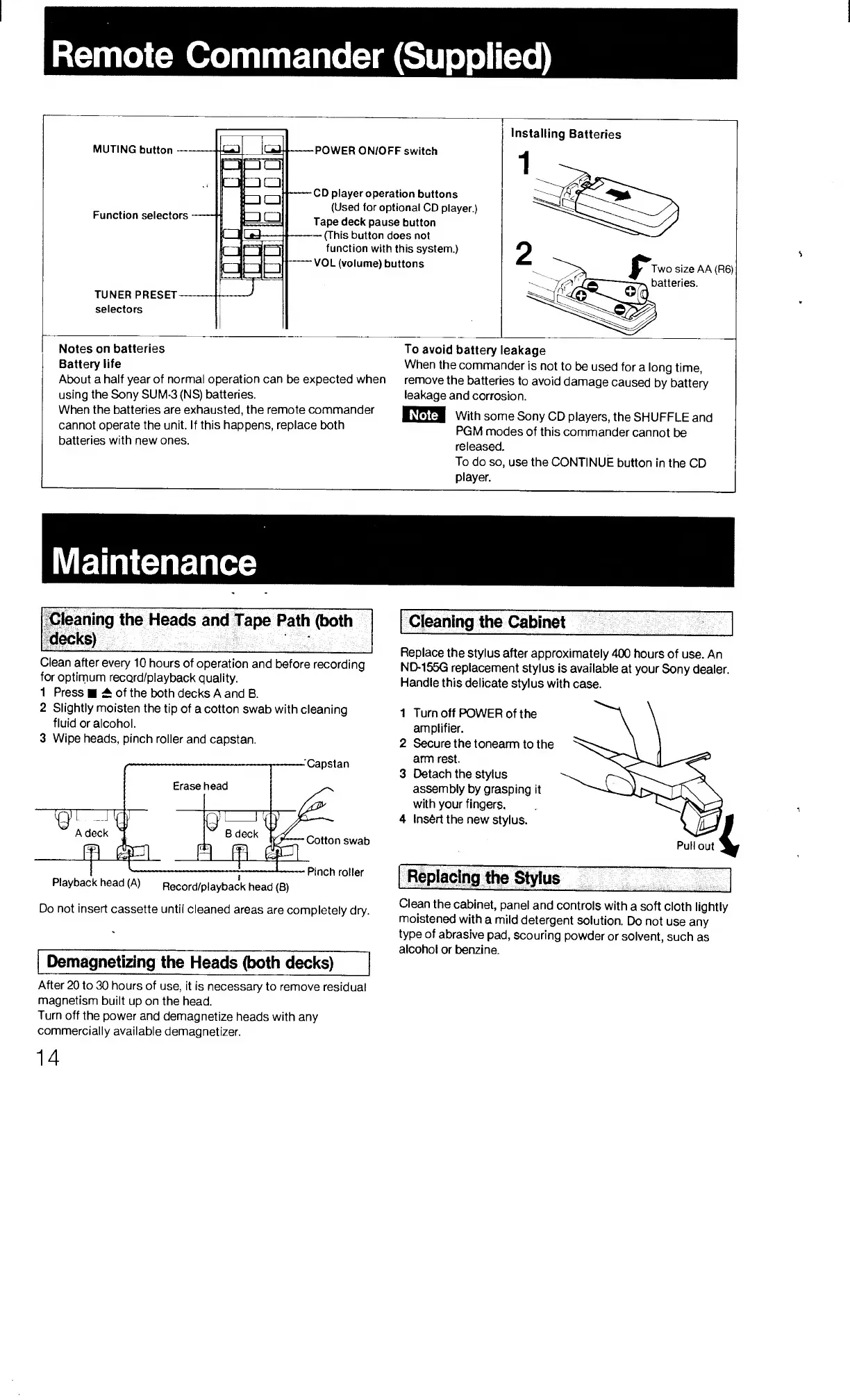
Cleaning
the
Heads
and
Tape
Path
(both
decks)
_
-
Clean
after
every
10
hours
of
operation
and
before
recording
foroptirnum
record/playback
quality.
1
Press
A
of
the
both
decks
A
and
B.
2
Slightly
moisten
the
tip
of
a
cotton
swab
with
cleaning
fluid
or
alcohol.
3
Wipe
heads,
pinch
roller
and
capstan.
Capstan
Cleaning
the
Cabinet
__
Replace
the
stylus
after
approximately
400
hours
of
use.
An
ND-155G
replacement
stylus
is
available
at
your
Sony
dealer.
Handle
this
delicate
stylus
with
case.
1
Turn
off
POWER
of
the
amplifier.
2
Secure
the
tonearm
to
the
arm
rest.
3
Detach
the
stylus
assembly
by
grasping
it
with
your
fingers.
4
Insert
the
new
stylus.
Cotton
swab
Pinch
roller
Pull
out
Playback
head
(A)
Record/playback
head
(B)
Do
not
insert
cassette
until
cleaned
areas
are
completely
dry.
Demagnetizing
the
Heads
(both
decks)
After
20
to
30
hours
of
use,
it
is
necessary
to
remove
residual
magnetism
built
up
on
the
head.
Turn
off
the
power
and
demagnetize
heads
with
any
commercially
available
demagnetizer.
the
Stylus
Clean
the
cabinet,
panel
and
controls
with
a
soft
cloth
lightly
moistened
with
a
mild
detergent
solution.
Do
not
use
any
type
of
abrasive
pad,
scouring
powder
or
solvent,
such
as
alcohol
or
benzine.

Related product manuals