EasyManua.ls Logo

Sony SEN-280 - Audio Adjustment; Receiving Radio Programs; Automatic Tuning; Manual Tuning

Sony SEN-280
16 pages
Print Icon
To Next Page IconTo Next Page
To Previous Page IconTo Previous Page
Loading...
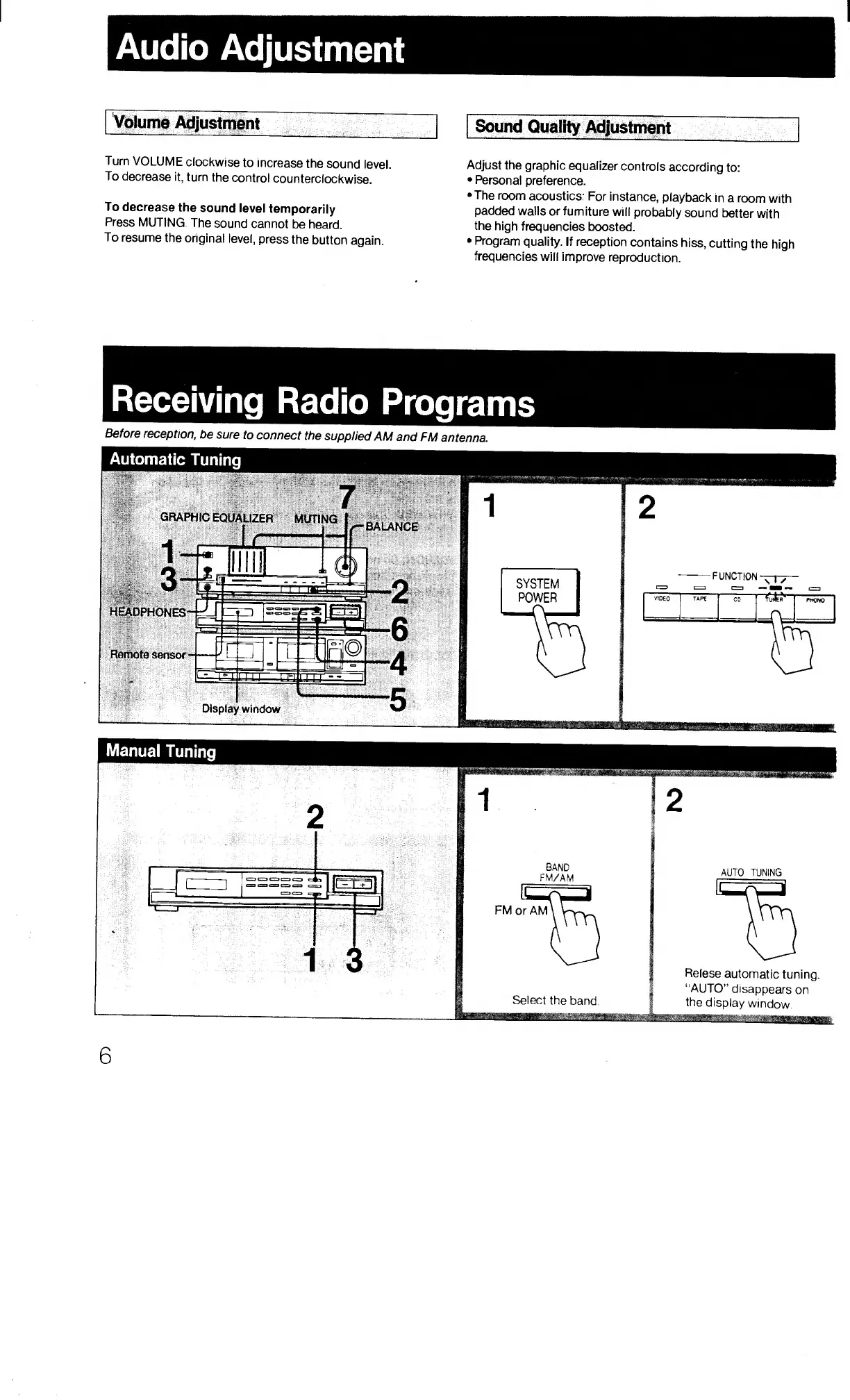
Turn
VOLUME
clockwise
to
increase
the
sound
level.
Adjust
the
graphic
equalizer
controls
according
to:
To
decrease
it,
turn
the
control
counterclockwise.
Personal
preference.
•The
room
acoustics:
For
Instance,
playback
in
a
room
with
To
decrease
the
sound
level
temporarily
padded
walls
or
furniture
will
probably
sound
better
with
Press
MUTING.
The
sound
cannot
be
heard.
the
high
frequencies
boosted.
To
resume
the
original
level,
press
the
button
again.
Program
quality.
If
reception
contains
hiss,
cutting
the
high
frequencies
will
improve
reproduction.
Receiving
Radio
Programs
Before
reception,
be
sure
to
connect
the
supplied
AM
and
FM
antenna.
6

Related product manuals