EasyManua.ls Logo

Sony SEN-280 - Page 7

Sony SEN-280
16 pages
Print Icon
To Next Page IconTo Next Page
To Previous Page IconTo Previous Page
Loading...
I
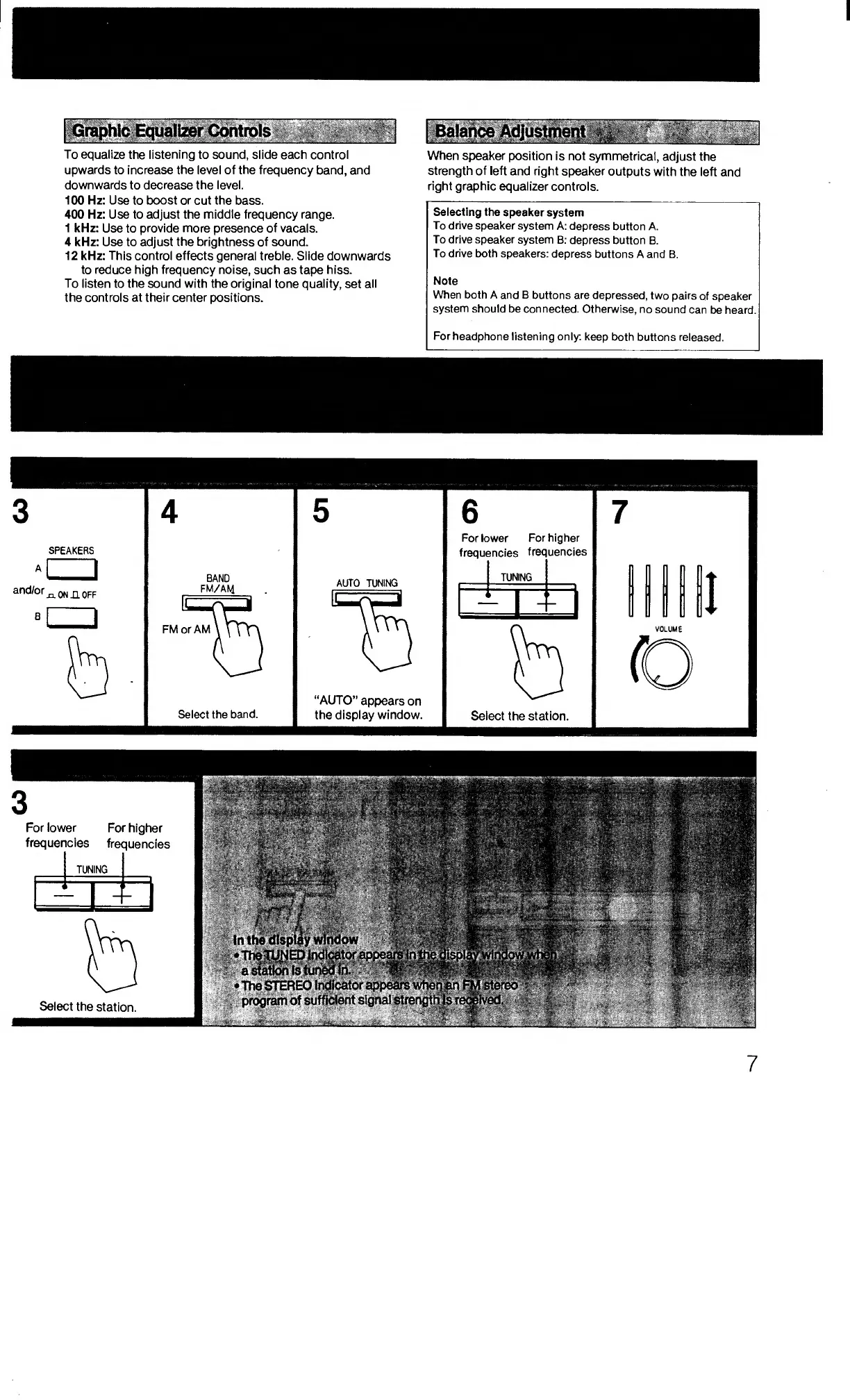
Graphic
Equalizer
Controls
.
To
equalize
the
listening
to
sound,
slide
each
control
upwards
to
increase
the
level
of
the
frequency
band,
and
downwards
to
decrease
the
level.
100
Hz:
Use
to
boost
or
cut
the
bass.
400
Hz:
Use
to
adjust
the
middle
frequency
range.
1
kHz:
Use
to
provide
more
presence
of
vacals.
4
kHz:
Use
to
adjust
the
brightness
of
sound.
12
kHz:
This
control
effects
general
treble.
Slide
downwards
to
reduce
high
frequency
noise,
such
as
tape
hiss.
To
listen
to
the
sound
with
the
original
tone
quality,
set
all
the
controls
at
their
center
positions.
;Balah^Adjusjtmeqt
_
When
speaker
position
is
not
symmetrical,
adjust
the
strength
of
left
and
right
speaker
outputs
with
the
ieft
and
right
graphic
equalizer
controls.
Selecting
the
speaker
system
To
drive
speaker
system
A:
depress
button
A.
To
drive
speaker
system
B:
depress
button
B.
To
drive
both
speakers:
depress
buttons
A
and
B.
Note
When
both
A
and
B
buttons
are
depressed,
two
pairs
of
speaker
system
should
be
connected.
Otherwise,
no
sound
can
be
heard.
For
headphone
listening
only:
keep
both
buttons
released.
3
4
5
6
7
A
and/or
B
SPEAKERS
a
xlOnhoff
BAND
FM/AM
Select
the
band.
AUTO
TUNING
“AUTO”
appears
on
the
display
window.
For
lower
For
higher
frequencies
frequencies
_
TUNIN
G
!
s
Select
the
station.
I
7

Related product manuals