EasyManua.ls Logo

Sony SL-HF550 - Camera Recording

Sony SL-HF550
32 pages
Print Icon
To Next Page IconTo Next Page
To Previous Page IconTo Previous Page
Loading...
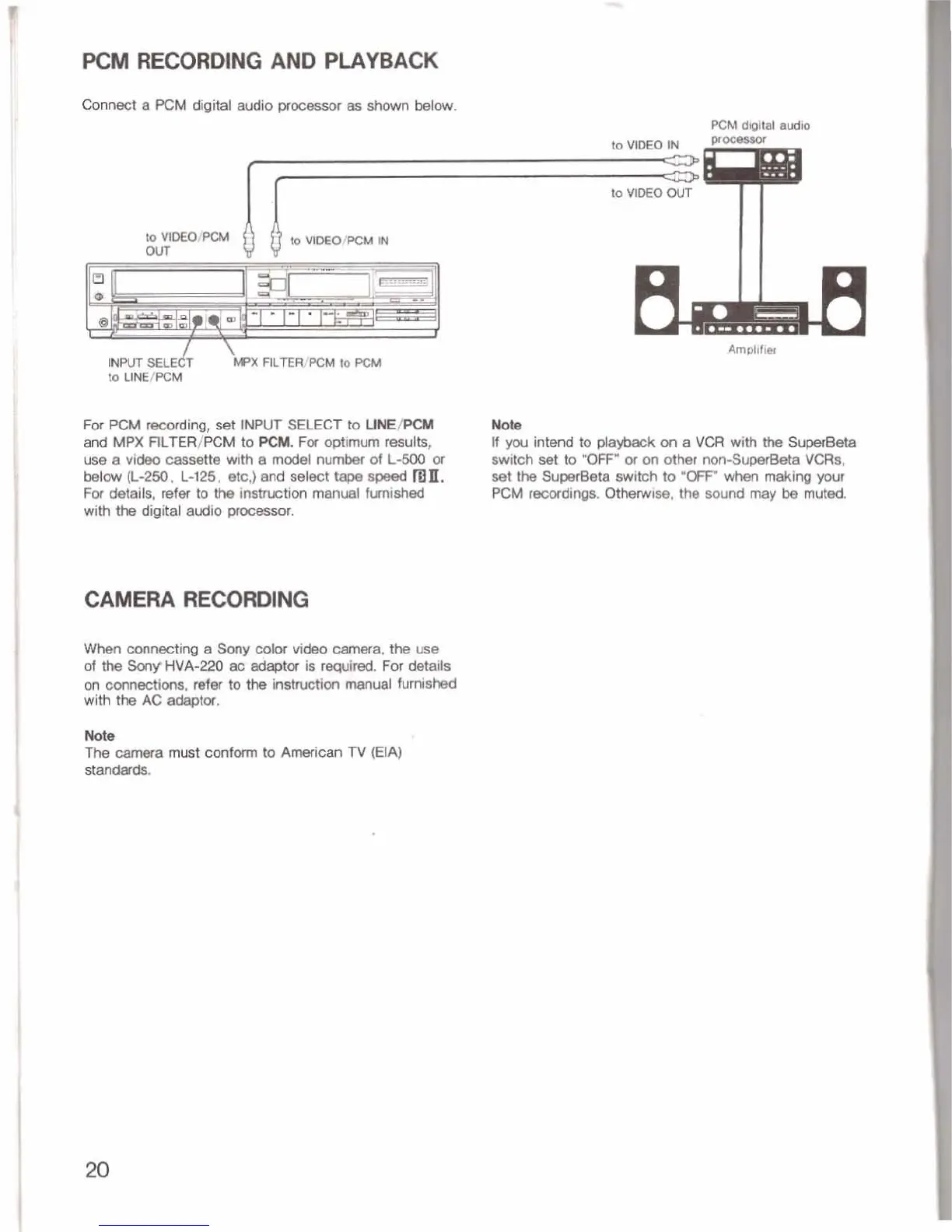
PCM
RECORDING AND
PLAYBACK
Connect
a
PCM
digital
Ulo
processor
shown
MOW.
PCM
dloltel
audb
I
I
to
VIDEO
OUT
to^^
our
$
~OMM~MM
For
PCM
ding,
E&
INPUT
SELECT
to
UNE/PCM
and
MPX
RLTER/PCM
to
PeM,
For
optimum
mul&,
use
a
video
cwxWte
with
e
model
number
of
L-500
or
bet^
(L-2M1.
L-125,
&,)
and
~ekt
tape
ma.
Fa
detalls,
refer
to
the
inshctim
manual
fmished
with
the
digltal
audio
procassor.
CAMERA
RECORDING
When
connecting
e
Sony
color
video
camera,
the
use
of
the
Smy
HVA-220
aa
is
required.
For
details
on
oannectim,
refw
to
the
instruction
manual
furnishEd
with
the
AC
adaptor.
Amplifier
Nobe
If
you
Intend
to
playbWc
on
a
VCR
with
tb
Su-
switch
set
to
'OFF"
or
on
0th
rwn-Superbta
VCRs,
set
the
SuperBeta
switch
to
'OFF"
wtm
making
ywr
PCM
mcdinos.
Otherwise,
the sound
may
be
mutd.
Nab
The-
crtmera
must
conform
to
American
TV
(EIA)
stand&I.ds.

Related product manuals