Basics
Charging the battery
Before using Smart Wireless Headset pro for the first time, you need to charge it for
approximately 2.5 hours. Use Sony and/or Sony Ericsson chargers only.
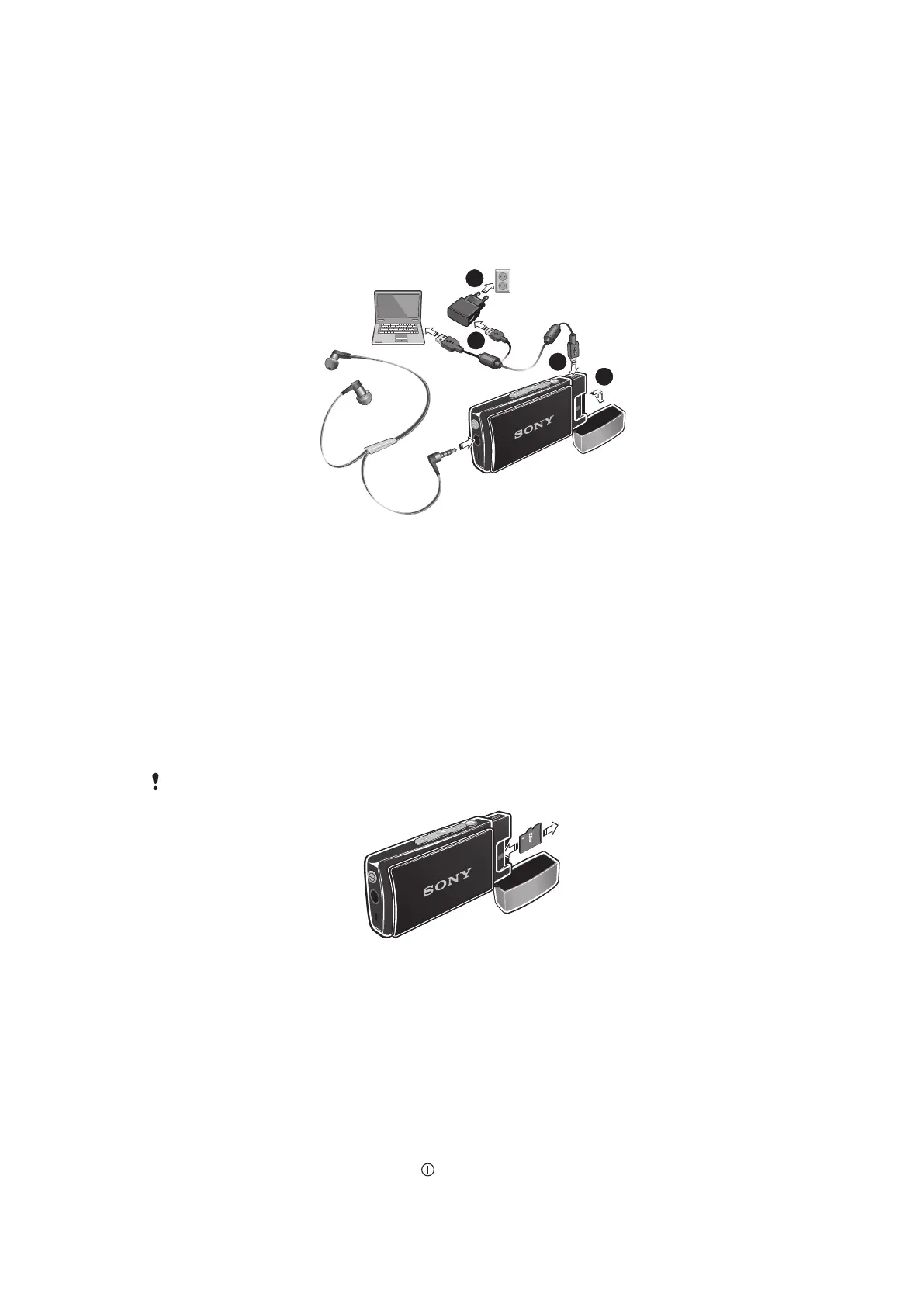
To charge the battery
1
Remove the cap from your Smart Wireless Headset pro device.
2
Plug the charger into a power outlet.
3
Plug one end of the USB cable into the charger (or into the USB port of a
computer).
4
Plug the other end of the cable into the Micro USB port on your Smart Wireless
Headset pro device.
Memory card
Smart Wireless Headset pro supports microSD™ cards of up to 32 GB, allowing you lots
of storage space for your music and other files. When the microSD™ card is inserted in
your headset, you can use the headset as a portable memory card and transfer content
between the card and other devices such as a computer or phone.
You may have to purchase a memory card separately.
To insert a memory card
•
Open the cap and insert the microSD™ card into the slot, with the gold-colored
contacts facing down.
To remove a memory card
•
Open the cap and draw the microSD™ card outwards.
Turning on and off
To turn on the headset
•
Press and hold down the power key until the display turns on.
7
This is an Internet version of this publication. © Print only for private use.


 To Next Page