EasyManua.ls Logo

Sony SRF-M903 - Radio Operation; Memory Preset Tuning; For Better Reception

Sony SRF-M903
5 pages
Print Icon
To Next Page IconTo Next Page
To Previous Page IconTo Previous Page
Loading...
SRF-M903
Radio
Operation
'D)
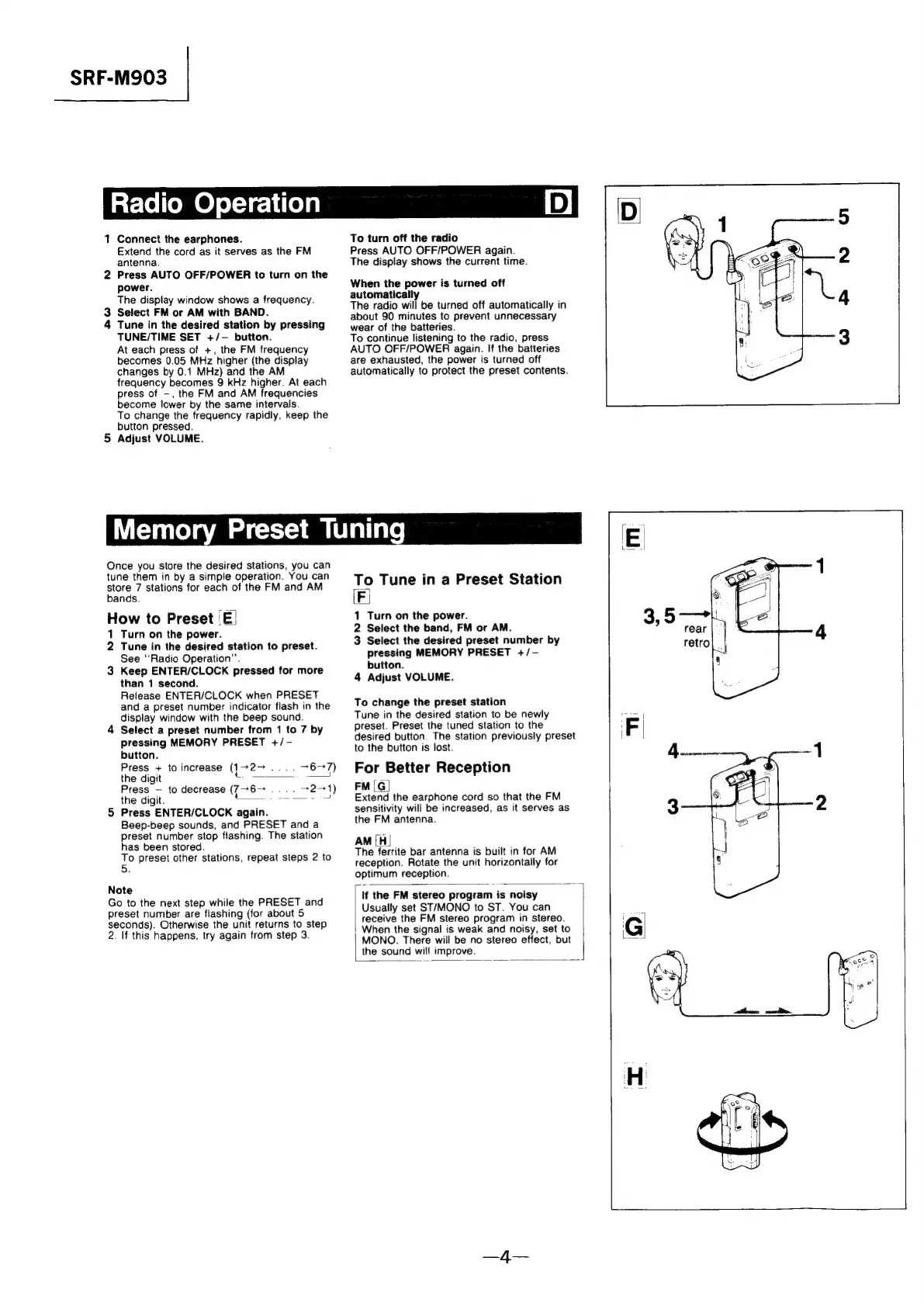
1
Connect
the
earphones.
Extend
the
cord
as
it
serves
as
the
FM
antenna.
2
Press
AUTO
OFF/POWER
to
turn
on
the
power.
The
dispiay
window
shows
a
frequency.
Select
FM
or
AM
with
BAND.
Tune
in
the
desired
station
by
pressing
TUNE/TIME
SET
+/-
button.
At
each
press
of
+,
the
FM
frequency
becomes
0.05
MHz
higher
(the
display
changes
by
0.1
MHz)
and
the
AM
frequency
becomes
9
kHz
higher.
At
each
press
of
-,
the
FM
and
AM
frequencies
become
lower
by
the
same
intervals.
To
change
the
frequency
rapidly,
keep
the
button
pressed.
Adjust
VOLUME.
aw
a
To
turn
off
the
radio
Press
AUTO
OFF/POWER
again.
The
display
shows
the
current
time.
When
the
power
is
turned
off
automatically
The
radio
will
be
turned
off
automatically
in
about
90
minutes
to
prevent
unnecessary
wear
of
the
batteries.
To
continue
listening
to
the
radio,
press
AUTO
OFF/POWER
again.
If
the
batteries
are
exhausted,
the
power
is
turned
off
automatically
to
protect
the
preset
contents.
Memory
Preset
Tuning
Once
you
store
the
desired
stations,
you
can
tune
them
in
by
a
simple
operation.
You
can
store
7
stations
for
each
of
the
FM
and
AM
bands.
How
to
Preset
‘E|
1
Turn
on
the
power.
2
Tune
in
the
desired
station
to
preset.
See
‘Radio
Operation”’.
3
Keep
ENTER/CLOCK
pressed
for
more
than
1
second.
Release
ENTER/CLOCK
when
PRESET
and
a
preset
number
indicator
flash
in
the
display
window
with
the
beep
sound.
4
Select
a
preset
number
from
1
to
7
by
pressing
MEMORY
PRESET
+/-
button.
Press
+
to
increase
(1727
....
76-7)
the
digit
et
——
Press
~
to
decrease
(7~6-—
.
.
72-1)
the
digit.
Sei
5
Press
ENTER/CLOCK
again.
Beep-beep
sounds,
and
PRESET
and
a
preset
number
stop
flashing.
The
station
has
been
stored.
To
preset
other
stations,
repeat
steps
2
to
5.
Note
Go
to
the
next
step
while
the
PRESET
and
preset
number
are
flashing
(for
about
5
seconds).
Otherwise
the
unit
returns
to
step
2.
If
this
happens,
try
again
from
step
3.
To
Tune
in
a
Preset
Station
LF
1
Turn
on
the
power.
2
Select
the
band,
FM
or
AM.
3
Select
the
desired
preset
number
by
pressing
MEMORY
PRESET
+/-—
button.
4
Adjust
VOLUME.
To
change
the
preset
station
Tune
in
the
desired
station
to
be
newly
preset.
Preset
the
tuned
station
to
the
desired
button.
The
station
previously
preset
to
the
button
is
lost.
For
Better
Reception
FM
[G|
Extend
the
earphone
cord
so
that
the
FM
sensitivity
will
be
increased,
as
it
serves
as
the
FM
antenna.
AM
[H|
The
ferrite
bar
antenna
is
built
in
for
AM
reception.
Rotate
the
unit
horizontally
for
optimum
reception.
If
the
FM
stereo
program
is
noisy
Usually
set
ST/MONO
to
ST.
You
can
receive
the
FM
stereo
program
in
stereo.
When
the
signal
is
weak
and
noisy,
set
to
MONO.
There
will
be
no
stereo
effect,
but
the
sound
will
improve.

Related product manuals