EasyManua.ls Logo

Sony SRF-M903 - Timer Setting; Alarm Setting

Sony SRF-M903
5 pages
Print Icon
To Previous Page IconTo Previous Page

Loading...
PeyWaveltate
You
can
make
the
unit
sound
its
beep
through
the
connected
earphones
at
the
desired
time.
Use
this
feature
to
remind
you
of
an
appointment,
etc.
There
are
two
ways
of
setting:
¢
Timer
setting
to
sound
the
beep
a
certain
number
of
minutes
later
than
the
present.
¢
Alarm
setting
to
sound
the
beep
ata
certain
time.
You
cari
set
the
timer
and
alarm
while
the
radio
is
either
on
or
off.
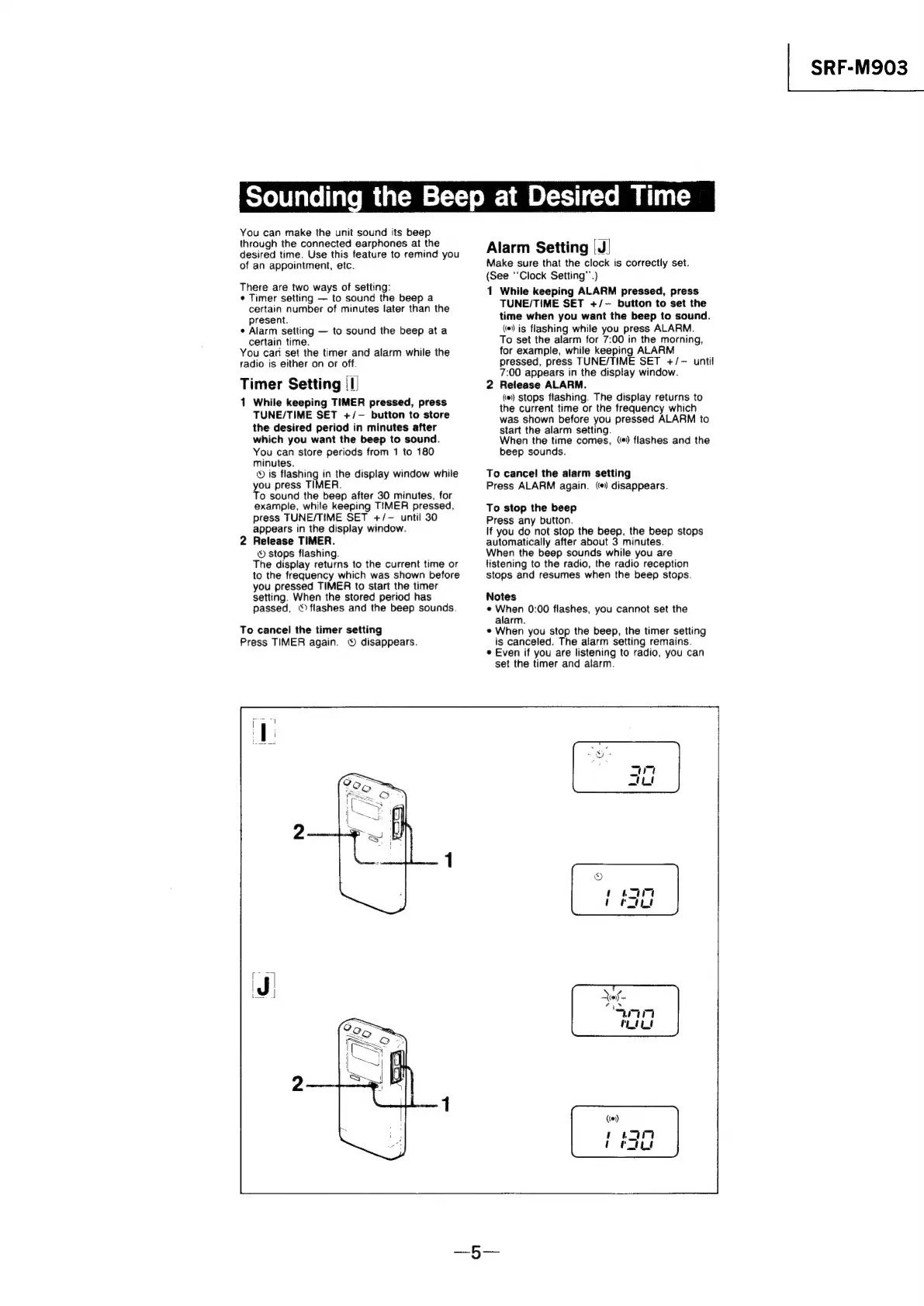
Timer
Setting
(I)
1
While
keeping
TIMER
pressed,
press
TUNE/TIME
SET
+/-
button
to
store
the
desired
period
in
minutes
after
which
you
want
the
beep
to
sound.
You
can
store
periods
from
1
to
180
minutes.
®
is
flashing
in
the
display
window
while
you
press
TIMER.
To
sound
the
beep
after
30
minutes,
for
example,
while
keeping
TIMER
pressed,
press
TUNE/TIME
SET
+/-
until
30
appears
in
the
display
window.
2
Release
TIMER.
©
stops
flashing.
The
display
returns
to
the
current
time
or
to
the
frequency
which
was
shown
before
you
pressed
TIMER
to
start
the
timer
setting.
When
the
stored
period
has
passed,
°)
flashes
and
the
beep
sounds.
To
cancel
the
timer
setting
Press
TIMER
again.
©
disappears.
the
Beep
at
Desired
Time
Alarm
Setting
|
J)
Make
sure
that
the
clock
is
correctly
set.
(See
“Clock
Setting’’.)
1
While
keeping
ALARM
pressed,
press
TUNE/TIME
SET
+/-
button
to
set
the
time
when
you
want
the
beep
to
sound.
(*)
is
flashing
while
you
press
ALARM.
To
set
the
alarm
for
7:00
in
the
morning,
for
example,
while
keeping
ALARM
pressed,
press
TUNE/TIME
SET
+/—
until
7:00
appears
in
the
display
window.
2
Release
ALARM.
(#)
stops
flashing.
The
display
returns
to
the
current
time
or
the
frequency
which
was
shown
before
you
pressed
ALARM
to
start
the
alarm
setting.
When
the
time
comes,
()
flashes
and
the
beep
sounds.
To
cancel
the
alarm
setting
Press
ALARM
again.
(+)
disappears.
To
stop
the
beep
Press
any
button.
If
you
do
not
stop
the
beep,
the
beep
stops
automatically
after
about
3
minutes.
When
the
beep
sounds
while
you
are
listening
to
the
radio,
the
radio
reception
stops
and
resumes
when
the
beep
stops.
Notes
¢
When
0:00
flashes,
you
cannot
set
the
alarm.
e
When
you
stop
the
beep,
the
timer
setting
is
canceled.
The
alarm
setting
remains.
¢
Even
if
you
are
listening
to
radio,
you
can
set
the
timer
and
alarm.
SRF-M903

Related product manuals