EasyManua.ls Logo

Sony STR-AV320 - System Connections; System Connection Overview; Antenna Connections; Speaker Connections and Specifications

Sony STR-AV320
8 pages
Print Icon
To Next Page IconTo Next Page
To Previous Page IconTo Previous Page
Loading...
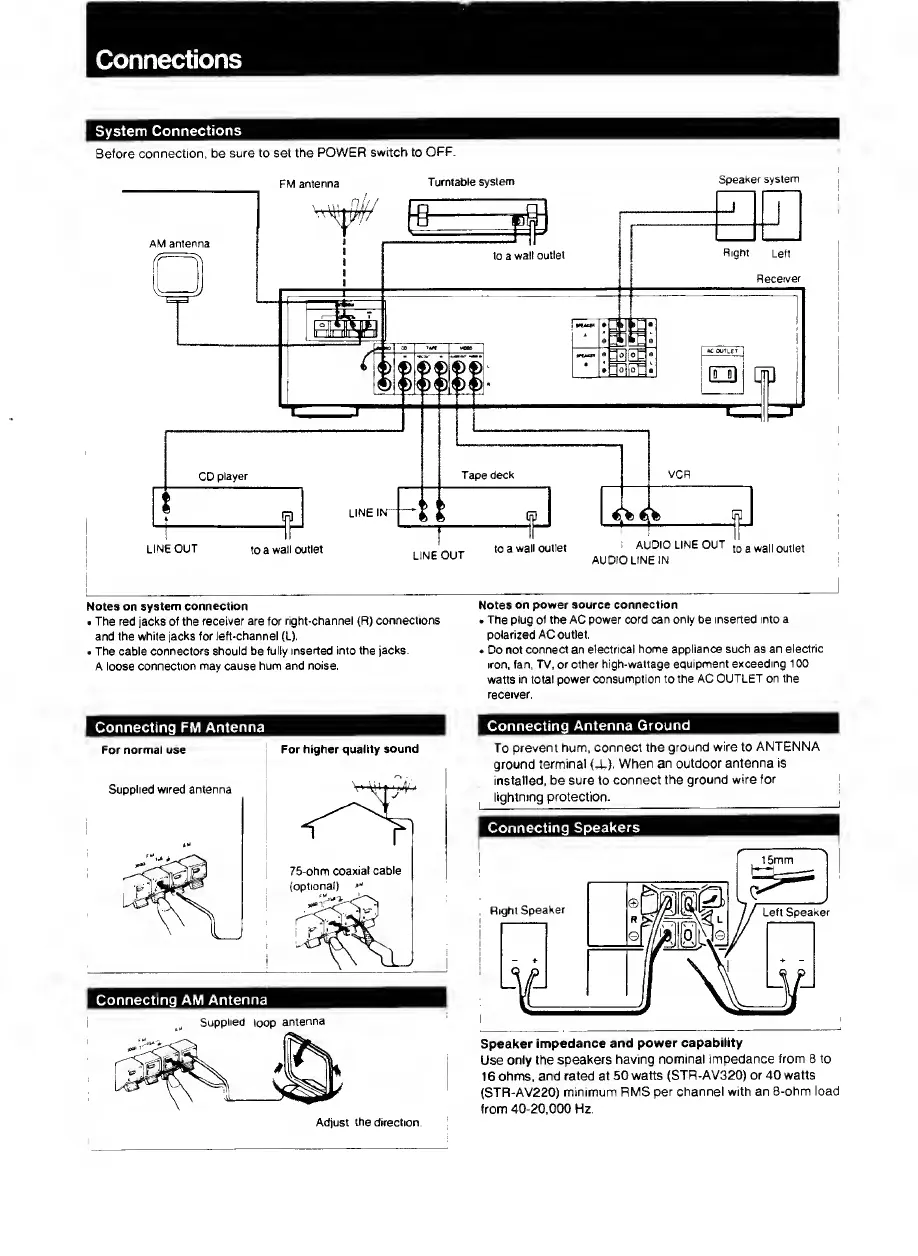
Connections
System
Connections
Before
connection,
be
sure
to
set
the
POWER
switch
to
OFF.
FM
antenna
Turntable
system
Speaker
system
Notes
on
system
connection
The
red
jacks
of
the
receiver
are
for
right-channel
(R)
connections
and
the
white
jacks
for
left-channel
(L).
The
cable
connectors
should
be
fully
inserted
into
the
jacks.
A
loose
connection
may
cause
hum
and
noise.
Notes
on
power
source
connection
The
plug
of
the
AC
power
cord
can
only
be
inserted
into
a
polarized
AC
outlet.
Do
not
connect
an
electrical
home
appliance
such
as
an
electric
iron.
fan.
TV.
or
other
high-wattage
equipment
exceeding
100
watts
in
total
power
consumption
to
the
AC
OUTLET
on
the
receiver.
Connecting
FM
Antenna
For
normal
use
Supplied
wired
antenna
For
higher
quality
sound
Connecting
Antenna
Ground
To
prevent
hum,
connect
the
ground
wire
to
ANTENNA
ground
terminal
(-U).
When
an
outdoor
antenna
is
installed,
be
sure
to
connect
the
ground
wire
for
lightning
protection.
Connecting
Speakers
Speaker
impedance
and
power
capability
Use
only
the
speakers
having
nominal
impedance
from
8
to
16
ohms,
and
rated
at
50
watts
(STR-AV320)
or
40
watts
(STR-AV220)
minimum
RMS
per
channel
with
an
8-ohm
load
from
40-20,000
Hz.

Related product manuals