EasyManua.ls Logo

Sony STR-AV320 - Receiving FM;AM Broadcasts; Tuning Methods Overview; Direct Access Tuning; Memorizing Stations

Sony STR-AV320
8 pages
Print Icon
To Next Page IconTo Next Page
To Previous Page IconTo Previous Page
Loading...
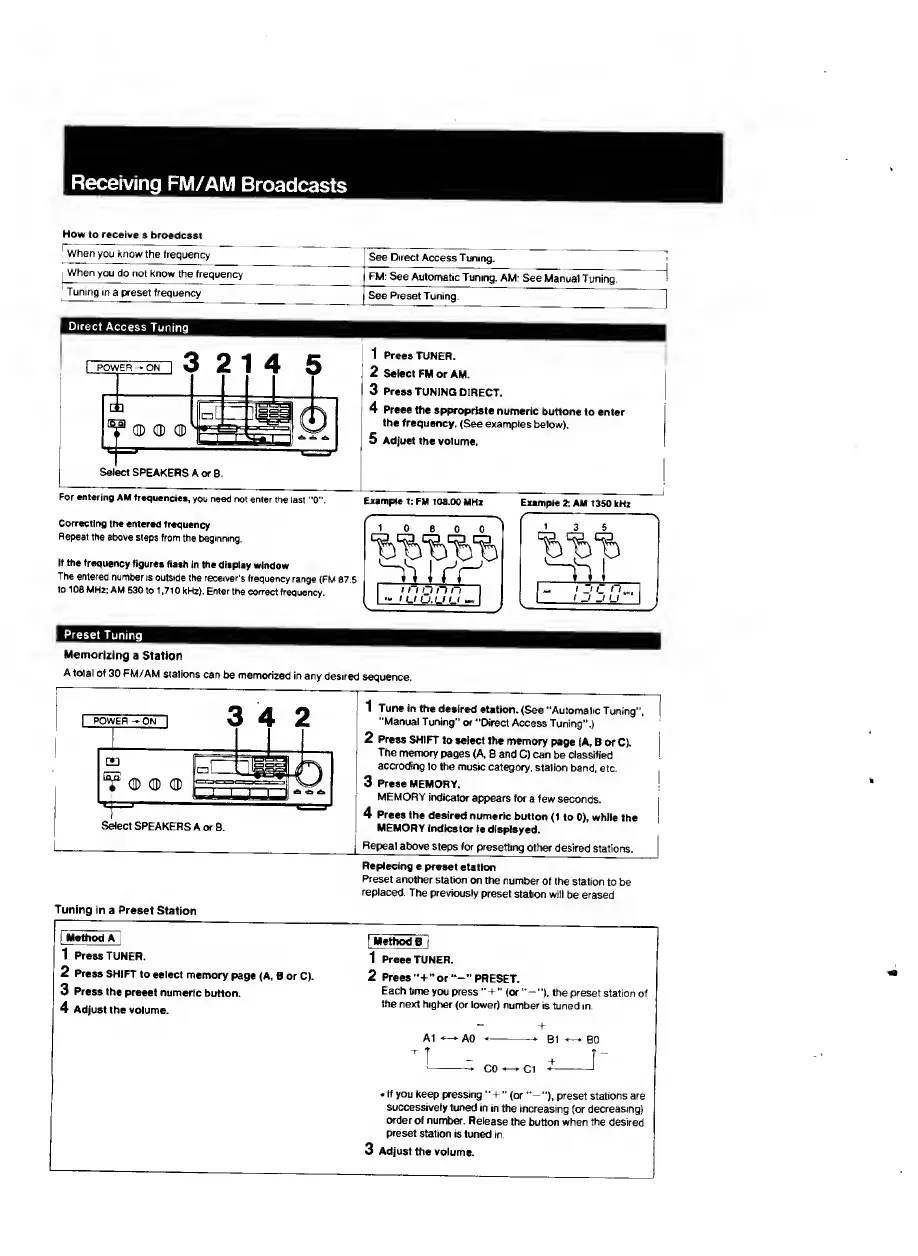
Receiving
FM/AM
Broadcasts
How
to
receive
a
broadcast
'
When
you
know
the
frequency
See
Direct
Access
Tuning.
1
When
you
do
not
know
the
frequency
FM:
See
Automatic
Tuning.
AM.
See
Manual
Tuning.
'
Tuning
in
a
preset
frequency
i
See
Preset
Tuning.
Direct
Access
Tuning
Correcting
tt>e
entered
frequency
Repeat
the
above
steps
from
the
beginning.
If
the
frequency
figures
flash
in
the
display
window
The
entered
number
is
outside
the
receiver's
frequency
range
(FM
87.5
to
108
MHz:
AM
530
to
1,710
kHz).
Enter
the
correct
frequency.
1
rr^
'
n
n
n
n
I
u
U.U
l_l
Preset
Tuning
Memorizing
a
Station
A
total
of
30
FM/AM
stations
can
be
memorized
in
any
desired
sequence.
Select
SPEAKERS
A
or
B.
Tuning
in
a
Preset
Station
I
Method^
1
Press
TUNER.
2
Press
SHIFT
to
select
memory
page
(A,
B
or
C).
3
Press
the
preset
numeric
button.
4
Adjust
the
volume.
1
Tune
in
the
desired
station.
(See
“Automatic
Tuning”,
“Manual
Tuning”
or
"Direct
Access
Tuning”
)
2
Press
SHIFT
to
select
the
memory
page
(A,
B
or
C).
The
memory
pages
(A,
B
and
C)
can
be
classified
accroding
to
the
music
category,
station
band.
etc.
3
Press
MEMORY.
MEMORY
indicator
af^ars
for
a
few
seconds.
4
Press
the
desired
numeric
button
(1
to
0),
whiie
the
MEMORY
indicat<M’
is
dispiayed.
Repeat
above
steps
for
preset
ting
other
desired
stations.
Replacing
a
preset
station
Preset
another
station
on
the
number
of
the
station
to
be
replaced.
The
previously
preset
station
will
be
erased.
fMethod
B
I
1
Press
TUNER.
2
Press
“+”
or
“-"PRESET.
Each
time
you
press
(or
the
preset
station
of
the
next
higher
(or
lower)
number
is
tuned
in.
At
AO
-
B1
BO
If
you
keep
pressing
+"
(or
—”),
preset
stations
are
successively
tuned
in
in
the
increasing
(or
decreasing)
order
of
number.
Release
the
button
when
the
desired
preset
station
is
tuned
in.
3
A
djust
the
voiume.

Related product manuals