EasyManua.ls Logo

Sony STR-AV320 - Location and Function of Controls; Front Panel Controls; Remote Commander Controls

Sony STR-AV320
8 pages
Print Icon
To Next Page IconTo Next Page
To Previous Page IconTo Previous Page
Loading...
igiesasH
mm
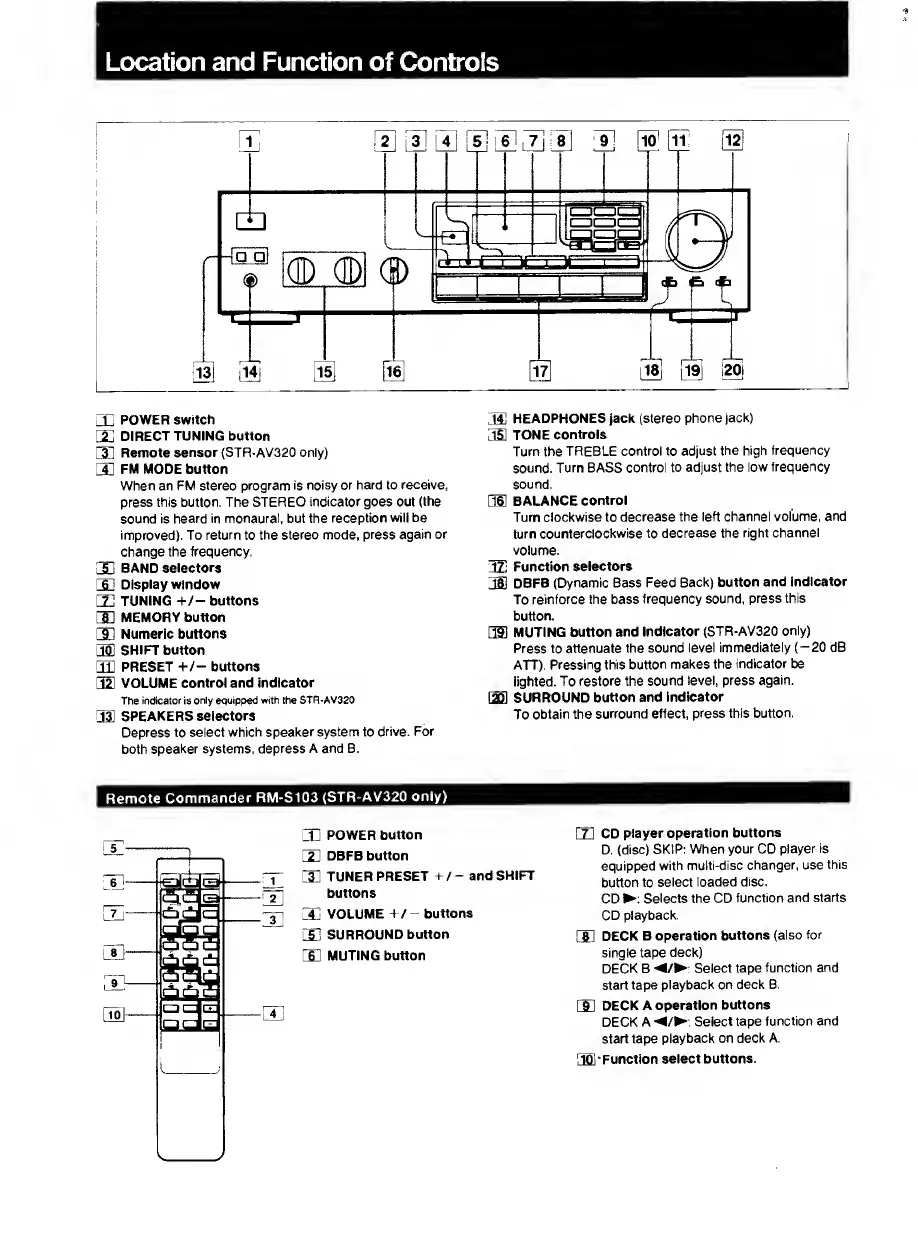
Location
and
Function
of
Controls
POWER
switch
DIRECT
TUNING
button
Remote
sensor
(STR-AV320
only)
FM
MODE
button
When
an
FM
stereo
program
is
noisy
or
hard
to
receive,
press
this
button.
The
STEREO
indicator
goes
out
(the
sound
is
heard
in
monaural,
but
the
reception
will
be
improved).
To
return
to
the
stereo
mode,
press
again
or
change
the
frequency.
BAND
selectors
Display
window
TUNING
+/-buttons
MEMORY
button
Numeric
buttons
SHIFT
button
PRESET
+/-
buttons
VOLUME
control
and
indicator
The
indicator
is
only
eouipped
with
the
STR-AV320
33
SPEAKERS
selectors
Depress
to
select
which
speaker
system
to
drive.
For
both
speaker
systems,
depress
A
and
B.
T4l
HEADPHONES
jack
(stereo
phone
jack)
351
TONE
controls
Turn
the
TREBLE
control
to
adjust
the
high
frequency
sound.
Turn
BASS
control
to
adjust
the
low
frequency
sound.
OS
BALANCE
control
Turn
clockwise
to
decrease
the
left
channel
volume,
and
turn
counterclockwise
to
decrease
the
right
channel
volume.
TTl
Function
selectors
TSl
DBFB
(Dynamic
Bass
Feed
Back)
button
and
indicator
To
reinforce
the
bass
frequency
sound,
press
this
button.
351
MUTING
button
and
Indicator
(STR-AV320
only)
Press
to
attenuate
the
sound
level
immediately
(-20
dB
ATT).
Pressing
this
button
makes
the
indicator
be
lighted.
To
restore
the
sound
level,
press
again.
laSl
SURROUND
button
and
indicator
To
obtain
the
surround
effect,
press
this
button.
Remote
Commander
RM-S103
(STR-AV320
only)
CLj
POWER
button
m
DBFB
button
CE
TUNER
PRESET
+
/-
and
SHIFT
buttons
lIj
volume
+/
-
buttons
lE
SURROUND
button
[E
MUTING
button
m
CD
player
operation
buttons
D.
(disc)
SKIP:
When
your
CD
player
is
equipped
with
multi-disc
changer,
use
this
button
to
select
loaded
disc.
CD
:
Selects
the
CD
function
and
starts
CD
playback.
rsi
deck
B
operation
buttons
(also
for
single
tape
deck)
DECK
B
/
:
Select
tape
function
and
start
tape
playback
on
deck
B.
rsi
deck
a
operation
buttons
DECK
A
/
;
Select
tape
function
and
start
tape
playback
on
deck
A.
3D1-Function
select
buttons.

Related product manuals