EasyManua.ls Logo

Sony STR-AV570X - Manual Tuning (for AM reception); Quickly Tuning AM Stations; Preset Tuning; Memorizing and Recalling Stations

Sony STR-AV570X
12 pages
Print Icon
To Next Page IconTo Next Page
To Previous Page IconTo Previous Page
Loading...
Manual
Tuning
(for
AM
reception)
Preset
Tuning
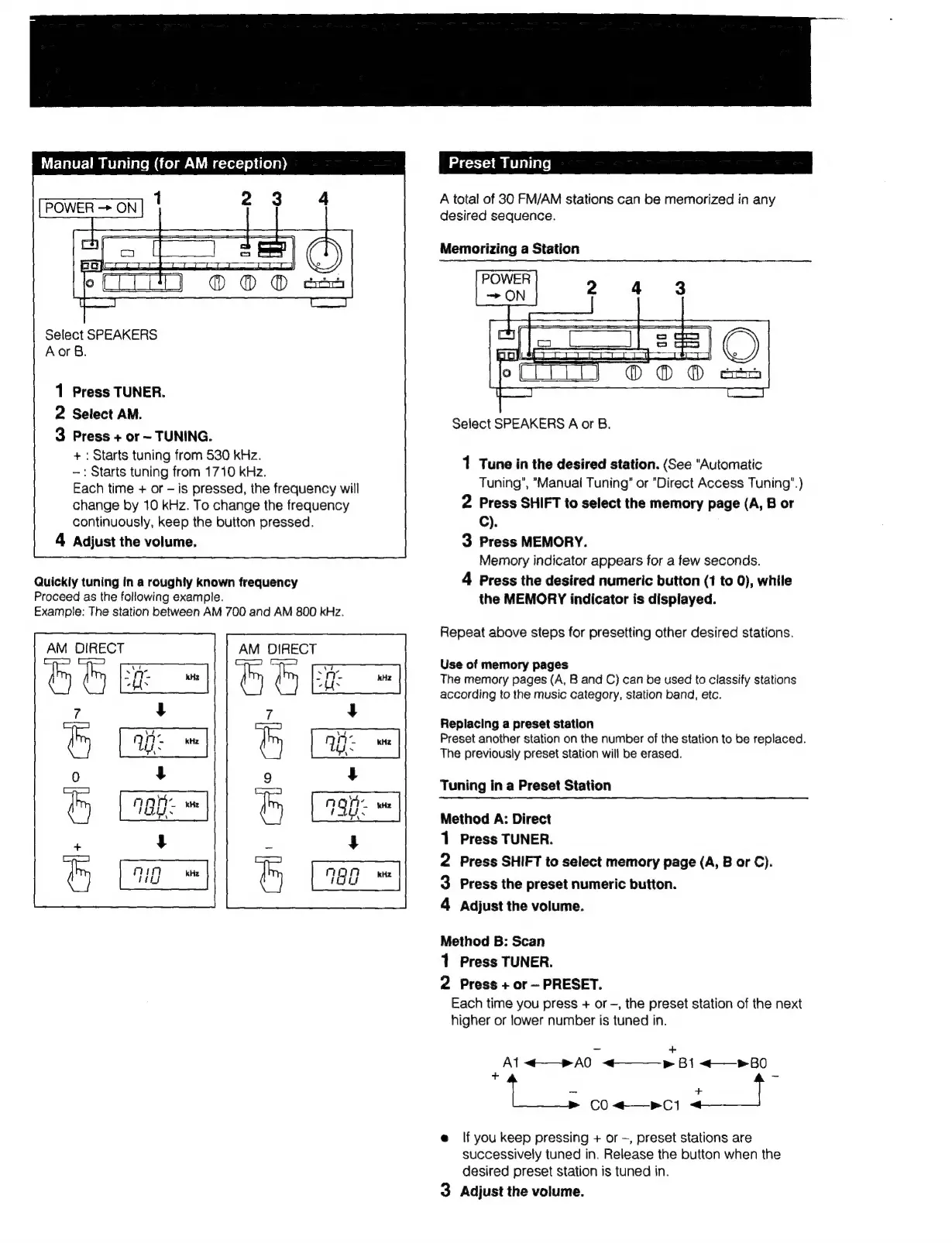
Select
SPEAKERS
Aor
B.
1
Press
TUNER.
2
Select
AM.
3
Press
+
or
~
TUNING.
+:
Starts
tuning
from
530
kHz.
-:
Starts
tuning
from
1710
kHz.
Each
time
+
or
-
is
pressed,
the
frequency
will
change
by
10
kHz.
To
change
the
frequency
continuously,
keep
the
button
pressed.
4
Adjust
the
volume.
Quickly
tuning
in
a
roughly
known
frequency
Proceed
as
the
following
example.
Example:
The
station
between
AM
700
and
AM
800
kHz.
AM
DIRECT
AM
DIRECT
A
total
of
30
FM/AM
stations
can
be
memorized
in
any
desired
sequence.
Memorizing
a
Station
Select
SPEAKERS
A
or
B.
1
Tune
in
the
desired
station.
(See
"Automatic
Tuning’,
"Manual
Tuning’
or
"Direct
Access
Tuning”.)
2
Press
SHIFT
to
select
the
memory
page
(A,
B
or
C).
3
Press
MEMORY.
Memory
indicator
appears
for
a
few
seconds.
4
Press
the
desired
numeric
button
(1
to
0),
while
the
MEMORY
indicator
is
displayed.
Repeat
above
steps
for
presetting
other
desired
stations.
Use
of
memory
pages
The
memory
pages
(A,
B
and
C)
can
be
used
to
classify
stations
according
to
the
music
category,
station
band,
etc.
Replacing
a
preset
station
Preset
another
station
on
the
number
of
the
station
to
be
replaced.
The
previously
preset
station
will
be
erased.
Tuning
in
a
Preset
Station
Method
A:
Direct
1
Press
TUNER.
2
Press
SHIFT
to
select
memory
page
(A,
B
or
C).
3
Press
the
preset
numeric
button.
4
Adjust
the
volume.
Method
B:
Scan
1
Press
TUNER.
2
Press
+
or
PRESET.
Each
time
you
press
+
or
-,
the
preset
station
of
the
next
higher
or
lower
number
is
tuned
in.
=
+
Al
<—»A0
<——p
Bi
+—
PB
+
CO
<—r
C1
e
lf
you
keep
pressing
+
or
-,
preset
stations
are
successively
tuned
in.
Release
the
button
when
the
desired
preset
station
is
tuned
in.
3
Adjust
the
volume.

Other manuals for Sony STR-AV570X

Related product manuals