EasyManua.ls Logo

Sony STR-AV570X - Receiving FM;AM Broadcasts; Tuning Methods Overview; Frequency Entry and Correction

Sony STR-AV570X
12 pages
Print Icon
To Next Page IconTo Next Page
To Previous Page IconTo Previous Page
Loading...
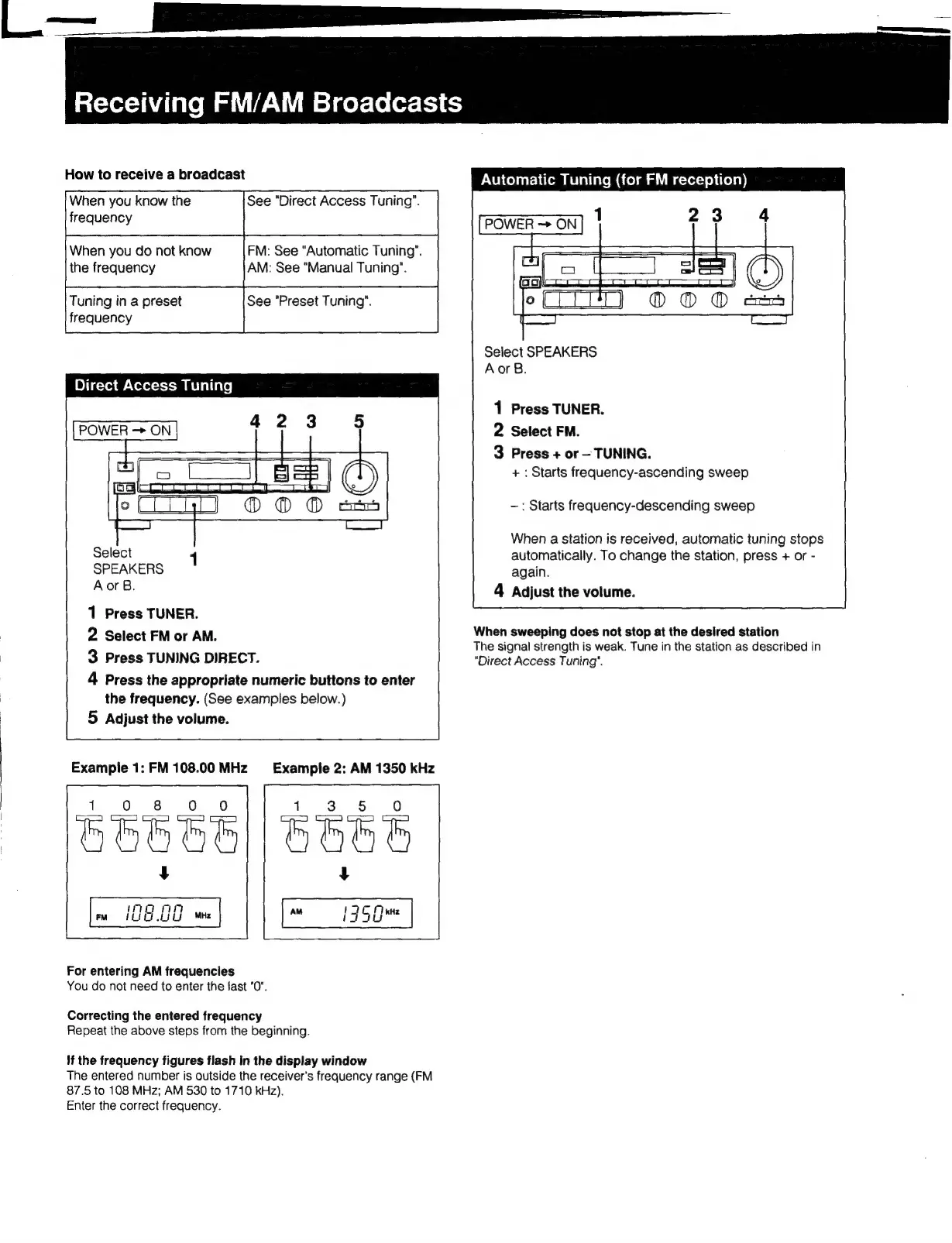
Automatic
Tuning
(for
FM
reception)
When
you
do
not
know
FM:
See
“Automatic
Tuning".
the
frequency
AM:
See
"Manual
Tuning’.
Tuning
in
a
preset
See
"Preset
Tuning".
frequency
Select
SPEAKERS
AorsB.
Direct
Access
Tuning
1
Press
TUNER.
2
Select
FM.
3
Press
+
or
TUNING.
+:
Starts
frequency-ascending
sweep
POWER
ON
—:
Starts
frequency-descending
sweep
When
a
station
is
received,
automatic
tuning
stops
automatically.
To
change
the
station,
press
+
or
-
again.
4
Adjust
the
volume.
SPEAKERS
AorB.
1
Press
TUNER.
2
Select
FM
or
AM.
When
sweeping
does
not
stop
at
the
desired
station
The
signal
strength
is
weak.
Tune
in
the
station
as
described
in
3
Press
TUNING
DIRECT.
"Direct
Access
Tuning".
4
Press
the
appropriate
numeric
buttons
to
enter
the
frequency.
(See
examples
below.)
|
5
Adjust
the
volume.
Example
1:
FM
108.00
MHz
Example
2:
AM
1350
kHz
For
entering
AM
frequencies
You
do
not
need
to
enter
the
fast
"0".
Correcting
the
entered
frequency
Repeat
the
above
steps
from
the
beginning.
If
the
frequency
figures
flash
in
the
display
window
The
entered
number
is
outside
the
receiver's
frequency
range
(FM
87.5
to
108
MHz;
AM
530
to
1710
kHz).
Enter
the
correct
frequency.

Other manuals for Sony STR-AV570X

Related product manuals