EasyManua.ls Logo

Sony STR-D715 - Adjusting Sound Field Programs

Sony STR-D715
35 pages
Print Icon
To Next Page IconTo Next Page
To Previous Page IconTo Previous Page
Loading...
Sound
Field
Settings
(Continued)
Adjusting
the
Sound
Field
Programs
Adjusting
the
tone
control
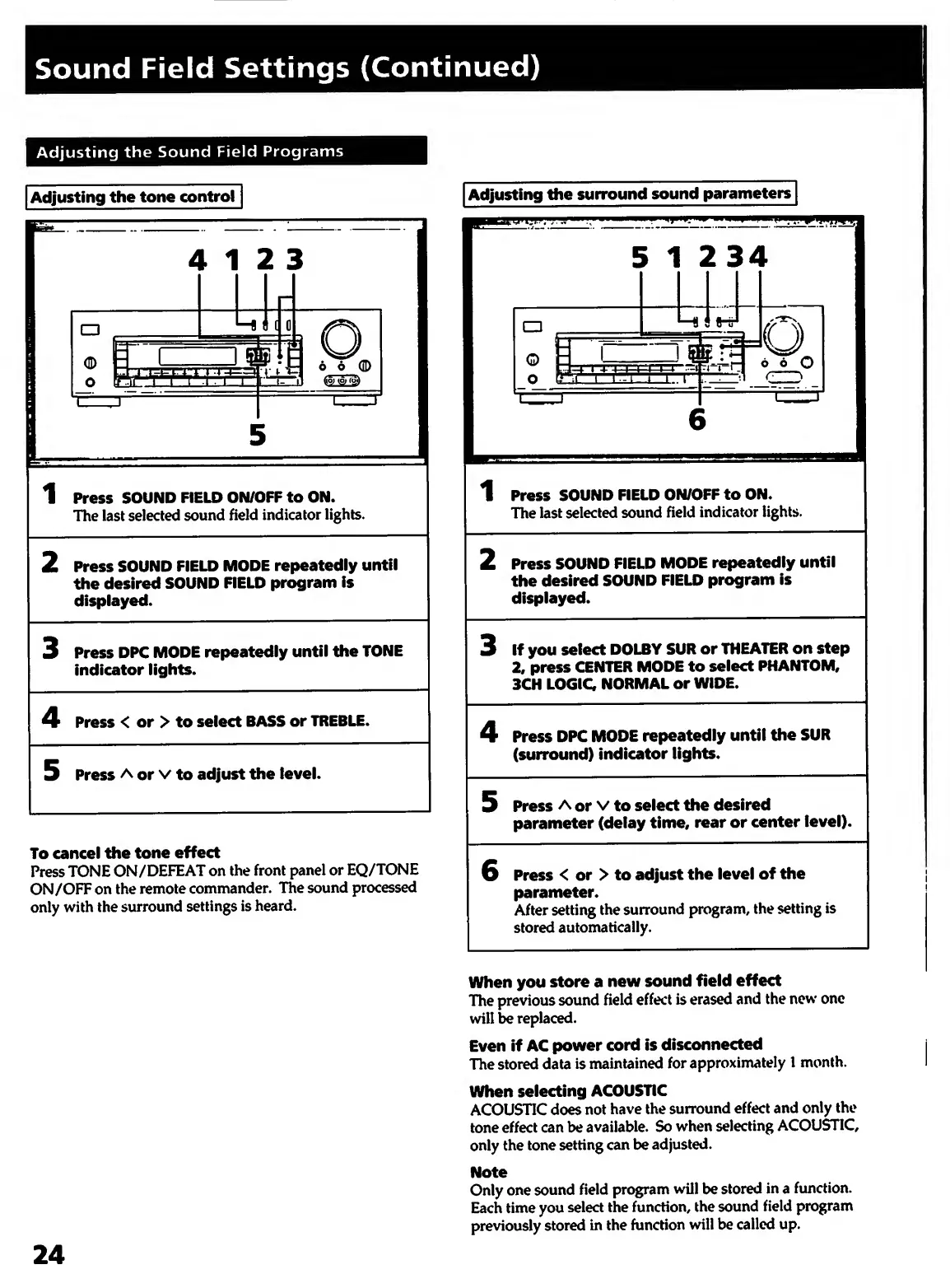
4
12
3
5
1
P
ress
SOUND
FIELD
ON/OFF
to
ON.
The
last
selected
sound
field
indicator
lights.
2
P
ress
SOUND
FIELD
MODE
repeatedly
until
the
desired
SOUND
FIELD
program
is
displayed.
3
P
ress
DPC
MODE
repeatedly
until
the
TONE
indicator
lights.
4
P
ress
<
or
>
to
select
BASS
or
TREBLE.
5
P
ress
A
or
V
to
adjust
the
level.
To
cancel
the
tone
effect
Press
TONE
ON/DEFEAT
on
the
front
panel
or
EQ/TONE
ON/OFF
on
the
remote
commander.
The
sound
processed
only
with
the
surround
settings
is
heard.
Adjusting
the
surround
sound
parameters
1
Press
SOUND
FIELD
ON/OFF
to
ON.
The
last
selected
sound
field
indicator
lights.
2
P
ress
SOUND
FIELD
MODE
repeatedly
until
the
desired
SOUND
FIELD
program
is
displayed.
3
I
f
you
select
DOLBY
SUR
or
THEATER
on
step
2,
press
CENTER
MODE
to
select
PHANTOM,
3CH
LOGIC
NORMAL
or
WIDE.
4
P
ress
DPC
MODE
repeatedly
until
the
SUR
(surround)
indicator
lights.
5
P
ress
A
or
V
to
select
the
desired
parameter
(delay
time,
rear
or
center
level).
6
P
ress
<
or
>
to
adjust
the
level
of
the
parameter.
After
setting
the
surround
program,
the
setting
is
stored
automatically.
When
you
store
a
new
sound
field
effect
The
previous
sound
field
effect
is
erased
and
the
new
one
will
be
replaced.
Even
if
AC
power
cord
is
disconnected
The
stored
data
is
maintained
for
approximately
1
month.
When
selecting
ACOUSTIC
ACOUSTIC
does
not
have
the
surround
effect
and
only
the
tone
effect
can
be
available.
So
when
selecting
ACOUSTIC,
only
the
tone
setting
can
be
adjusted.
Note
Only
one
sound
field
program
will
be
stored
in
a
function.
Each
time
you
select
the
function,
the
sound
field
program
previously
stored
in
the
function
will
be
called
up.
24

Other manuals for Sony STR-D715

Related product manuals