EasyManua.ls Logo

Sony STR-D911 - Adding New Audio to Video Tapes (STR-D911)

Sony STR-D911
36 pages
Print Icon
To Next Page IconTo Next Page
To Previous Page IconTo Previous Page
Loading...
Keli
diate
mcm
are(tomelelel
ge:
/Nololiate
MN
(cai
mere)
eine
me)
am-Ma(e|-lomer-]
elcmelel
alalem\aielsre)
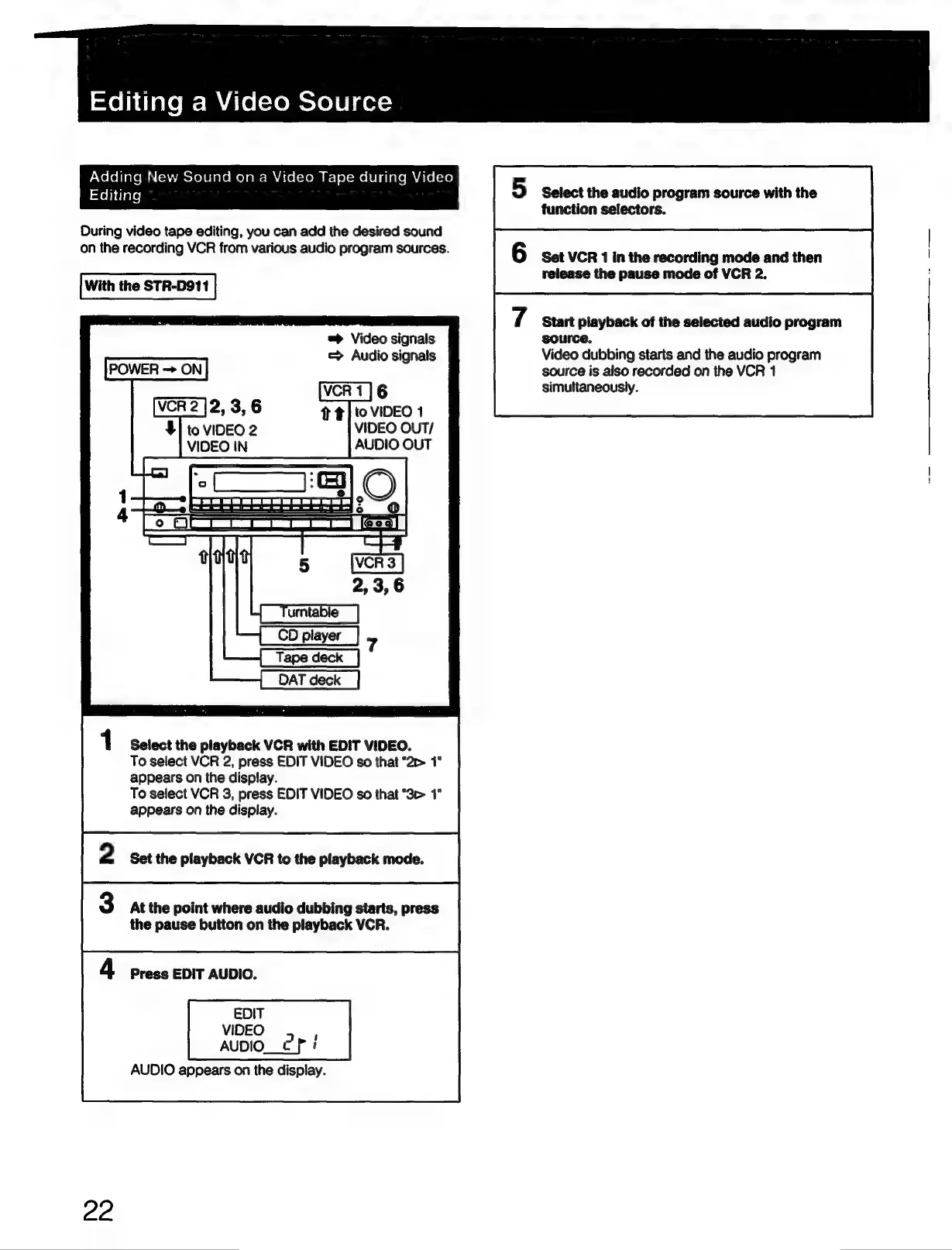
Editing
During
video
tape
editing,
you
can
add
the
desired
sound
on
the
recording
VCR
from
various
audio
program
sources.
With
the
STR-D911
=>
Video
signals
=
Audio
signals
POWER
ON
VIDEO
OUT/
AUDIO
OUT
DAT
deck
1
Select
the
playback
VCR
with
EDIT
VIDEO.
To
select
VCR
2,
press
EDIT
VIDEO
so
that
‘2>
appears
on
the
display.
To
select
VCR
3,
press
EDIT
VIDEO
so
that
“3c
1"
appears
on
the
display.
2
Set
the
playback
VCR
to
the
playback
mode.
3
At
the
point
where
audio
dubbing
starts,
press
the
pause
button
on
the
playback
VCR.
4
Press
EDIT
AUDIO.
EDIT
VIDEO
AUDIO_e
Pi
AUDIO
appears
on
the
display.
22
5
Select
the
audio
program
source
with
the
function
selectors.
Set
VCR
1
in
the
recording
mode
and
then
release
the
pause
mode
of
VCR
2.
Start
playback
of
the
selected
audio
program
source,
Video
dubbing
starts
and
the
audio
program
source
is
also
recorded
on
the
VCR
1
simultaneously.

Related product manuals