EasyManua.ls Logo

Sony STR-D911 - Speaker System Connections and Impedance

Sony STR-D911
36 pages
Print Icon
To Next Page IconTo Next Page
To Previous Page IconTo Previous Page
Loading...
Hooking
Up
the
System
[Connecting
Speaker
Systems
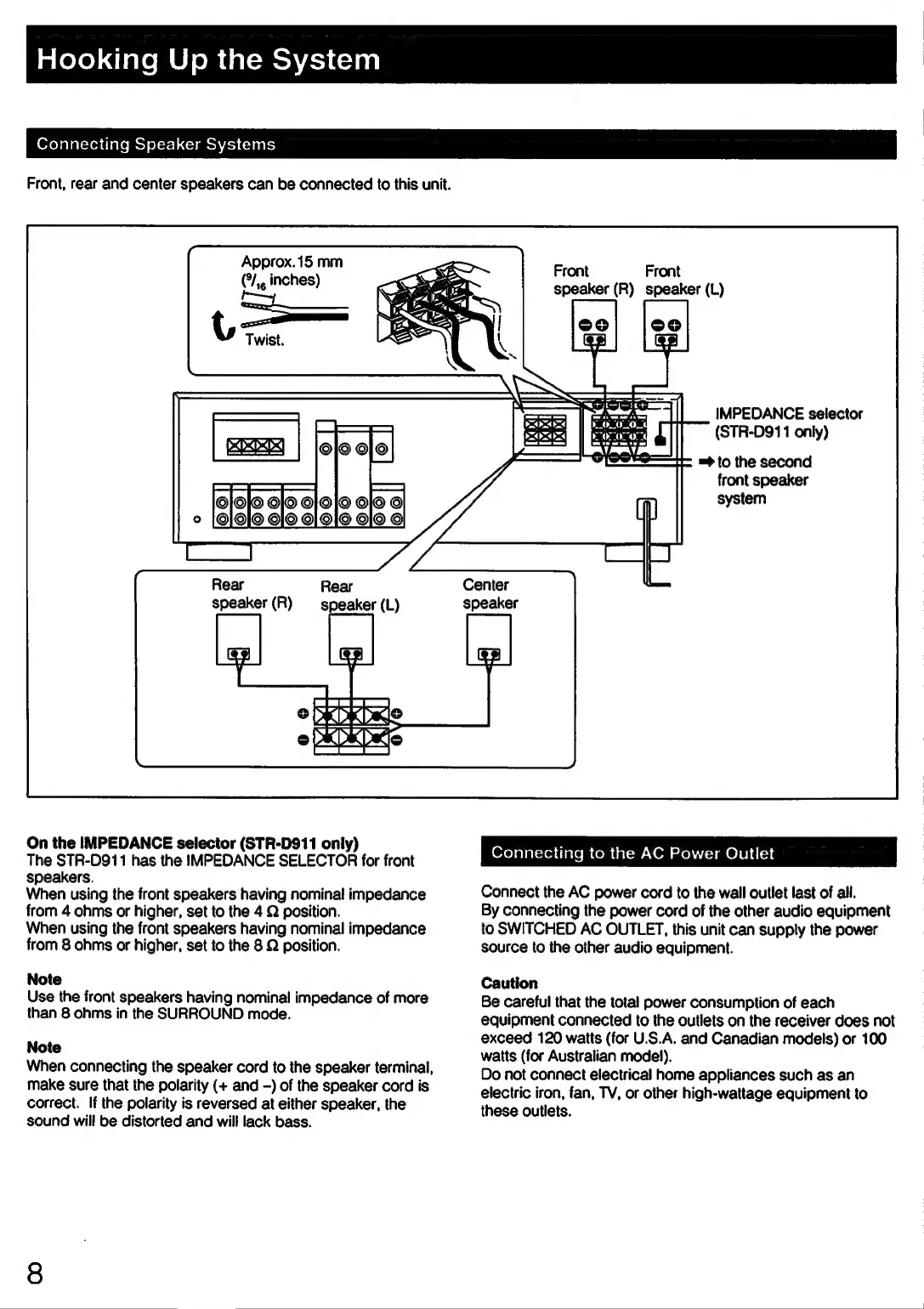
Connecting
Speaker
Systems
Front,
rear
and
center
speakers
can
be
connected
to
this
unit.
Approx.15
mm
(*/,,
inches)
Front
Front
speaker
(R)
speaker
(L)
IMPEDANCE
selector
(STR-D911
only)
=>
to
the
second
front
speaker
system
Center
speaker
The
STR-D911
has
the
IMPEDANCE
SELECTOR
for
front
wenbec
ing
to
Wie.At:
Fewer
Que!
speakers.
When
using
the
front
speakers
having
nominal
impedance
Connect
the
AC
power
cord
to
the
wall
outlet
last
of
all.
from
4
ohms
or
higher,
set
to
the
4
Q
position.
By
connecting
the
power
cord
of
the
other
audio
equipment
When
using
the
front
speakers
having
nominal
impedance
to
SWITCHED
AC
OUTLET,
this
unit
can
supply
the
power
from
8
ohms
or
higher,
set
to
the
8
Q
position.
source
to
the
other
audio
equipment.
Note
Caution
Use
the
front
speakers
having
nominal
impedance
of
more
Be
careful
that
the
total
power
consumption
of
each
than
8
ohms
in
the
SURROUND
mode.
equipment
connected
to
the
outlets
on
the
receiver
does
not
exceed
120
watts
(for
U.S.A,
and
Canadian
models)
or
100
watts
(for
Australian
model).
Do
not
connect
electrical
home
appliances
such
as an
electric
iron,
fan,
TV,
or
other
high-wattage
equipment
to
these
outlets.
Note
When
connecting
the
speaker
cord
to
the
speaker
terminal,
make
sure
that
the
polarity
(+
and
-)
of
the
speaker
cord
is
correct.
If
the
polarity
is
reversed
at
either
speaker,
the
sound
will
be
distorted
and
will
lack
bass.

Related product manuals