EasyManua.ls Logo

Sony STR-D965 - Recording

Sony STR-D965
28 pages
Print Icon
To Next Page IconTo Next Page
To Previous Page IconTo Previous Page
Loading...
Receiver
Operations
To
select
different
station
indexes
Press
TUNING/INDEX
SELECT
+
or
-
to
select
the
one
you
want,
then
press
PRESET
TUNING
+
or
-
to
select
a
station.
Indexing
program
sources
This
feature
is
useful
when,
for
example,
you
have
more
than
one
VCR:
you
can
label
one
VCR
as
“VHS”
and
label
the
other
as
“8MM.”
Then,
you
can
have
the
receiver
display
the
index
names
so
you
can
tell
which
VCR
you
are
using.
This
feature
also
comes
in
handy
if
you
connect
a
component
to
jacks
designed
for
another
component
(for
example,
connecting
a
second
CD
player
to
the
DAT/MD
jacks).
4
Press
the
FUNCTION
button
you
want
to
label.
2
Press
DISPLAY
repeatedly
until
“NAME
MODE”
appears
in
the
display.
3
Press
DPC
MODE
repeatedly
until
the
INDEX
indicator
lights
up.
4
create
a
name
by
using
the
digital
processing
control
buttons
as
follows:
Press
A
or
V
to
select
a
character,
and
then
press
>
to
move
the
cursor
to
the
next
position.
To
insert
a
space,
press
“or
V
until
a
blank
space
appears
in
the
display
(the
space
is
between
“}”
and
“!”).
The
name
you
created
is
stored
automatically.
If
you've
made
a
mistake
Press
<
or
>
repeatedly
until
the
character
you
want
to
change
flashes.
Then
select
the
right
character.
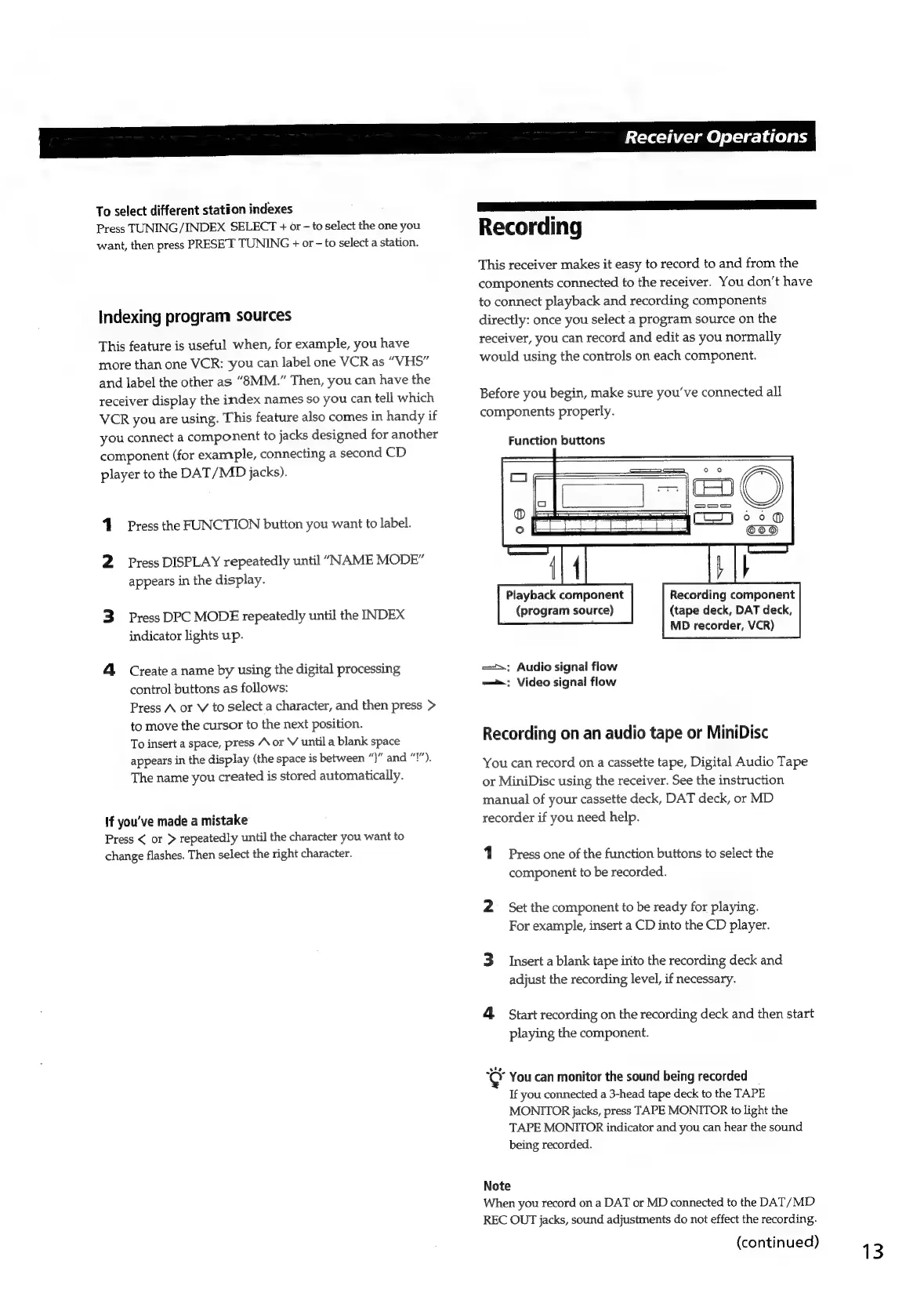
Recording
This
receiver
makes
it
easy
to
record
to
and
from
the
components
connected
to
the
receiver.
You
don’t
have
to
connect
playback
and
recording
components
directly:
once
you
select
a
program
source
on
the
receiver,
you
can
record
and
edit
as
you
normally
would
using
the
controls
on
each
component.
Before
you
begin,
make
sure
you've
connected
all
components
properly.
Function
buttons
io
ea
"=
1
©
0
————
(TI
©
°
.
{4
bth
Playback
component
(program
source)
Recording
component
(tape
deck,
DAT
deck,
MD
recorder,
VCR)
=:
Audio
signal
flow
=:
Video
signal
flow
Recording
on
an
audio
tape
or
MiniDisc
You
can
record
on
a
cassette
tape,
Digital
Audio
Tape
or
MiniDisc
using
the
receiver.
See
the
instruction
manual
of
your
cassette
deck,
DAT
deck,
or
MD
recorder
if
you
need
help.
Press
one
of
the
function
buttons
to
select
the
component
to
be
recorded.
2
=
Set
the
component
to
be
ready
for
playing.
For
example,
insert
a
CD
into
the
CD
player.
3
Insert
a
blank
tape
irito
the
recording
deck
and
adjust
the
recording
level,
if
necessary.
4
Start
recording
on
the
recording
deck
and
then
start
playing
the
component.
Key
You
can
monitor
the
sound
being
recorded
_
If
you
connected
a
3-head
tape
deck
to
the
TAPE
MONITOR
jacks,
press
TAPE
MONITOR
to
light
the
TAPE
MONITOR
indicator
and
you
can
hear
the
sound
being
recorded.
Note
When
you
record
on
a
DAT
or
MD
connected
to
the
DAT/MD
REC
OUT
jacks,
sound
adjustments
do
not
effect
the
recording.
(continued)
13

Related product manuals