EasyManua.ls Logo

Sony STR-D965 - Surround Sound Features; Using Pre-programmed Sound Fields; Taking Advantage of the Sound Fields

Sony STR-D965
28 pages
Print Icon
To Next Page IconTo Next Page
To Previous Page IconTo Previous Page
Loading...
.
Using
Surround
Sound
|
[de
Tee
re
ee
ES
Se
SoS
Using
Pre-programmed
Sound
Fields
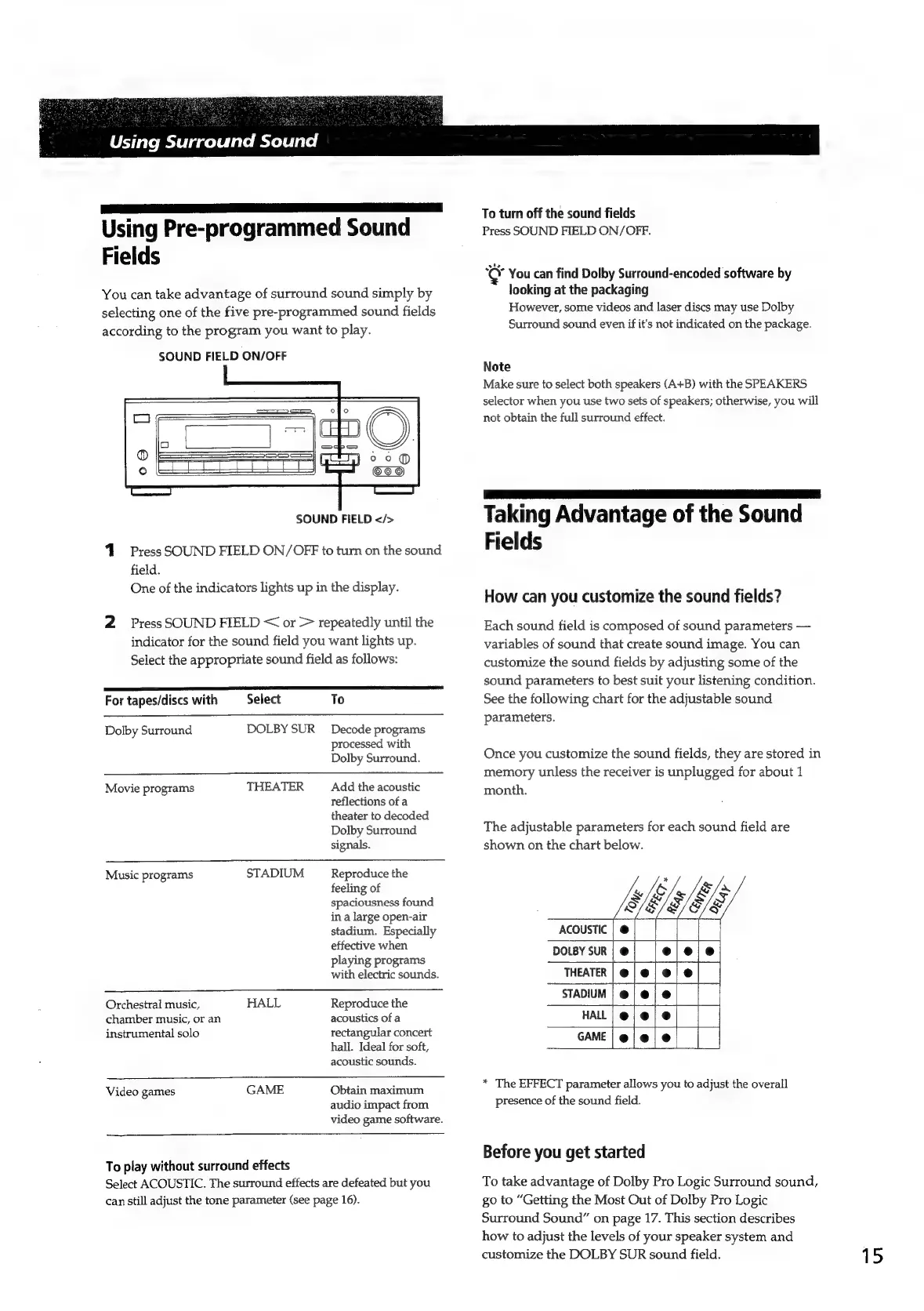
You
can
take
advantage
of
surround
sound
simply
by
selecting
one
of
the
five
pre-programmed
sound
fields
according
to
the
program
you
want
to
play.
SOUND
FIELD
ON/OFF
SOUND
FIELD
</>
Press
SOUND
FIELD
ON/OFF
to
turn
on
the
sound
field.
One
of
the
indicators
lights
up
in
the
display.
2
Press
SOUND
FIELD
<
or
>
repeatedly
until
the
indicator
for
the
sound
field
you
want
lights
up.
Select
the
appropriate
sound
field
as
follows:
a
TI
ERT
A
SRR
RA
For
tapes/discs
with
Select
To
DOLBY
SUR
Decode
programs
processed
with
Dolby
Surround.
Dolby
Surround
THEATER
Add
the
acoustic
reflections
of
a
theater
to
decoded
Dolby
Surround
signals.
Movie
programs
STADIUM
Reproduce
the
feeling
of
spaciousness
found
in
a
large
open-air
stadium.
Especially
effective
when
playing
programs
with
electric
sounds.
Music
programs
Orchestral
music,
HALL
chamber
music,
or
an
instrumental
solo
Reproduce
the
acoustics
of
a
rectangular
concert
hall.
Ideal
for
soft,
acoustic
sounds.
Obtain
maximum
audio
impact
from
video
game
software.
Video
games
GAME
To
play
without
surround
effects
Select
ACOUSTIC.
The
surround
effects
are
defeated
but
you
can
still
adjust
the
tone
parameter
(see
page
16).
To
turn
off
the
sound
fields
Press
SOUND
FIELD
ON/OFF.
°CY
You
can
find
Dolby
Surround-encoded
software
by
looking
at
the
packaging
However,
some
videos
and
laser
discs
may
use
Dolby
Surround
sound
even
if
it's
not
indicated
on
the
package.
Note
Make
sure
to
select
both
speakers
(A+B)
with
the
SPEAKERS
selector
when
you
use
two
sets
of
speakers;
otherwise,
you
will
not
obtain
the
full
surround
effect.
Taking
Advantage
of
the
Sound
Fields
How
can
you
customize
the
sound
fields?
Each
sound
field
is
composed
of
sound
parameters
variables
of
sound
that
create
sound
image.
You
can
customize
the
sound
fields
by
adjusting
some
of
the
sound
parameters
to
best
suit
your
listening
condition.
See
the
following
chart
for
the
adjustable
sound
parameters.
Once
you
customize
the
sound
fields,
they
are
stored
in
memory
unless
the
receiver
is
unplugged
for
about
1
month.
The
adjustable
parameters
for
each
sound
field
are
shown
on
the
chart
below.
ACOUSTIC
|
@
DOLBY
SUR
|
@
THEATER
[
@
e
e
e
STADIUM
HALL
GAME
*
The
EFFECT
parameter
allows
you
to
adjust
the
overall
presence
of
the
sound
field.
Before
you
get
started
To
take
advantage
of
Dolby
Pro
Logic
Surround
sound,
go
to
“Getting
the
Most
Out
of
Dolby
Pro
Logic
Surround
Sound”
on
page
17.
This
section
describes
how
to
adjust
the
levels
of
your
speaker
system
and
customize
the
DOLBY
SUR
sound
field.
15

Related product manuals