EasyManua.ls Logo

Sony STR-D965 - Page 16

Sony STR-D965
28 pages
Print Icon
To Next Page IconTo Next Page
To Previous Page IconTo Previous Page
Loading...
16
Using
Surround
Sound
Customizing
Sound
Fields
You
can
customize
the
sound
fields
by
adjusting
the
tone
(bass
or
treble)
and
surround
sound
parameters
while
listening
to
a
program
source.
The
adjusted
parameters
are
stored
in
memory
automatically
and
you
can
use
your
custom
sound
fields
just
as
you
would
use
the
pre-programmed
ones.
Before
you
start,
select
the
sound
field
you
want
to
customize
and
start
playing
a
program.
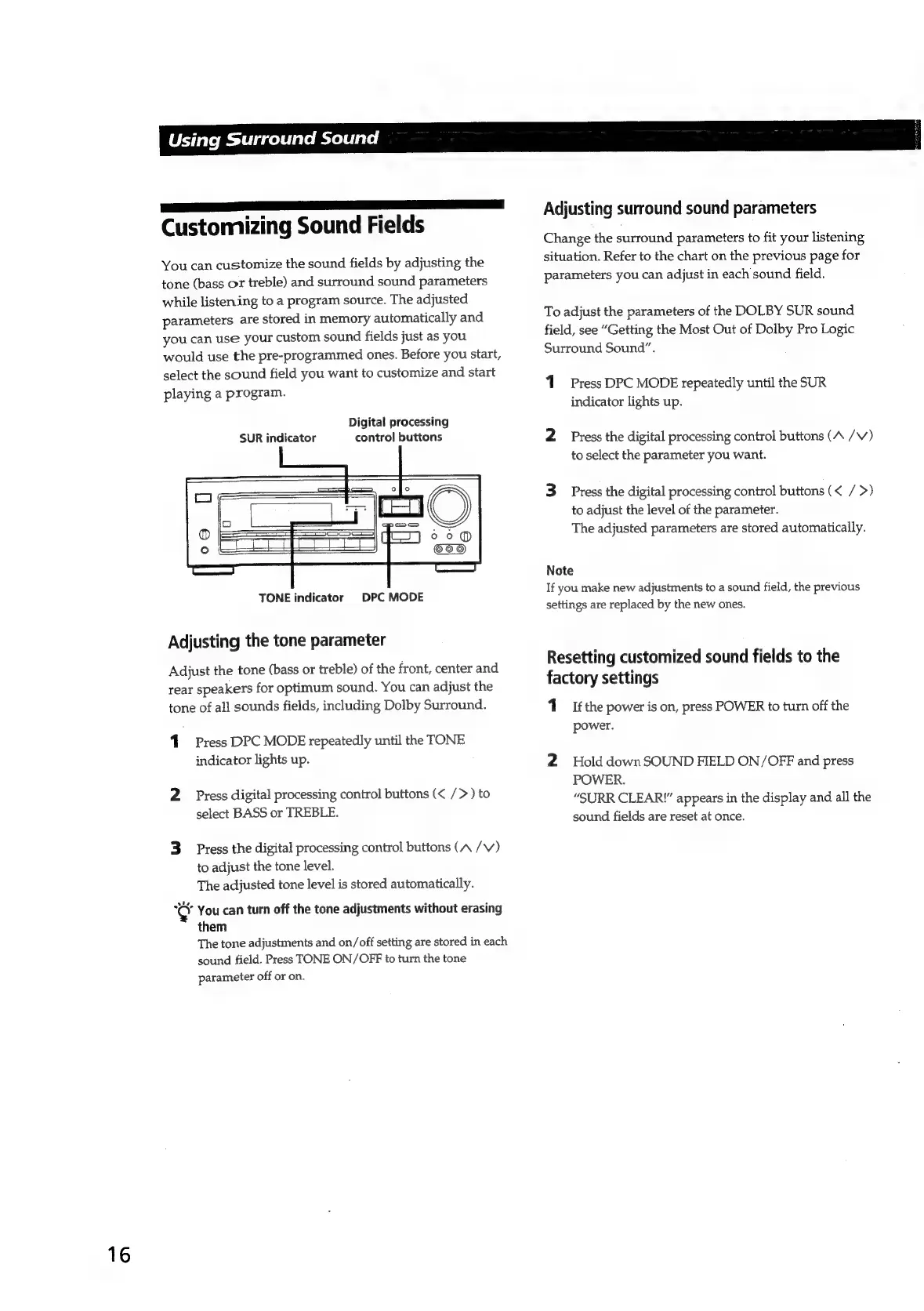
Digital
processing
control
buttons
SUR
indicator
TONE
indicator
DPC
MODE
Adjusting
the
tone
parameter
Adjust
the
tone
(bass
or
treble)
of
the
front,
center
and
rear
speakers
for
optimum
sound.
You
can
adjust
the
tone
of
all
sounds
fields,
including
Dolby
Surround.
1.
Press
DPC
MODE
repeatedly
until
the
TONE
indicator
lights
up.
2
Press
digital
processing
control
buttons
(<
/>)
to
select
BASS
or
TREBLE.
3
Press
the
digital
processing
control
buttons
(A
/V)
to
adjust
the
tone
level.
The
adjusted
tone
level
is
stored
automatically.
¢
You
can
turn
off
the
tone
adjustments
without
erasing
them
The
tone
adjustments
and
on/off
setting
are
stored
in
each
sound
field.
Press
TONE
ON/OFF
to
turn
the
tone
parameter
off
or
on.
Adjusting
surround
sound
parameters
Change
the
surround
parameters
to
fit
your
listening
situation.
Refer
to
the
chart
on
the
previous
page
for
parameters
you
can
adjust
in
each
sound
field.
To
adjust
the
parameters
of
the
DOLBY
SUR
sound
field,
see
“Getting
the
Most
Out
of
Dolby
Pro
Logic
Surround
Sound”.
1
Press
DPC
MODE
repeatedly
until
the
SUR
indicator
lights
up.
2
Press
the
digital
processing
control
buttons
(A
/V)
to
select
the
parameter
you
want.
3
Press
the
digital
processing
control
buttons
(<
/
>)
to
adjust
the
level
of
the
parameter.
The
adjusted
parameters
are
stored
automatically.
Note
If
you
make
new
adjustments
to
a
sound
field,
the
previous
settings
are
replaced
by
the
new
ones.
Resetting
customized
sound
fields
to
the
factory
settings
1
If
the
power
is
on,
press
POWER
to
turn
off
the
power.
2
Hold
down
SOUND
FIELD
ON/OFF
and
press
POWER.
“SURR
CLEAR"
appears
in
the
display
and
all
the
sound
fields
are
reset
at
once.

Related product manuals