EasyManua.ls Logo

Sony STR-D965 - Getting the Most Out of Dolby Pro Logic Surround Sound; Selecting the Center Mode; Adjusting Speaker Volume

Sony STR-D965
28 pages
Print Icon
To Next Page IconTo Next Page
To Previous Page IconTo Previous Page
Loading...
Sa
yey
eS
Oe
er
ee
Getting
the
Most
Out
of
Dolby
Pro
Logic
Surround
Sound
To
obtain
the
best
possible
Dolby
Pro
Logic
Surround
sound,
first
select
the
center
mode
according
to
your
speaker
system.
Then,
adjust
the
sound
parameters
of
the
DOLBY
SUR
sound
field.
Note
that
you
must
have
at
least
one
additional
pair
of
speakers
and/or
one
center
speaker
to
do
the
following
adjustments.
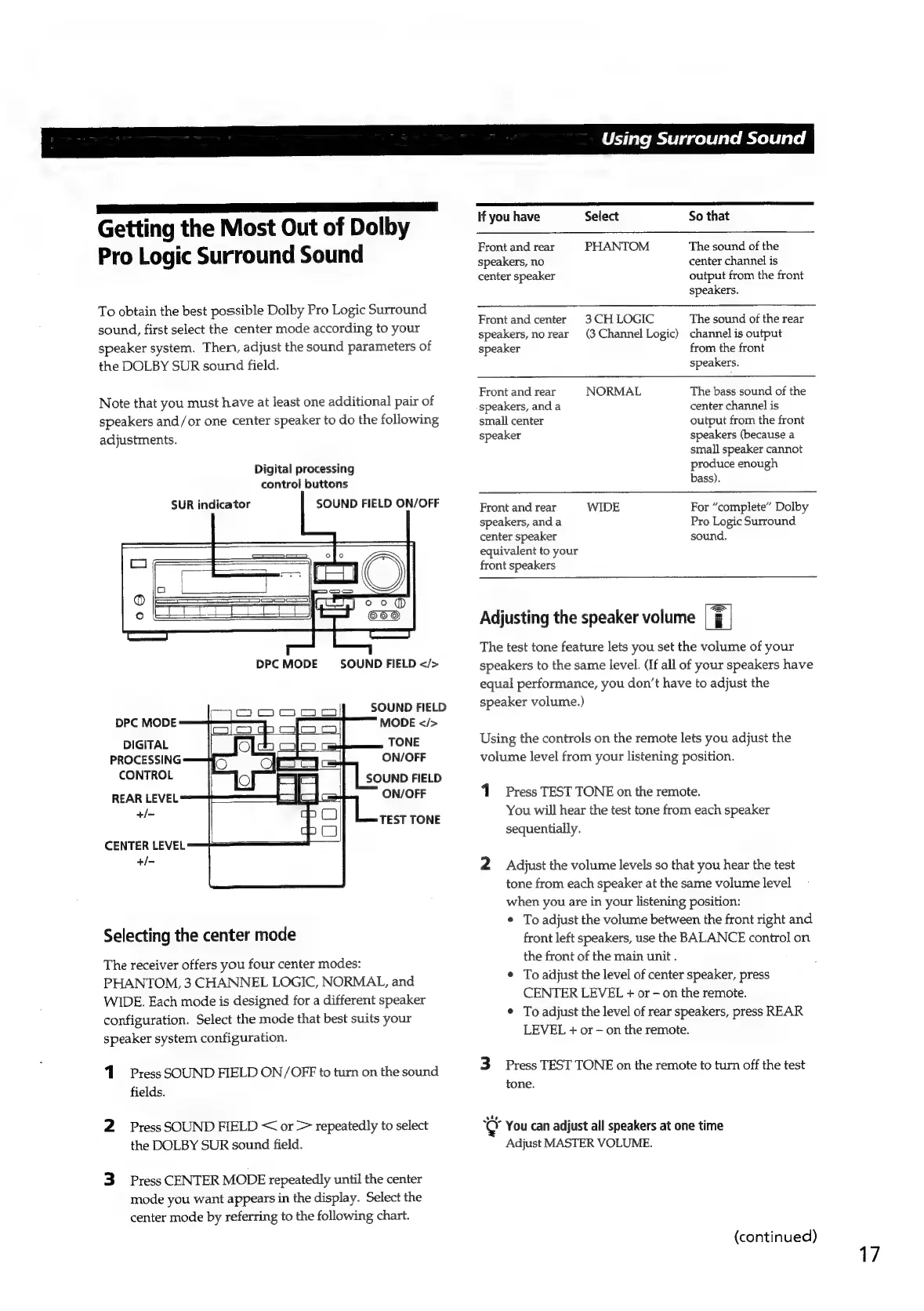
Digital
processing
control
buttons
SUR
indicator
SOUND
FIELD
ON/OFF
DPC
MODE
SOUND
FIELD
</>
SOUND
FIELD
DPC
MODE
MODE
</>
DIGITAL
TONE
PROCESSING
ON/OFF
CONTROL
SOUND
FIELD
REAR
LEVEL
ON/OFF
si
TEST
TONE
CENTER
LEVEL
+/-
Selecting
the
center
mode
The
receiver
offers
you
four
center
modes:
PHANTOM,
3
CHANNEL
LOGIC,
NORMAL,
and
WIDE.
Each
mode
is
designed
for
a
different
speaker
configuration.
Select
the
mode
that
best
suits
your
speaker
system
configuration.
1.
Press
SOUND
FIELD
ON/OFF
to
turn
on
the
sound
fields.
2
Press
SOUND
FIELD
<
or
>
repeatedly
to
select
the
DOLBY
SUR
sound
field.
3
Press
CENTER
MODE
repeatedly
until
the
center
mode
you
want
appears
in
the
display.
Select
the
center
mode
by
referring
to
the
following
chart.
|
Using
Surround
Sound
lf
you
have
Select
So
that
Front
and
rear
PHANTOM
The
sound
of
the
speakers,
no
center
channel
is
center
speaker
output
from
the
front
speakers.
Front
and
center
3CH
LOGIC
The
sound
of
the
rear
speakers,
no
rear
(3
Channel
Logic)
channel
is
output
speaker
from
the
front
speakers.
Front
and
rear
NORMAL
The
bass
sound
of
the
speakers,
and
a
center
channel
is
small
center
output
from
the
front
speaker
speakers
(because
a
small
speaker
cannot
produce
enough
bass).
Front
and
rear
WIDE
For
“complete”
Dolby
speakers,
and
a
Pro
Logic
Surround
center
speaker
sound.
equivalent
to
your
front
speakers
Adjusting
the
speaker
volume
The
test
tone
feature
lets
you
set
the
volume
of
your
speakers
to
the
same
level.
(If
all
of
your
speakers
have
equal
performance,
you
don’t
have
to
adjust
the
speaker
volume.)
Using
the
controls
on
the
remote
lets
you
adjust
the
volume
level
from
your
listening
position.
Press
TEST
TONE
on
the
remote.
You
will
hear
the
test
tone
from
each
speaker
sequentially.
2
Adjust
the
volume
levels
so
that
you
hear
the
test
tone
from
each
speaker
at
the
same
volume
level
when
you
are
in
your
listening
position:
¢
To
adjust
the
volume
between
the
front
right
and
front
left
speakers,
use
the
BALANCE
control
on
the
front
of
the
main
unit
.
¢
To
adjust
the
level
of
center
speaker,
press
CENTER
LEVEL
+
or
on
the
remote.
¢
To
adjust
the
level
of
rear
speakers,
press
REAR
LEVEL
+
or
on
the
remote.
3
Press
TEST
TONE
on
the
remote
to
turn
off
the
test
tone.
¢
You
can
adjust
all
speakers
at
one
time
Adjust
MASTER
VOLUME.
(continued)
17

Related product manuals