10
US
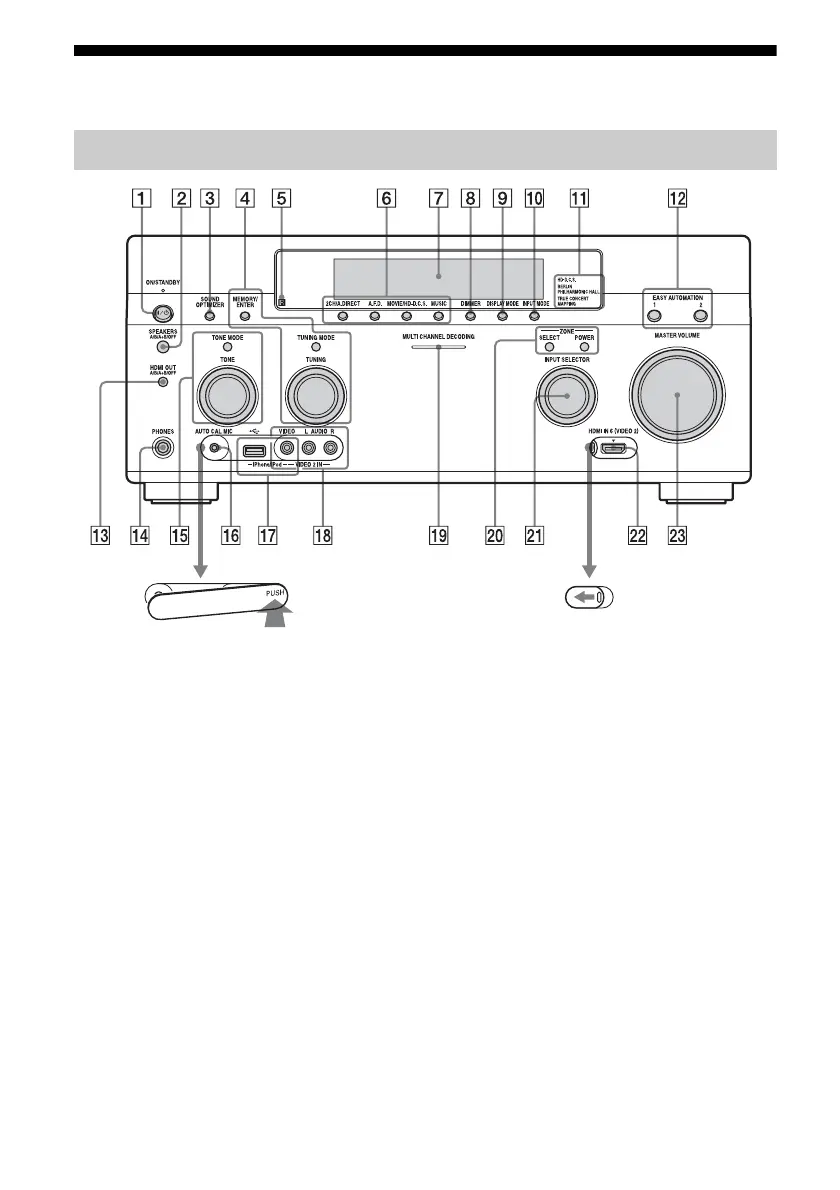
Description and location of parts
A ?/1 ON/STANDBY
Press to turn the receiver on or off. When
the power is on, the lamp above the button
lights up in green. If “Control for HDMI”
(page 113), “Pass Through” (page 113),
or “Network Standby” (page 115) is set to
“On,” or the power for zone 2 or zone 3 is
turned on, the lamp above the button
lights up in amber when in the standby
mode.
B SPEAKERS (A/B/A+B/OFF)
(page 50)
C SOUND OPTIMIZER (page 76)
D MEMORY/ENTER, TUNING MODE,
TUNING (page 62)
E Remote sensor
Receives signals from remote control.
F 2CH/A.DIRECT, A.F.D., MOVIE/
HD-D.C.S., MUSIC (page 71, 72, 72,
74)
G Display window (page 12)
H DIMMER
Press repeatedly to adjust brightness of
the display window.
I DISPLAY MODE (page 126)
J INPUT MODE (page 88)
Front panel
To remove the cover
Press PUSH.
When you remove the cover, keep it out of
reach from children.
To open the cover
Slide the cover to the left.















 To Next Page