7
STR-DG710
13
US
Getting Started
a)
The number 5, MASTER VOL +, TV VOL +, and
H buttons have tactile dots. Use the tactile dots
as references when operating the receiver.
b)
This button is also available for DIGITAL MEDIA
PORT adapter operation. For details on the
function of the button, refer to the operating
instructions supplied with the DIGITAL MEDIA
PORT adapter.
Notes
•Some functions explained in this section may not
work depending on the model.
•The above explanation is intended to serve as an
example only. Therefore, depending on the
component, the above operation may not be
possible or may operate differently than described.
Name Function
S -/-- Press -/-- and TV (M) at the
same time to select the
channel entry mode, either
one or two digits of the TV.
>10/
x
Press to select
–track numbers over 10 of the
VCR, satellite tuner or CD
player.
–channel numbers of the
Digital CATV terminal.
CLEAR Press to clear a mistake when
you press the incorrect
numeric button.
T Numeric
buttons
(number 5
a)
)
Press to
–preset/tune to preset
stations.
–select track numbers of the
CD player, DVD player or
blu-ray disc player. Press 0/
10 to select track number 10.
–select channel numbers of
the VCR or satellite tuner.
Press the numeric buttons and
TV (M) at the same time to
select the TV channels.
U TV INPUT Press TV INPUT and TV (M)
at the same time to select the
input signal (TV input or
video input).
SLEEP Press to activate the Sleep
Timer function and the
duration which the receiver
turns off automatically.
4
GB
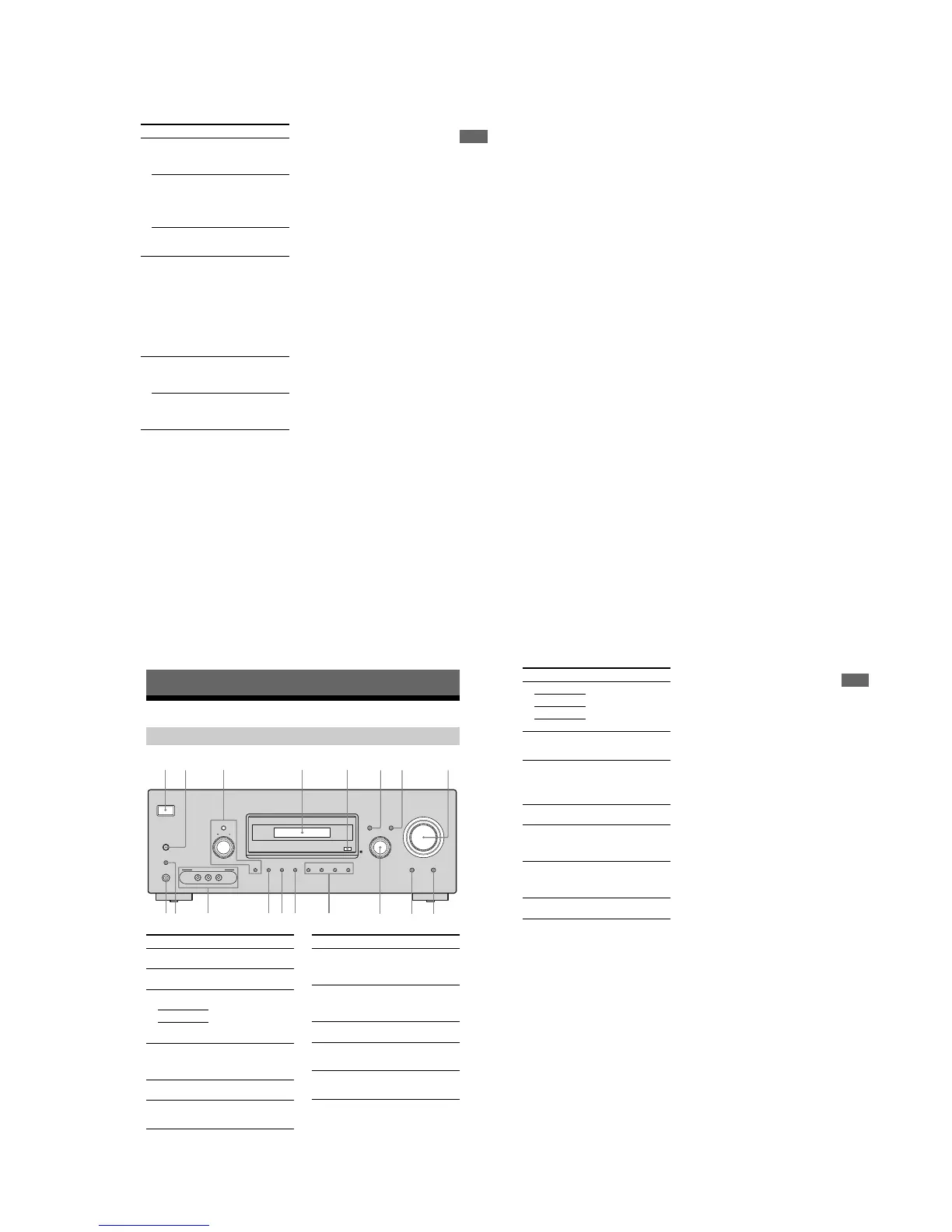
Description and location of parts
Getting Started
Front panel
?/1
AUTO CAL MIC
SPEAKERS
(OFF/A/B)
PHONES
VIDEO 3 IN/PORTABLE AV IN
VIDEO L AUDIO R
MEMORY/
ENTER
SUR BACK
DECODING
DIMMER
SLEEP
TUNING
2CH A.F.D. MOVIE MUSIC
AUTO CAL DIRECT
DISPLAY INPUT MODE
INPUT SELECTOR
MASTER VOLUME
TUNING MODE
9q;qk qaqdqfqg qsqj qh
8
13 567
Name Function
A ?/1
(on/standby)
Press to turn the receiver on
or off (page 25, 33, 34, 54).
B SPEAKERS
(OFF/A/B)
Press to select the front
speaker system (page 26).
C TUNING
MODE
Press or turn to operate the
tuner (FM/AM) (page 54).
TUNING +/–
MEMORY/
ENTER
D Display The current status of the
selected component or a list
of selectable items appears
here (page 6).
E Remote
sensor
Receives signals from remote
commander.
F DISPLAY Press to select information
displayed on the display
(page 59, 66).
Name Function
G INPUT MODE Press to select the input mode
when the same components
are connected to both digital
and analog jacks (page 60).
H MASTER
VO LU ME
Turn to adjust the volume
level of all speakers at the
same time (page 31, 32, 33,
34).
I DIRECT Press to listen to high quality
analog sound (page 53).
J AUTO CAL Press to activate the Auto
Calibration function (page
28).
K INPUT
SELECTOR
Turn to select the input
source to play back (page 32,
33, 34, 53, 55, 57, 60, 65, 67).
2 4
5
GB
Getting Started
Name Function
L 2CH Press to select a sound field
(page 48).
A.F.D.
MOVIE
MUSIC
M SUR BACK
DECODING
Press to select the surround
back decoding mode (page
41).
N SLEEP Press to activate the Sleep
Timer function and the
duration which the receiver
turns off automatically (page
66).
O DIMMER Press to adjust the brightness
of the display (page 47).
P VIDEO 3 IN/
PORTABLE AV
IN jacks
Connects to a portable audio/
video component such as a
camcorder or video game
(page 23, 32).
Q AUTO CAL
MIC jack
Connects to the supplied
optimizer microphone for the
Auto Calibration function
(page 27).
R PHONES jack Connects to headphones
(page 71).
• EXCEPT US, Canadian MODEL














 To Next Page