22
GB
D:\NORM'S JOB\SO0135\4262412121_GB\GB04GET_STR-DH720-CEL.fm masterpage: Left
STR-DH720
4-262-412-12(1)
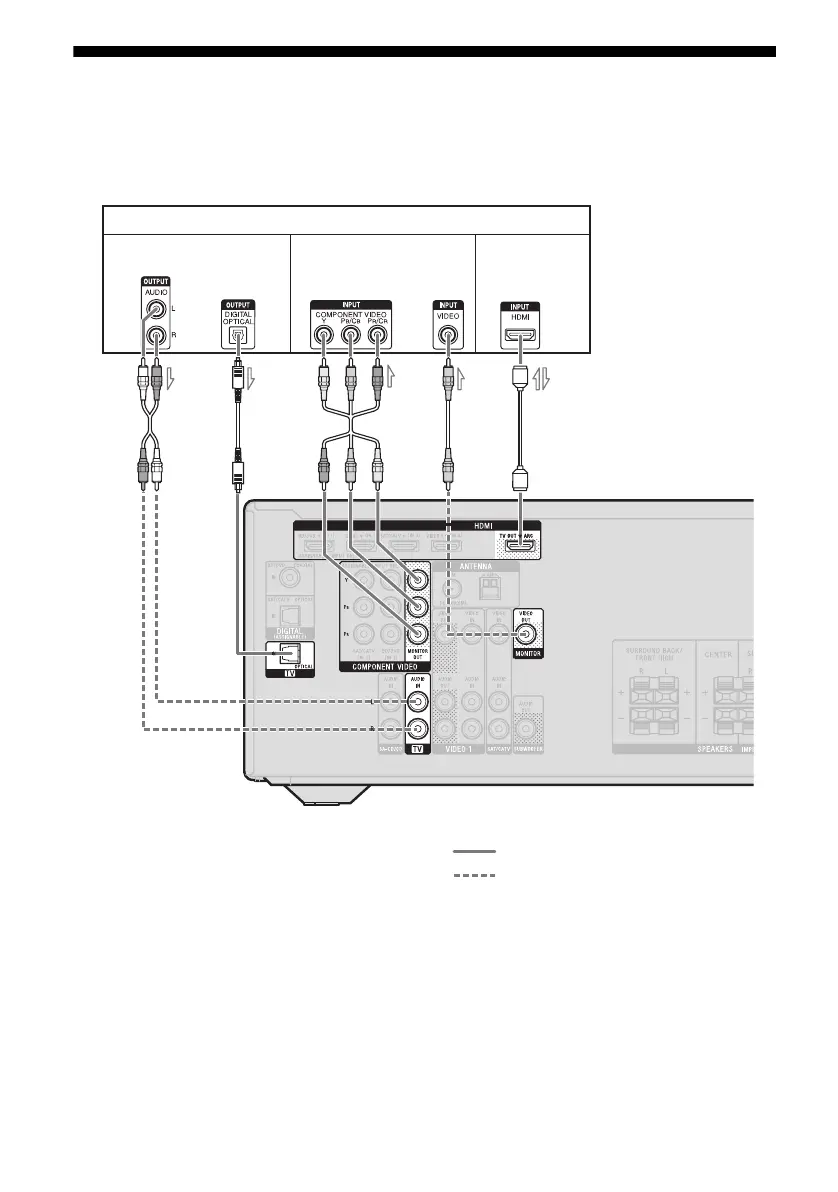
3: Connecting the TV
You can watch the selected input image when you connect the HDMI TV OUT or MONITOR OUT
jack to a TV. You can operate this receiver using a GUI (Graphical User Interface) if you connect
HDMI TV OUT jack to a TV.
ARC
TV
A
Audio/Video
signals
Audio signals Video signals
B* CDE*
or or
**
A Audio cord (not supplied)
B Optical digital cord (not supplied)
C Component video cord (not supplied)
D Video cord (not supplied)
E HDMI cable (not supplied)
Sony recommends that you use an HDMI-
authorized cable or Sony HDMI cable.
Recommended connection
Alternative connection



 To Next Page