Note
This function does not work in the following cases.
[Direct] is being used and an analog input is selected.
There are no surround back speakers and [Surround Speaker Position] is set to [Front].
When [In-Ceiling Speaker Mode] is set to [Front & Center] or [Front].
[DSD Native] is set to [On] and DSD signals are being played back.
Perform Auto Calibration before using the Speaker Relocation/Phantom Surround Back function.
[170] Adjusting Settings Speaker Settings
Setting the height from the floor to the ceiling (Ceiling
Height)
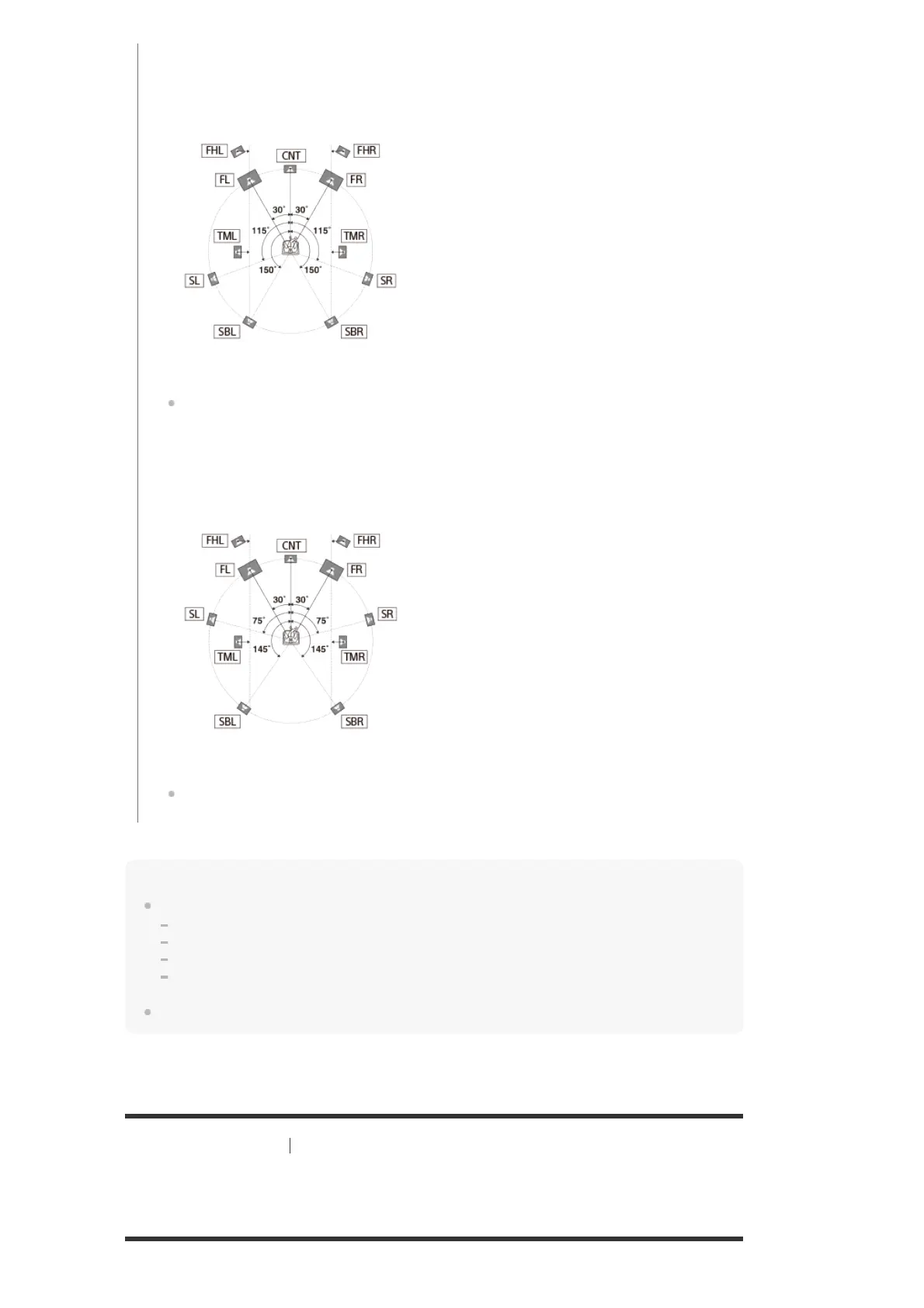
surround back speakers sound as if they have been placed on the back wall.
When height speakers such as front high speakers or top middle speakers are
available, the height speakers sound as if they have been placed on each side directly
aligned with the front speakers.
Type B: This function adjusts each speaker’s distance and angle to simulate the sound
of an ideally placed surround system. When surround speakers are available, the 4
surround speakers sound as if they have been placed at the identical angle.
When height speakers such as front high speakers or top middle speakers are
available, the height speakers sound as if they have been placed on each side directly
aligned with the front speakers.
Off: Speaker positioning is not relocated.


 To Next Page