7
STR-K990
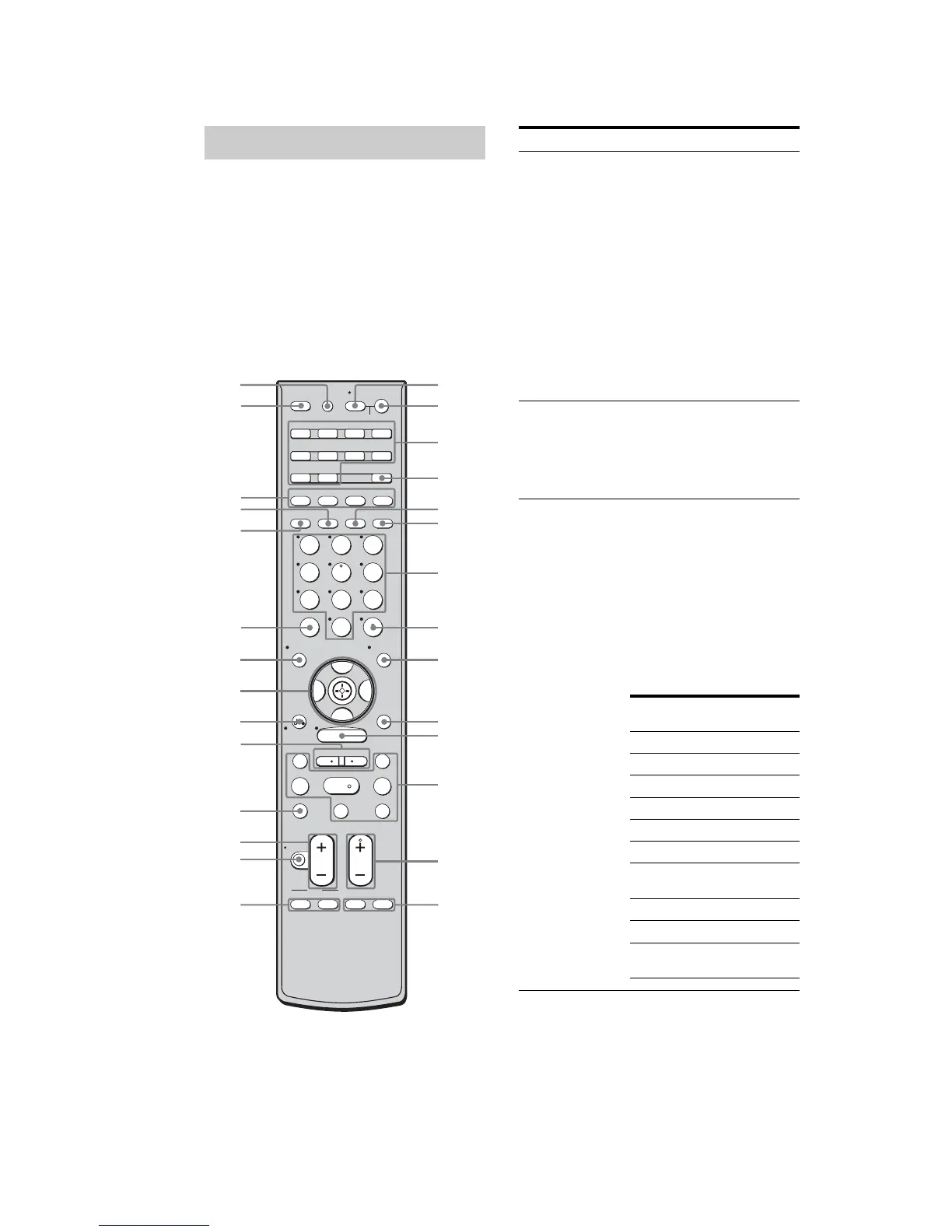
You can use the supplied remote to operate the
receiver and to control the Sony audio/video
components that the remote is assigned to
operate.
You can also program the remote to control
non-Sony audio/video components. For
details, see “Programming the remote” (page
65).
RM-AAP017
Remote commander
SYSTEM STANDBY
TUNING –
DISC SKIP
MUTING
TOP MENU MENU F1
TV INPUT WIDE
F2
TV VOL
MASTER VOL
TV CH
PRESET
TUNING +
GUIDE DISPLAY
RETURN/
EXIT
OPTIONS
TOOLS
REPLAY ADVANCE
TV
VIDEO 1 VIDEO 2 VIDEO 3 DVD
SAT TV TUNER
2CH A.F.D. MOVIE MUSIC
SLEEP
FM MODE D. TUNING
SA-CD/CD
AUX DMPORT RECEIVER
RM SET UP
?/1
MEMORY
.
>
m M
xX
MENU
H
CLEAR
>10
–
/
– –
<
<
DVD
23
456
789
ENTER
0/10
1
AV ?/1
AUTO CAL
B
V
v
B
1
5
2
8
9
q;
qh
qk
w;
ws
wa
ql
qj
qs
qd
qf
qa
4
6
7
3
qg
wd
wj
wh
wg
wf
k
Name Function
A AV ?/1
(on/standby)
Press to turn on or off the
audio/video components that
the remote is programmed to
operate.
To turn the TV on or off, press
TV (wj) and then press AV
?/1.
If you press ?/1 (B) at the
same time, it will turn off the
receiver and other components
(SYSTEM STANDBY).
Note
The function of the AV ?/1
switch changes automatically
each time you press the input
buttons (C).
B ?/1
(on/standby)
Press to turn the receiver on or
off.
To turn off all components,
press ?/1 and AV ?/1 (A) at
the same time (SYSTEM
STANDBY).
C Input buttons Press one of the buttons to
select the component you want
to use. When you press any of
the input buttons, the receiver
turns on. The buttons are
factory assigned to control
Sony components as follows.
You can program the remote to
control non-Sony components
following the steps in
“Programming the remote” on
page 65.
Button Assigned Sony
component
VIDEO 1 VCR (VTR mode 3)
VIDEO 2 VCR (VTR mode 2)
VIDEO 3 VCR (VTR mode 1)
DVD DVD player
SATSatellite tuner
TV TV
SA-CD/CD Super Audio CD/
CD player
TUNER Built-in tuner
AUXNot assigned
DMPORT DIGITAL MEDIA
PORT adapter


 To Next Page