EasyManua.ls Logo

Sony STR-VX10L - Page 7

Sony STR-VX10L
15 pages
Print Icon
To Next Page IconTo Next Page
To Previous Page IconTo Previous Page
Loading...
-OCATION
AND
FUNCTION
OF
CONTROLS
3efore
plugging
in
or
attempting
to
operate
this
receiver,
:
is
suggested
that
you
famitiarize
yourself
with
all
its
switches
and
the
purpose
of
each.
‘ach
number
in
the
photo
is
keyed
to
the
descriptive
text.
Amplifier
section
|
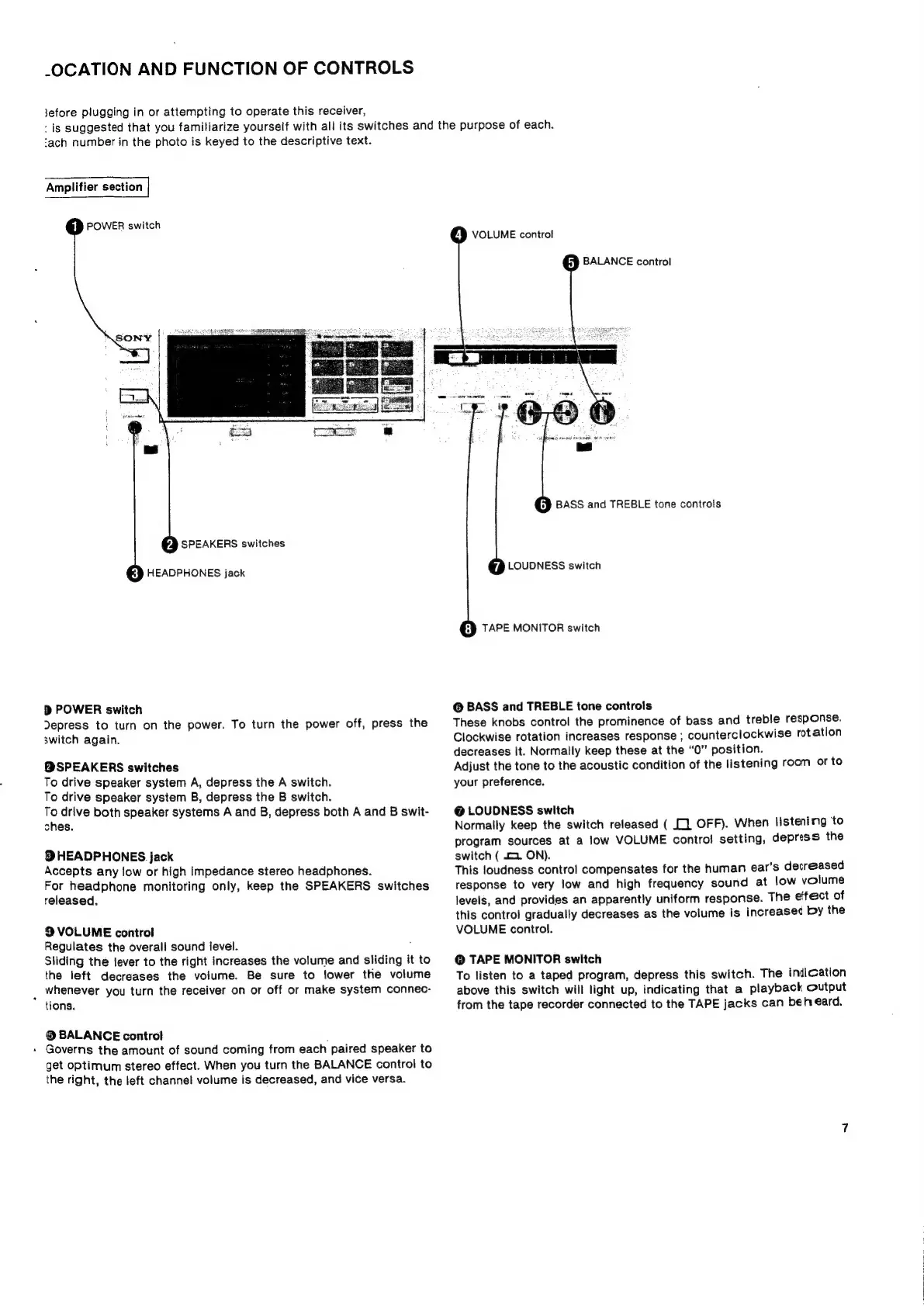
POWER
switch
ya
SPEAKERS
switches
HEADPHONES
jack
>
POWER
switch
Depress
to
turn
on
the
power.
To
turn
the
power
off,
press
the
switch
again.
BSPEAKERS
switches
To
drive
speaker
system
A,
depress
the
A
switch.
To
drive
speaker
system
B,
depress
the
B
switch.
To
drive
both
speaker
systems
A
and
B,
depress
both
A
and
B
swit-
ches.
®
HEADPHONES
jack
Accepts
any
low
or
high
impedance
stereo
headphones.
For
headphone
monitoring
only,
keep
the
SPEAKERS
switches
released.
9
VOLUME
control
Regulates
the
overall
sound
level.
Sliding
the
lever
to
the
right
increases
the
volume
and
sliding
it
to
the
left
decreases
the
volume.
Be
sure
to
lower
the
volume
whenever
you
turn
the
receiver
on
or
off
or
make
system
connec-
tions.
®
BALANCE
control
;
»
Governs
the
amount
of
sound
coming
from
each
paired
speaker
to
get
optimum
stereo
effect.
When
you
turn
the
BALANCE
control
to
the
right,
the
left
channel
volume
is
decreased,
and
vice
versa.
®
VOLUME
control
ip
BALANCE
control
iP
BASS
and
TREBLE
tone
controls
LOUDNESS
switch
TAPE
MONITOR
switch
@
BASS
and
TREBLE
tone
controls
These
knobs
control
the
prominence
of
bass
and
treble
response.
Clockwise
rotation
increases
response
;
counterclockwise
rotation
decreases
it.
Normally
keep
these
at
the
“0”
position.
Adjust
the
tone
to
the
acoustic
condition
of
the
listening
room
or
to
your
preference.
@
LOUDNESS
switch
Normally
keep
the
switch
released
(
[].
OFF).
When
listening
‘to
program
sources
at
a
low
VOLUME
contro!
setting,
depress
the
switch
(
2
ON).
This
loudness
control
compensates
for
the
human
ear’s
decreased
response
to
very
low
and
high
frequency
sound
at
low
volume
levels,
and
provides
an
apparently
uniform
response.
The
effect
of
this
contro!
gradually
decreases
as
the
volume
is
increased
by
the
VOLUME
control.
@
TAPE
MONITOR
switch
To
listen
to
a
taped
program,
depress
this
switch.
The
indication
above
this
switch
will
light
up,
indicating
that
a
playback
Output
from
the
tape
recorder
connected
to
the
TAPE
jacks
can
beh
eéard.

Related product manuals