EasyManua.ls Logo

Sony STR-VX10L - Page 8

Sony STR-VX10L
15 pages
Print Icon
To Next Page IconTo Next Page
To Previous Page IconTo Previous Page
Loading...
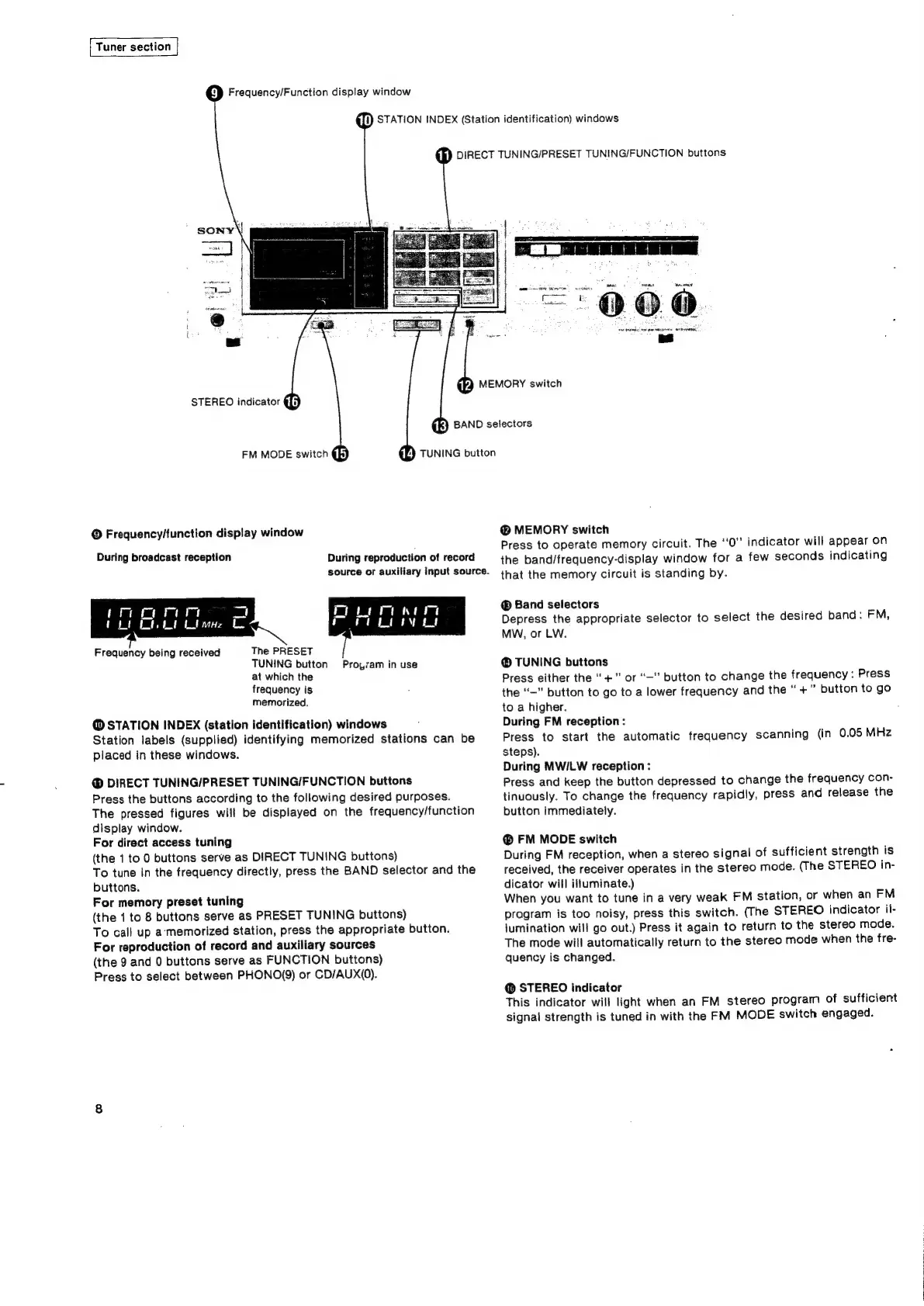
Tuner
section
['®
Frequency/Function
display
window
¢Ti)
STATION
INDEX
(Station
identification)
windows
fh)
DIRECT
TUNING/PRESET
TUNING/FUNCTION
buttons
MEMORY
switch
(kK)
BAND
selectors
STEREO
indicator
@{jj
FM
MODE
switch
©
Frequency/function
display
window
During
broadcast
reception
During
reproduction
of
record
source
or
auxiliary
input
source.
The
PRESET
TUNING
button
at
which
the
frequency
is
memorized,
@
STATION
INDEX
(station
identification)
windows
Station
labels
(supplied)
identifying
memorized
stations
can
be
placed
in
these
windows.
Frequency
being
received
Proyvam
in
use
@
DIRECT
TUNING/PRESET
TUNING/FUNCTION
buttons
Press
the
buttons
according
to
the
following
desired
purposes.
The
pressed
figures
will
be
displayed
on
the
frequency/function
display
window.
For
direct
access
tuning
(the
1
to
0
buttons
serve
as
DIRECT
TUNING
buttons)
To
tune
in
the
frequency
directly,
press
the
BAND
selector
and
the
buttons.
For
memory
preset
tuning
(the
1
to
8
buttons
serve
as
PRESET
TUNING
buttons)
To
call
up
a-‘memorized
station,
press
the
appropriate
button.
For
reproduction
of
record
and
auxiliary
sources
(the
9
and
0
buttons
serve
as
FUNCTION
buttons)
Press
to
select
between
PHONO(9)
or
CD/AUX(0).
(7)
TUNING
button
@
MEMORY
switch
Press
to
operate
memory
circuit.
The
‘‘0”
indicator
will
appear
on
the
band/frequency-display
window
for
a
few
seconds
indicating
that
the
memory
circuit
is
standing
by.
®
Band
selectors
Depress
the
appropriate
selector
to
select
the
desired
band:
FM,
MW,
or
LW.
TUNING
buttons
Press
either
the
+"
or
“—”
button
to
change
the
frequency
:
Press
the
‘“—”
button
to
go
to
a
lower
frequency
and
the
“+”
button
to
go
to
a
higher.
During
FM
reception:
Press
to
start
the
automatic
frequency
scanning
(in
0.05
MHz
steps).
During
MWILW
reception:
Press
and
keep
the
button
depressed
to
change
the
frequency
con-
tinuously.
To
change
the
frequency
rapidly,
press
and
release
the
button
immediately.
©
FM
MODE
switch
During
FM
reception,
when
a
stereo
signal
of
sufficient
strength
is
received,
the
receiver
operates
in
the
stereo
mode.
(The
STEREO
in-
dicator
will
illuminate.)
When
you
want
to
tune
in
a
very
weak
FM
station,
or
when
an
FM
pragram
is
too
noisy,
press
this
switch.
(The
STEREO
indicator
ii-
jumination
will
go
out.)
Press
it
again
to
return
to
the
stereo
mode.
The
mode
will
automatically
return
to
the
stereo
mode
when
the
fre-
quency
is
changed.
@
STEREO
indicator
This
indicator
will
light
when
an
FM
stereo
program
of
sufficient
signal
strength
is
tuned
in
with
the
FM
MODE
switch
engaged.

Related product manuals