EasyManua.ls Logo

Sony TA-AX310 - Rear Panel Connections

Sony TA-AX310
10 pages
Print Icon
To Next Page IconTo Next Page
To Previous Page IconTo Previous Page
Loading...
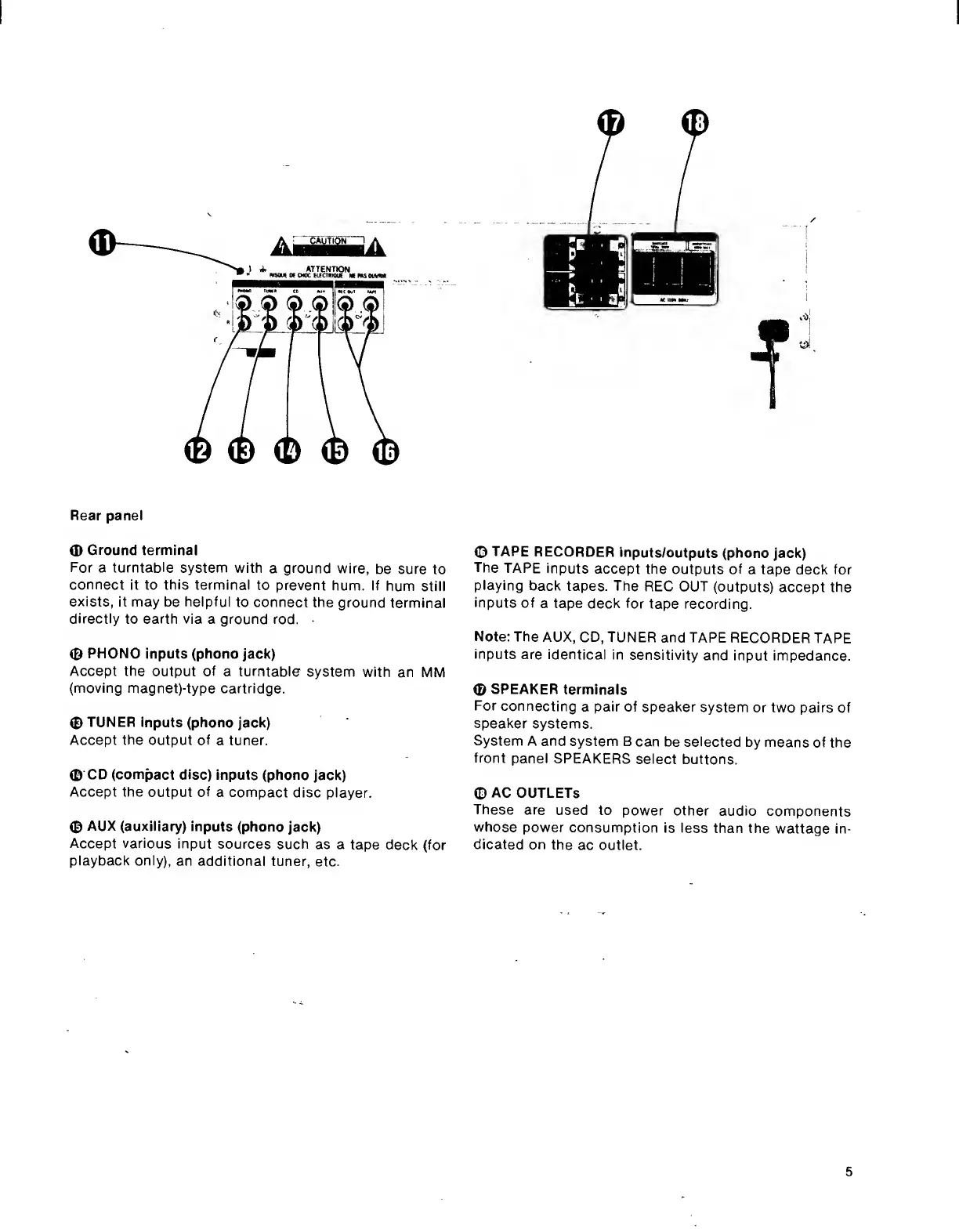
Rear
panel
0
Ground
terminal
For
a
turntable
system
with
a
ground
wire,
be
sure
to
connect
it
to
this
terminal
to
prevent
hum.
If
hum
still
exists,
it
may
be
helpful
to
connect
the
ground
terminal
directly
to
earth
via
a
ground
rod.
©
PHONO
inputs
(phono
jack)
Accept
the
output
of
a
turntable
system
with
an
MM
(moving
magnet)-type
cartridge.
©
TUNER
inputs
(phono
jack)
Accept
the
output
of
a
tuner.
©
CD
(compact
disc)
inputs
(phono
jack)
Accept
the
output
of
a
compact
disc
player.
©
AUX
(auxiliary)
inputs
(phono
jack)
Accept
various
input
sources
such
as
a
tape
deck
(for
playback
only),
an
additional
tuner,
etc.
©
TAPE
RECORDER
inputs/outputs
(phono
jack)
The
TAPE
inputs
accept
the
outputs
of
a
tape
deck
for
playing
back
tapes.
The
REC
OUT
(outputs)
accept
the
inputs
of
a
tape
deck
for
tape
recording.
Note:
The
AUX,
CD,
TUNER
and
TAPE
RECORDER
TAPE
inputs
are
identical
in
sensitivity
and
input
impedance.
©
SPEAKER
terminals
For
connecting
a
pair
of
speaker
system
or
two
pairs
of
speaker
systems.
System
A
and
system
B
can
be
selected
by
means
of
the
front
panel
SPEAKERS
select
buttons.
©
AC
OUTLETS
These
are
used
to
power
other
audio
components
whose
power
consumption
is
less
than
the
wattage
in¬
dicated
on
the
ac
outlet.

Other manuals for Sony TA-AX310

Related product manuals