EasyManua.ls Logo

Sony TA-AX310 - Operation Modes; Listening to Sources; Listening to Taped Programs

Sony TA-AX310
10 pages
Print Icon
To Next Page IconTo Next Page
To Previous Page IconTo Previous Page
Loading...
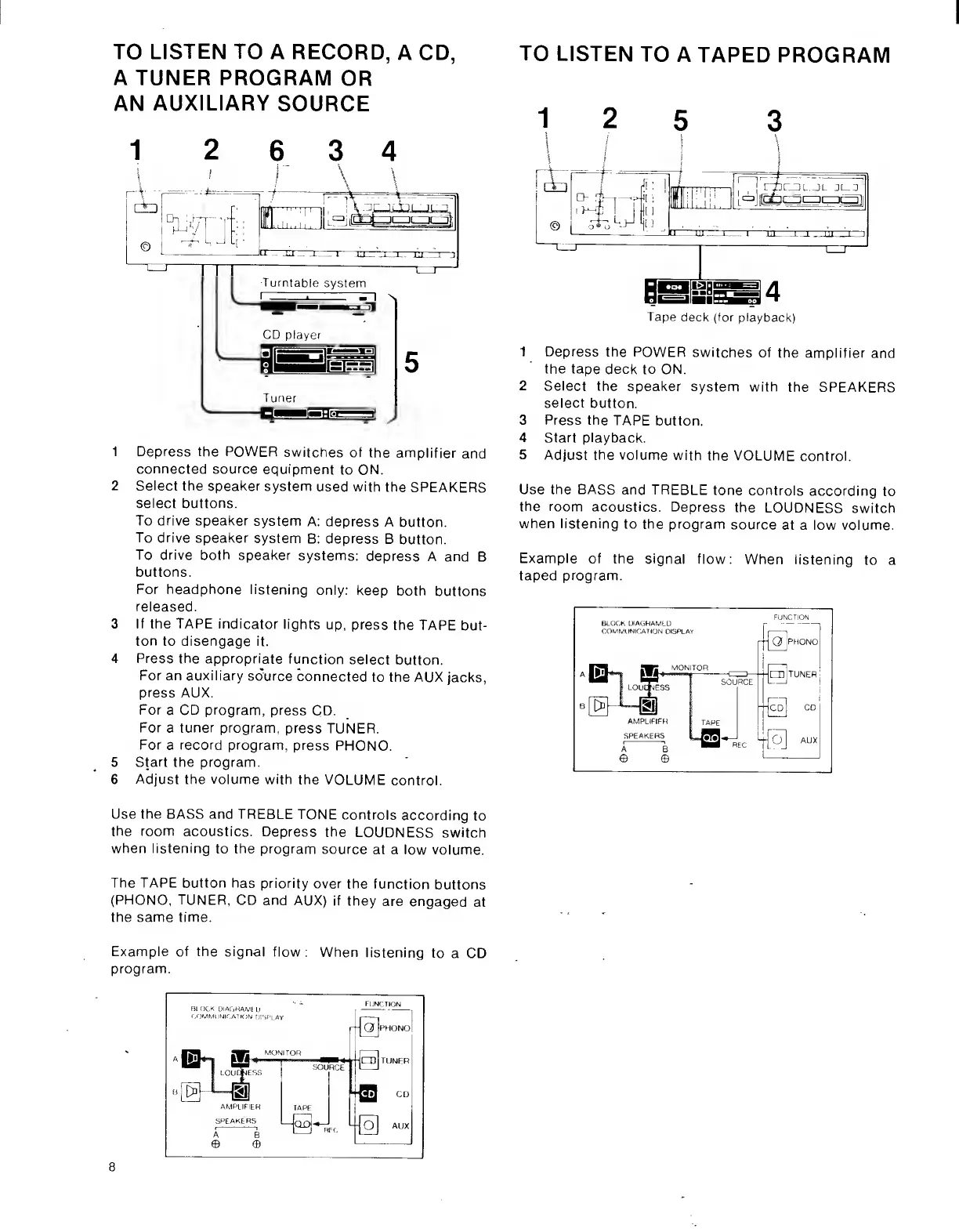
TO
LISTEN
TO
A
RECORD,
A
CD,
A
TUNER
PROGRAM
OR
AN
AUXILIARY
SOURCE
1
2
6
3
4
1
Depress
the
POWER
switches
of
the
amplifier
and
connected
source
equipment
to
ON.
2
Select
the
speaker
system
used
with
the
SPEAKERS
select
buttons.
To
drive
speaker
system
A:
depress
A
button.
To
drive
speaker
system
B:
depress
B
button.
To
drive
both
speaker
systems:
depress
A
and
B
buttons.
For
headphone
listening
only:
keep
both
buttons
released.
3
If
the
TAPE
indicator
lights
up,
press
the
TAPE
but¬
ton
to
disengage
it.
4
Press
the
appropriate
function
select
button.
For
an
auxiliary
source
connected
to
the
AUX
jacks,
press
AUX.
For
a
CD
program,
press
CD.
For
a
tuner
program,
press
TUNER.
For
a
record
program,
press
PFIONO.
5
Start
the
program.
6
Adjust
the
volume
with
the
VOLUME
control.
TO
LISTEN
TO
A
TAPED
PROGRAM
12
5
3
l|]
\
i
/
\
j
\
|
A:
|
It
!
It
1
i
L
tlrrnrmr—ir-|rnl|
;
i
.
if
:
"f
1
ik.!
i.
©
—[_
J
-
_
i-
__
7
,
fll
lS
4
Tape
deck
(for
playback)
1
Depress
the
POWER
switches
of
the
amplifier
and
the
tape
deck
to
ON.
2
Select
the
speaker
system
with
the
SPEAKERS
select
button.
3
Press
the
TAPE
button.
4
Start
playback.
5
Adjust
the
volume
with
the
VOLUME
control.
Use
the
BASS
and
TREBLE
tone
controls
according
to
the
room
acoustics.
Depress
the
LOUDNESS
switch
when
listening
to
the
program
source
at
a
low
volume.
Example
of
the
signal
flow:
When
listening
to
a
taped
program.
Use
the
BASS
and
TREBLE
TONE
controls
according
to
the
room
acoustics.
Depress
the
LOUDNESS
switch
when
listening
to
the
program
source
at
a
low
volume.
The
TAPE
button
has
priority
over
the
function
buttons
(PFIONO,
TUNER,
CD
and
AUX)
if
they
are
engaged
at
the
same
time.
Example
of
the
signal
flow:
When
listening
to
a
CD
program.
8

Other manuals for Sony TA-AX310

Related product manuals