4
SECTION 2
GENERAL
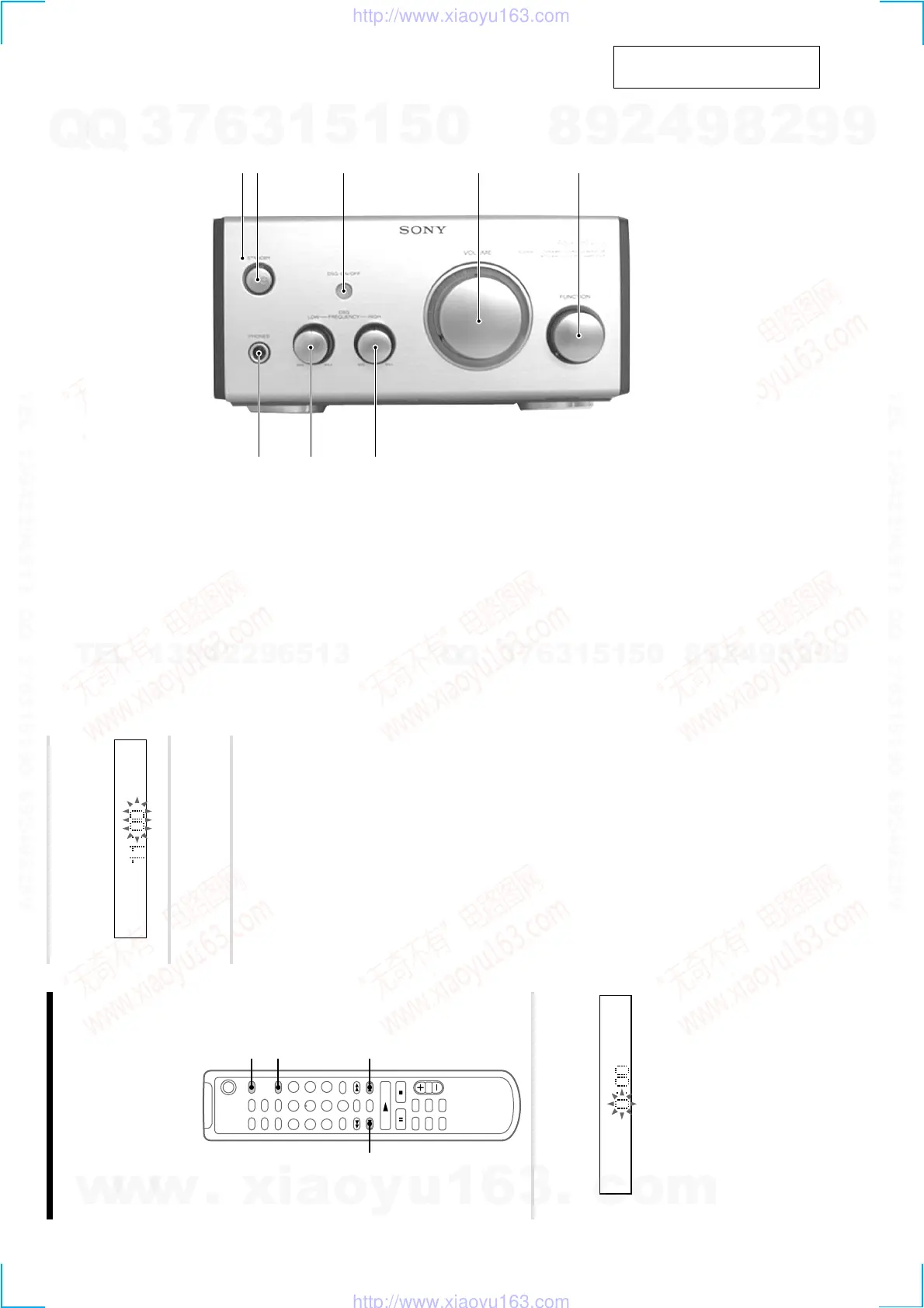
12 3 4 5
8
7 6
FRONT PANEL
This section is extracted from
instruction manual.
8
Step 2: Setting the time
You must set the time beforehand to use the timer
functions.
The clock is on a 24-hour system for the European
model, and a 12-hour system for other models.
The 24-hour system is used for illustration
purposes.
Set the time before turning on the system.
`/1
1
2,3
2,32,3
1 Press CLOCK/TIMER SET while the
system is off.
The hour indication flashes.
2
Press . or > to set the hour, then
press ENTER/YES.
The minute indication flashes.
3
Press . or > to set the minute,
then press ENTER/YES.
The clock starts.
If you made a mistake
Start over from step 1.
To change the preset time
You can change the preset time while the system
is on.
1 Press CLOCK/TIMER SET.
2 Press . or > repeatedly until “SET
CLOCK” appears, then press ENTER/YES.
3 Repeat steps 2 and 3.
Tips
• The built-in clock shows the time in the display
while the system is off. If you press DISPLAY at
this time, the display back light lights up, making
the clock easier to see.
• The upper dot of the colon flashes for the first 30
seconds, and the lower dot flashes for the last 30
seconds of each minute.
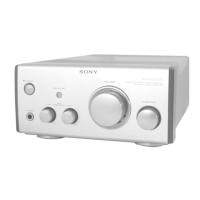
1 STANDBY indicator
2 @/1 button
3 DSG ON/OFF button and indicator
4 VOLUME knob
5 FUNCTION knob
6 DSG FREQUENCY HIGH knob
7 DSG FREQUENCY LOW knob
8 PHONES jack
w
w
w
.
x
i
a
o
y
u
1
6
3
.
c
o
m
Q
Q
3
7
6
3
1
5
1
5
0
9
9
2
8
9
4
2
9
8
T
E
L
1
3
9
4
2
2
9
6
5
1
3
9
9
2
8
9
4
2
9
8
0
5
1
5
1
3
6
7
3
Q
Q
TEL 13942296513 QQ 376315150 892498299
TEL 13942296513 QQ 376315150 892498299
http://www.xiaoyu163.com
http://www.xiaoyu163.com


 To Next Page