EasyManua.ls Logo

Sony TC-252 D - Adapting to Local Power Line; Mounting the Unit

Sony TC-252 D
19 pages
Print Icon
To Next Page IconTo Next Page
To Previous Page IconTo Previous Page
Loading...
12
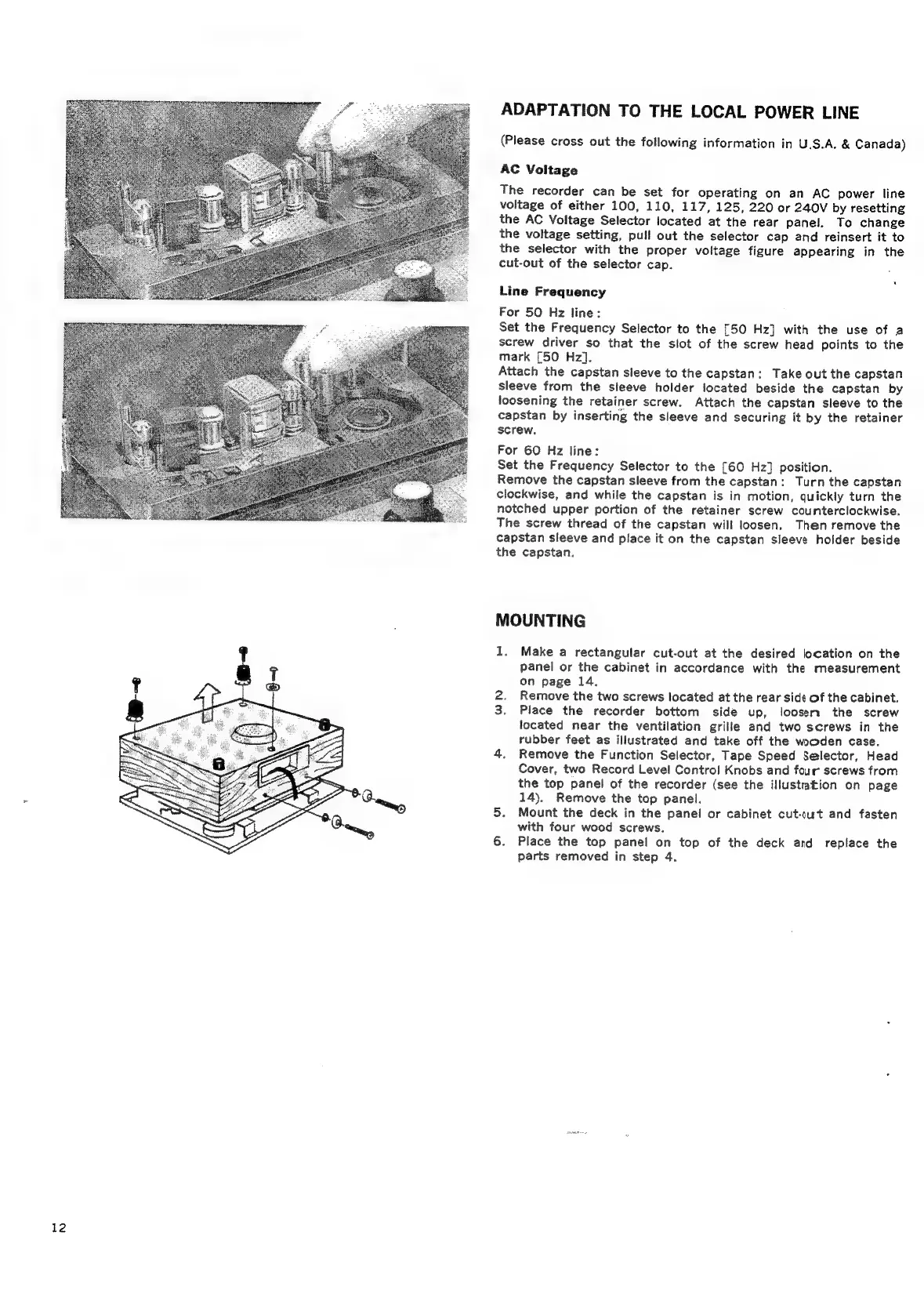
ADAPTATION
TO
THE
LOCAL
POWER
LINE
(Please
cross
out
the
following
information
in
U.S.A,
&
Canada)
AC
Voitage
The
recorder
can
be
set
for
operating
on
an
AC
power
line
voitage
of
either
100,
110,
117,
125,
220
or
240V
by
resetting
the
AC
Voltage
Selector
located
at
the
rear
panel.
To
change
the
voltage
setting,
pull
out
the
selector
cap
and
reinsert
it
to
the
selector
with
the
proper
voltage
figure
appearing
in
the
cut-out
of
the
selector
cap.
Line
Frequency
For
50
Hz
line:
Set
the
Frequency
Selector
to
the
£50
Hz]
with
the
use
of
a
screw
driver
so
that
the
slot
of
the
screw
head
points
to
the
mark
£50
Hz].
Attach
the
capstan
sleeve
to
the
capstan:
Take
out
the
capstan
sleeve
from
the
sleeve
holder
located
beside
the
capstan
by
loosening
the
retainer
screw.
Attach
the
capstan
sleeve
to
the
capstan
by
inserting
the
sleeve
and
securing
it
by
the
retainer
screw.
For
60
Hz
line:
Set
the
Frequency
Selector
to
the
[60
Hz]
position.
Remove
the
capstan
sleeve
from
the
capstan:
Turn
the
capstan
clockwise,
and
while
the
capstan
is
in
motion,
quickly
turn
the
notched
upper
portion
of
the
retainer
screw
counterclockwise.
The
screw
thread
of
the
capstan
will
loosen.
Then
remove
the
capstan
sleeve
and
place
it
on
the
capstan
sleeve
holder
beside
the
capstan.
MOUNTING
1.
Make
a
rectangular
cut-out
at
the
desired
location
on
the
panel
or
the
cabinet
in
accordance
with
the
measurement
on
page
14.
2.
Remove
the
two
screws
located
at
the
rear
side
of
the
cabinet.
3.
Place
the
recorder
bottom
side
up,
loosen
the
screw
located
near
the
ventilation
grille
and
two
screws
in
the
rubber
feet
as
illustrated
and
take
off
the
wooden
case.
4,
Remove
the
Function
Selector,
Tape
Speed
Selector,
Head
Cover,
two
Record
Level
Controi
Knobs
and
four
screws
from
the
top
panel
of
the
recorder
(see
the
illustration
on
page
14).
Remove
the
top
panel.
5.
Mount
the
deck
in
the
panel
or
cabinet
cut-cut
and
fasten
with
four
wood
screws.
6.
Place
the
top
panel
on
top
of
the
deck
and
replace
the
parts
removed
in
step
4.

Related product manuals