EasyManua.ls Logo

Sony TC-758 - Connections and Setup; External Device Connections; Power and Grounding

Sony TC-758
14 pages
Print Icon
To Next Page IconTo Next Page
To Previous Page IconTo Previous Page
Loading...
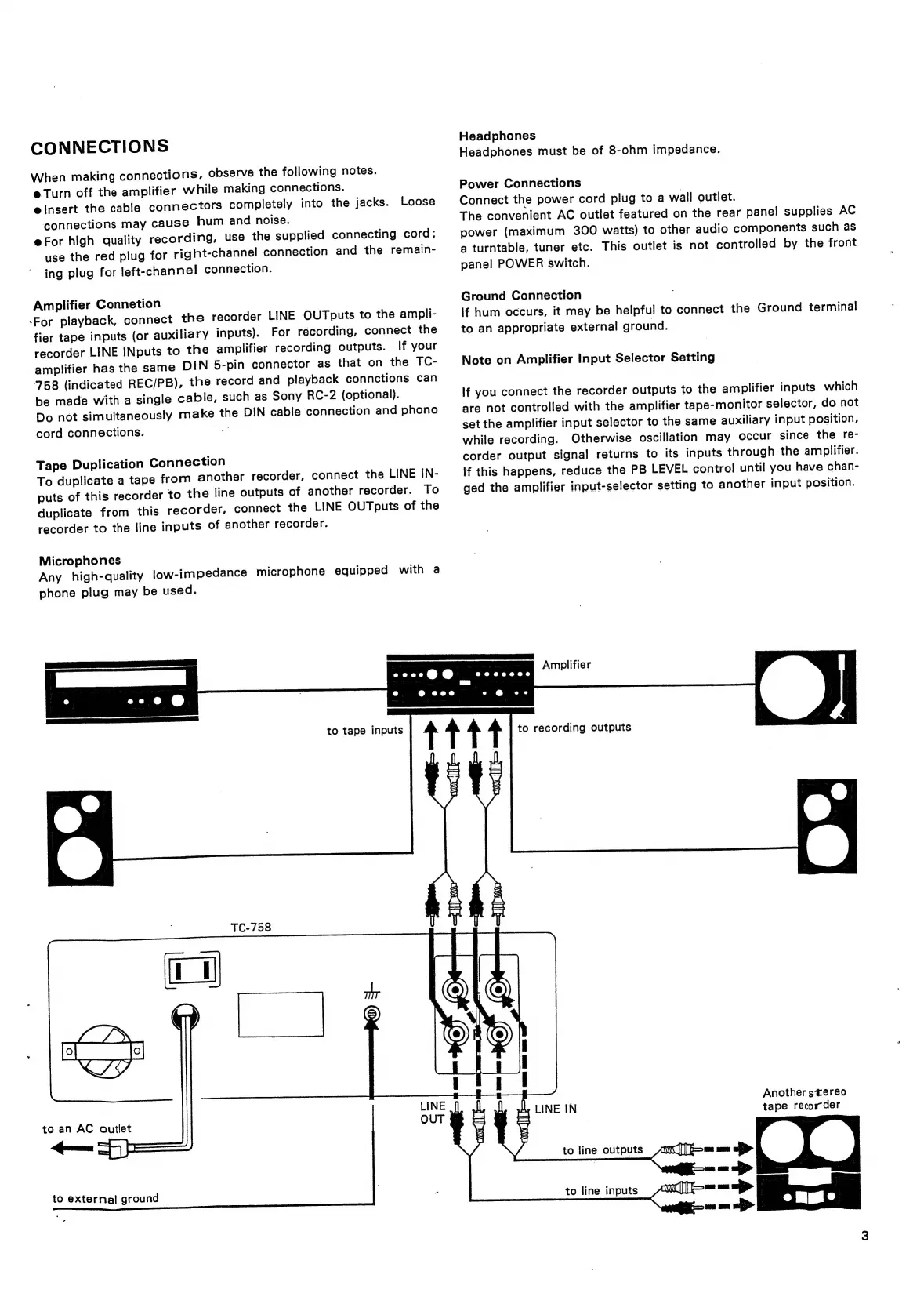
CONNECTIONS
When
making
connections,
observe
the
following
notes.
e
Turn
off
the
amplifier
while
making
connections.
einsert
the
cable
connectors
completely
into
the
jacks.
Loose
connections
may
cause
hum
and
noise.
eFor
high
quality
recording,
use
the
supplied
connecting
cord;
use
the
red
plug
for
right-channel
connection
and
the
remain-
ing
plug
for
left-channel
connection.
Amplifier
Connetion
-For
playback,
connect
the
recorder
LINE
OUTputs
to
the
ampli-
fier
tape
inputs
(or
auxiliary
inputs).
For
recording,
connect
the
recorder
LINE
INputs
to
the
amplifier
recording
outputs.
If
your
amplifier
has
the
same
DIN
5-pin
connector
as
that
on
the
TC-
758
(indicated
REC/PB),
the
record
and
playback
connctions
can
be
made
with
a
single
cable,
such
as
Sony
RC-2
(optional).
Do
not
simultaneously
make
the
DIN
cable
connection
and
phono
cord
connections.
Tape
Duplication
Connection
To
duplicate
a
tape
from
another
recorder,
connect
the
LINE
IN-
puts
of
this
recorder
to
the
line
outputs
of
another
recorder.
To
duplicate
from
this
recorder,
connect
the
LINE
OUTputs
of
the
recorder
to
the
line
inputs
of
another
recorder.
Microphones
Any
high-quality
low-impedance
microphone
equipped
with
a
phone
plug
may
be
used.
to
tape
inputs
Headphones
Headphones
must
be
of
8-ohm
impedance.
Power
Connections
Connect
the
power
cord
plug
to
a
wall
outlet.
The
convenient
AC
outlet
featured
on
the
rear
panel
supplies
AC
power
(maximum
300
watts)
to
other
audio
components
such
as
a
turntable,
tuner
etc.
This
outlet
is
not
controlled
by
the
front
panel
POWER
switch.
Ground
Connection
If
hum
occurs,
it
may
be
helpful
to
connect
the
Ground
terminal
to
an
appropriate
external
ground.
Note
on
Amplifier
Input
Selector
Setting
If
you
connect
the
recorder
outputs
to
the
amplifier
inputs
which
are
not
controlled
with
the
amplifier
tape-monitor
selector,
do
not
set
the
amplifier
input
selector
to
the
same
auxiliary
input
position,
while
recording.
Otherwise
oscillation
may
occur
since
the
re-
corder
output
signal
returns
to
its
inputs
through
the
amplifier.
If
this
happens,
reduce
the
PB
LEVEL
control
until
you
have
chan-
ged
the
amplifier
input-selector
setting
to
another
input
position.
Amplifier
to
recording
outputs
TC-758
to
an
AC
outlet
pn
to
external
ground
Another
stereo
LINE
IN
tape
recorder
to
line
outputs
to
line
inputs