EasyManua.ls Logo

Sony TC-758 - Operation of Controls; Tape Handling and Transport Controls

Sony TC-758
14 pages
Print Icon
To Next Page IconTo Next Page
To Previous Page IconTo Previous Page
Loading...
OPERATION
OF
CONTROLS
Ha,
SCE,
YAR
E!
@
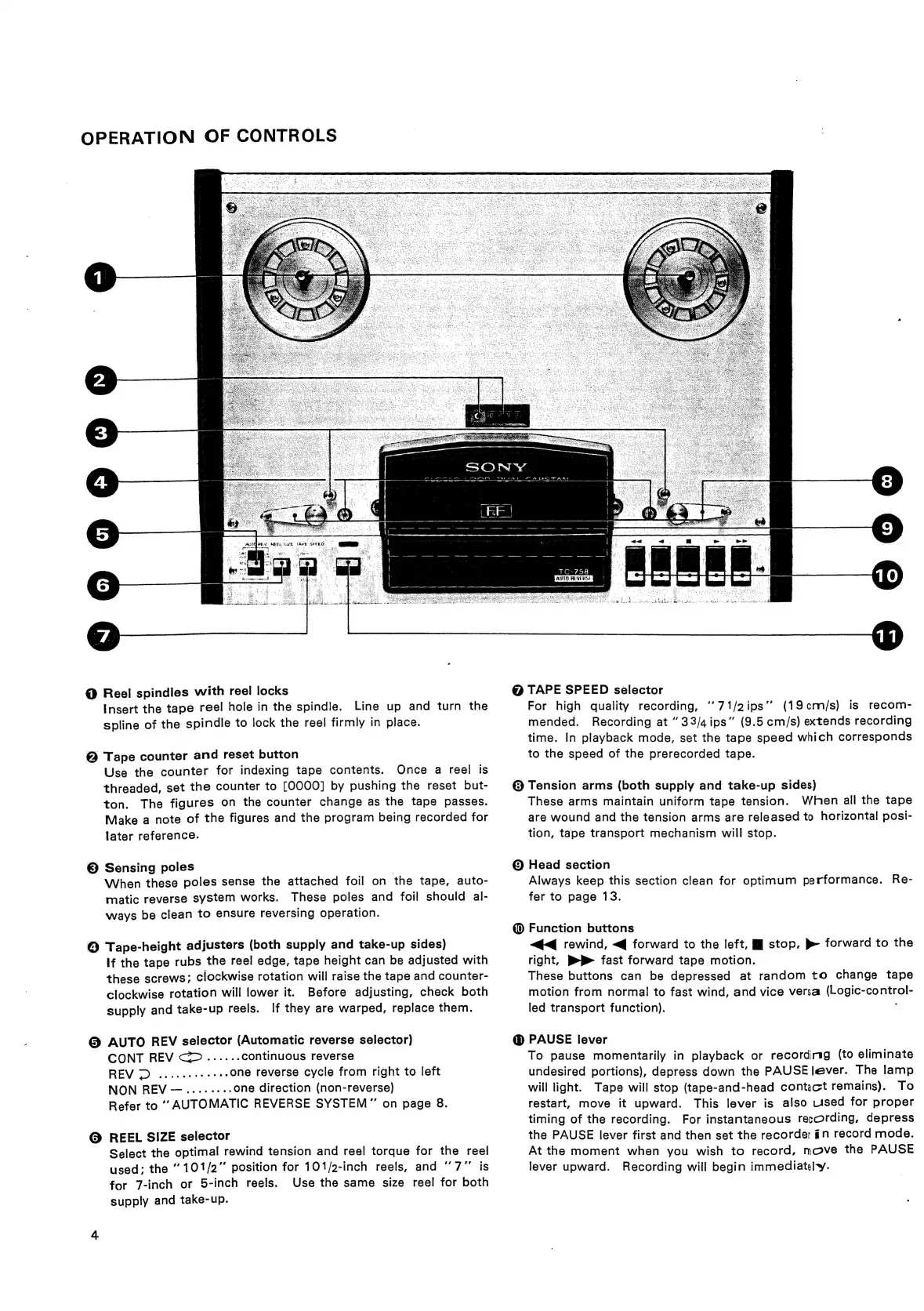
Reel
spindles
with
reel
locks
Insert
the
tape
reel
hole
in
the
spindle.
Line
up
and
turn
the
spline
of
the
spindle
to
lock
the
reel
firmly
in
place.
@
Tape
counter
and
reset
button
Use
the
counter
for
indexing
tape
contents.
Once
a
reel
is
threaded,
set
the
counter
to
[0000]
by
pushing
the
reset
but-
ton.
The
figures
on
the
counter
change
as
the
tape
passes.
Make
a
note
of
the
figures
and
the
program
being
recorded
for
later
reference.
©
Sensing
poles
|
When
these
poles
sense
the
attached
foil
on
the
tape,
auto-
matic
reverse
syStem
works.
These
poles
and
foil
should
al-
ways
be
clean
to
ensure
reversing
operation.
@
Tape-height
adjusters
(both
supply
and
take-up
sides)
If
the
tape
rubs
the
reel
edge,
tape
height
can
be
adjusted
with
these
screws;
clockwise
rotation
will
raise
the
tape
and
counter-
clockwise
rotation
will
lower
it.
Before
adjusting,
check
both
supply
and
take-up
reels.
If
they
are
warped,
replace
them.
@
AUTO
REV
selector
(Automatic
reverse
selector)
CONT
REV
<......
continuous
reverse
REV
2D
...eceeees
..one
reverse
cycle
from
right
to
left
NON
REV
—.....----
one
direction
(non-reverse)
Refer
to
‘’
AUTOMATIC
REVERSE
SYSTEM”’
on
page
8.
@
REEL
SIZE
selector
Select
the
optimal
rewind
tension
and
reel
torque
for
the
reel
used;
the
101/2"’
position
for
101/2-inch
reels,
and
“7”
is
for
7-inch
or
5-inch
reels.
Use
the
same
size
reel
for
both
supply
and
take-up.
8
AUT
REVERSE
@
TAPE
SPEED
selector
For
high
quality
recording,
‘‘71/2ips’’
(19cm/s)
is
recom-
mended.
Recording
at
“33/4ips”
(9.5
cm/s)
extends
recording
time.
In
playback
mode,
set
the
tape
speed
which
corresponds
to
the
speed
of
the
prerecorded
tape.
@
Tension
arms
(both
supply
and
take-up
sides)
These
arms
maintain
uniform
tape
tension.
When
all
the
tape
are
wound
and
the
tension
arms
are
released
to
horizontal
posi-
tion,
tape
transport
mechanism
will
stop.
©
Head
section
Always
keep
this
section
clean
for
optimum
performance.
Re-
fer
to
page
13.
@
Function
buttons
<q
rewind,
<q
forward
to
the
left,
MJ
stop,
»
forward
to
the
right,
P»P
fast
forward
tape
motion.
These
buttons
can
be
depressed
at
random
to
change
tape
motion
from
normal
to
fast
wind,
and
vice
versa
(Logic-control-
led
transport
function).
:
@
PAUSE
lever
To
pause
momentarily
in
playback
or
recording
(to
eliminate
undesired
portions),
depress
down
the
PAUSE
lever.
The
lamp
will
light.
Tape
will
stop
(tape-and-head
contact
remains).
To
restart,
move
it
upward.
This
lever
is
also
used
for
proper
timing
of
the
recording.
For
instantaneous
recording,
depress
the
PAUSE
lever
first
and
then
set
the
recorder
in
record
mode.
At
the
moment
when
you
wish
to
record,
move
the
PAUSE
lever
upward.
Recording
will
begin
immediately.