EasyManua.ls Logo

Sony TC-758 - Stereo Recording; Recording Monitoring; Mic-and-line Mixing

Sony TC-758
14 pages
Print Icon
To Next Page IconTo Next Page
To Previous Page IconTo Previous Page
Loading...
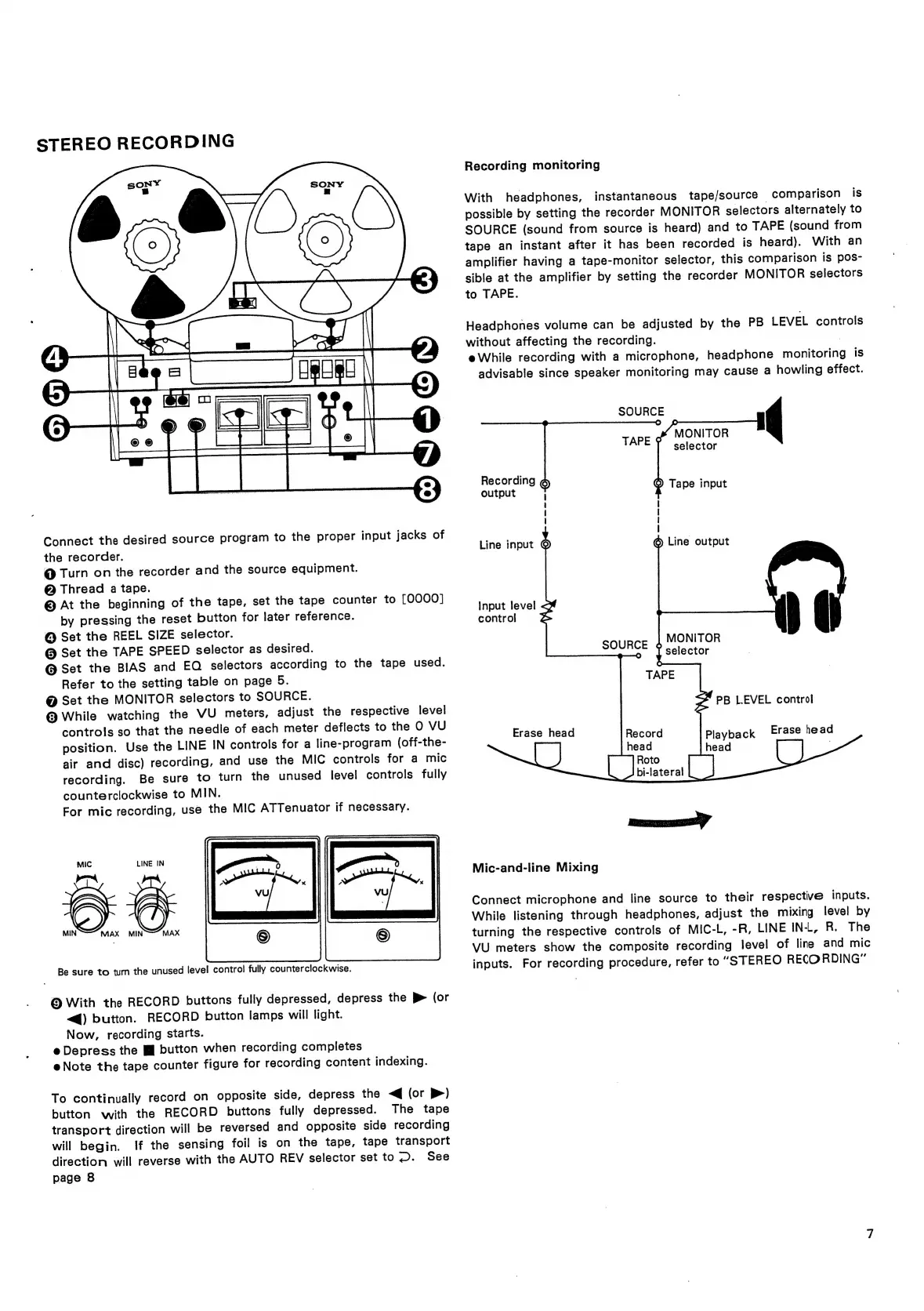
STEREO
RECORDING
Connect
the
desired
source
program
to
the
proper
input
jacks
of
the
recorder.
@
Turn
on
the
recorder
and
the
source
equipment.
@
Thread
a
tape.
©
At
the
beginning
of
the
tape,
set
the
tape
counter
to
[0000]
by
pressing
the
reset
button
for
later
reference.
@
Set
the
REEL
SIZE
selector.
@
Set
the
TAPE
SPEED
selector
as
desired.
@
Set
the
BIAS
and
EQ
selectors
according
to
the
tape
used.
Refer
to
the
setting
table
on
page
5.
@
Set
the
MONITOR
selectors
to
SOURCE.
@
While
watching
the
VU
meters,
adjust
the
respective
level
controls
so
that
the
needle
of
each
meter
deflects
to
the
O
VU
position.
Use
the
LINE
IN
controls
for
a
line-program
(off-the-
air
and
disc)
recording,
and
use
the
MIC
controls
for
a
mic
recording.
Be
sure
to
turn
the
unused
level
controls
fully
counterclockwise
to
MIN.
For
mic
recording,
use
the
MIC
ATTenuator
if
necessary.
MIC
LINE
IN
MIN
‘MAX
MIN
MAX
Be
sure
to
turn
the
unused
level
control
fully
counterclockwise.
©
With
the
RECORD
buttons
fully
depressed,
depress
the
>
(or
“@)
button.
RECORD
button
lamps
will
light.
Now,
recording
starts.
e
Depress
the
If
button
when
recording
completes
e@
Note
the
tape
counter
figure
for
recording
content
indexing.
To
continually
record
on
opposite
side,
depress
the
<q
(or
P)
button
with
the
RECORD
buttons
fully
depressed.
The
tape
transport
direction
will
be
reversed
and
opposite
side
recording
will
begin.
If
the
sensing
foil
is
on
the
tape,
tape
transport
direction
will
reverse
with
the
AUTO
REV
selector
set
to
.
See
page
8
Recording
monitoring
With
headphones,
instantaneous
tape/source
~
comparison
is
possible
by
setting
the
recorder
MONITOR
selectors
alternately
to
SOURCE
(sound
from
source
is
heard)
and
to
TAPE
(sound
from
tape
an
instant
after
it
has
been
recorded
is
heard).
With
an
amplifier
having
a
tape-monitor
selector,
this
comparison
is
pos-
sible
at
the
amplifier
by
setting
the
recorder
MONITOR
selectors
to
TAPE.
Headphones
volume
can
be
adjusted
by
the
PB
LEVEL
controls
without
affecting
the
recording.
eWhile
recording
with
a
microphone,
headphone
monitoring
is
advisable
since
speaker
monitoring
may
cause
a
howling
effect.
SOURCE
MONITOR
selector
Recording
?
output
:
Tape
input
i
{
|
;
Line
input
©
6
Line
output
Input
level
<
control
o
;
MONITOR
SOURCE
1
selector
TAPE
S
PB
LEVEL
control
Erase
head
Record
Playback
Erase
head
ze
head
head
|
Roto
bi-lateral
nen
Mic-and-line
Mixing
Connect
microphone
and
line
source
to
their
respective
inputs.
While
listening
through
headphones,
adjust
the
mixing
level
by
turning
the
respective
controls
of
MIC-L,
-R,
LINE
IN-L,
R.
The
VU
meters
show
the
composite
recording
level
of
line
and
mic
inputs.
For
recording
procedure,
refer
to
“STEREO
RECORDING”