EasyManua.ls Logo

Sony TC-C5 - Page 7

Sony TC-C5
41 pages
Print Icon
To Next Page IconTo Next Page
To Previous Page IconTo Previous Page
Loading...
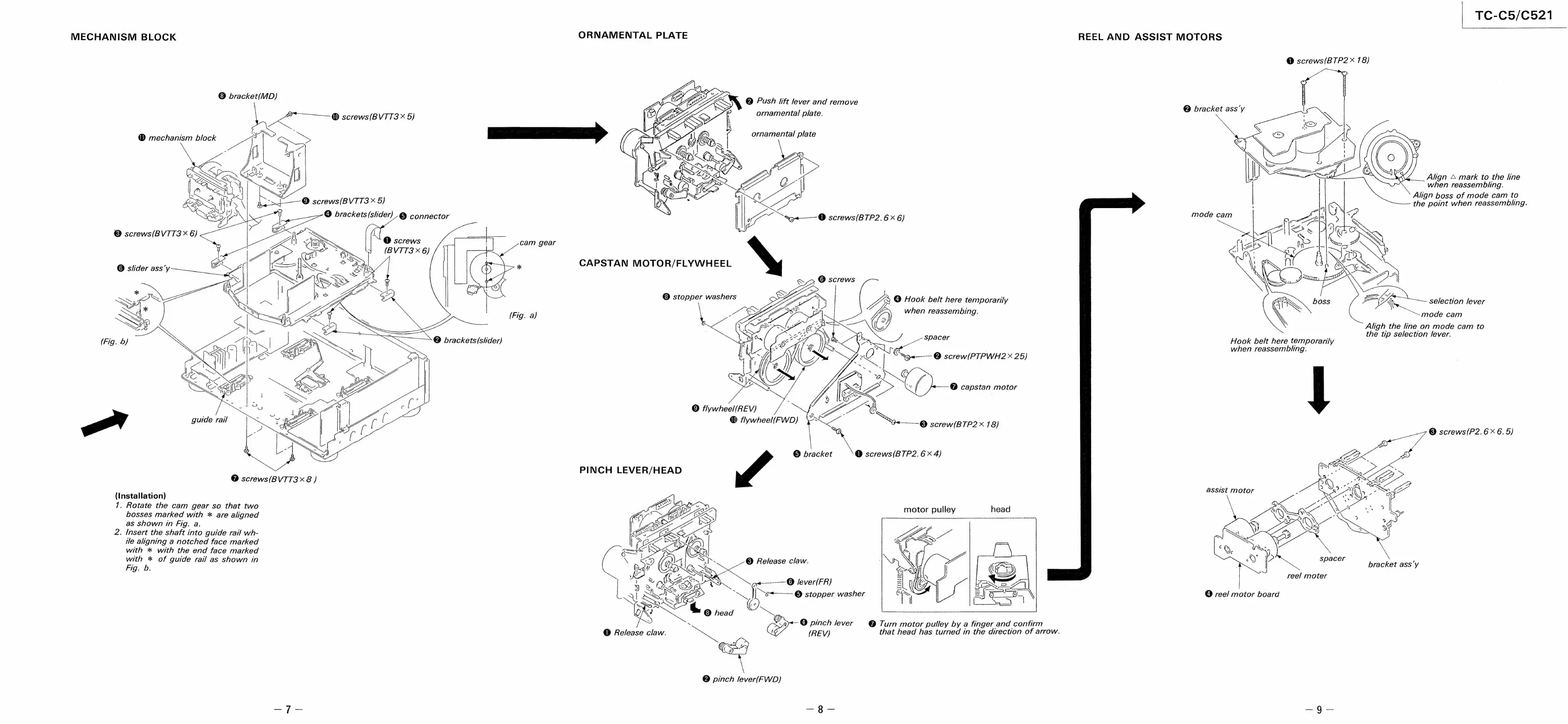
TC-C5/C521
MECHANISM
BLOCK
ORNAMENTAL
PLATE
REEL
AND
ASSIST
MOTORS
@
screws(BTP2
X
78)
®
bracket(MD)
@
Push
lift
lever
and
remove
@
bracket
ass’y
ornamental
plate.
2
@)
screws(BVTT3
X
5)
_Align
&
mark
to
the
line
when
reassembling.
Align
boss
of
mode
cam
to
the
point
when
reassembling.
&<—_—
@
screws(BTP2.
6x6)
&,2
@
screws
6S.
t
CAPSTAN
MOTOR/FLYWHEEL
®
stopper
washers
3
@
Hook
belt
here
temporarily
selection
lever
when
reassembing.
“~~
mode
cam
Aligh
the
line
on
mode
cam
to
the
tip
selection
lever.
Hook
belt
here
temporarily
when
reassembling.
——
©
screw(BTP2
X
78)
mn
eA
®
screws(P2.
6
x
6.
5)
©
bracket
@
screws(BTP2.
6
x
4)
@
screws(BVTT3
x8
)
assist
motor
(Installation)
7.
Rotate
the
cam
gear
so
that
two
bosses
marked
with
*
are
aligned
as
shown
in
Fig.
a.
2.
Insert
the
shaft
into
guide
rail
wh-
ile
aligning
a
notched
face
marked
with
*
with
the
end
face
marked
with
*
of
guide
rail
as
shown
in
Fig.
b.
motor
pulley
head
spacer
e
bracket
ass’y
,
@
lever(FR)
©
stopper
washer
@
reel
motor
board
(6
©
head
~~
ie
4
pinch
lever
@
Turn
motor
pulley
by
a
finger
and
confirm
@
s
.
(REV)
that
head
has
turned
in
the
direction
of
arrow.
Qo
pinch
lever(FWD)
@
Release
claw.

Related product manuals