EasyManua.ls Logo

Sony Trinitron KV-35S36 - Component Integration Features; S-Link Functionality; Camcorder Connection

Sony Trinitron KV-35S36
36 pages
Print Icon
To Next Page IconTo Next Page
To Previous Page IconTo Previous Page
Loading...
Using
the
S-Link
function
e
KV-27V26,
27V36,
29V36C,
29V66M, 29V76M,
32V26,
32V36,
34V36C,
35V36, 35V76,
37V36M
only
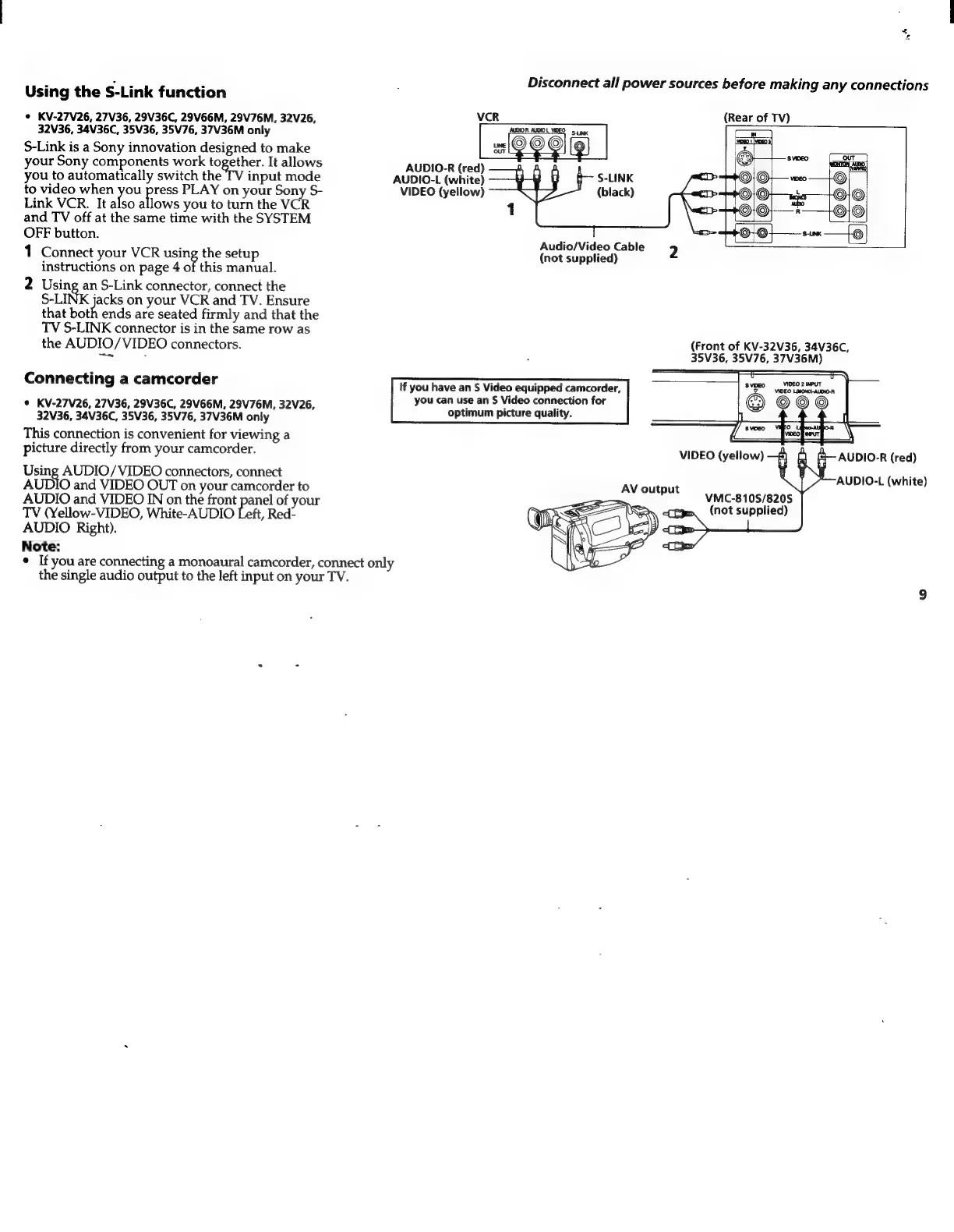
S-Link
is
a
Sony
innovation
designed
to
make
your
Sony
components
work
together.
It
allows
you
to
automatically
switch
the
TV
input
mode
to
video
when
you
press
PLAY
on
your
Sony
S-
Link
VCR.
It
also
allows
you
to
turn
the
VCR
and
TV
off
at
the
same
time
with
the
SYSTEM
OFF
button.
1
Connect
your
VCR
uing
the
setup
instructions
on
page
4
of
this
manual.
2
Using
an
S-Link
connector,
connect
the
S-LINK
jacks
on
your
VCR
and
TV.
Ensure
that
both
ends
are
seated
firmly
and
that
the
TV
S-LINK
connector
is
in
the
same
row
as
the
AUDIO/VIDEO
connectors.
Connecting
a
camcorder
e
KV-27V26,
27V36,
29V36C,
29V66M,
29V76M,
32V26,
32V36,
34V36C,
35V36,
35V76,
37V36M
only
This
connection
is
convenient
for
viewing
a
picture
directly
from
your
camcorder.
Using
AUDIO/VIDEO
connectors,
connect
AUDIO
and
VIDEO
OUT
on
your
camcorder
to
AUDIO
and
VIDEO
IN
on
the
front
panel
of
your
TV
(Yellow-VIDEO,
White-AUDIO
Left,
Red-
AUDIO
Right).
Note:
e
If
you
are
connecting
a
monoaural
camcorder,
connect
only
the
single
audio
output
to
the
left
input
on
your
TV.
Disconnect
all
power
sources
before
making
any
connections
VCR
(Rear
of
TV)
AUDIO-R
(red)
AUDIO-L
(white)
VIDEO
(yellow)
(black)
Audio/Video
Cable
2
(not
supplied)
(Front
of
KV-32V36,
34V36C,
35V36,
35V76,
37V36M)
tf
you
have
an
S
Video
equipped
camcorder,
you
can
use
an
S
Video
connection
for
optimum
picture
quality.
>
AUDIO-L
(white)
VMC-810S/820S
em.
(not
supplied)