EasyManua.ls Logo

Sony Trinitron KV-35S36 - VCR and MDP Remote Operation; VCR Remote Controls; MDP Remote Controls; Specific VCR Type Codes

Sony Trinitron KV-35S36
36 pages
Print Icon
To Next Page IconTo Next Page
To Previous Page IconTo Previous Page
Loading...
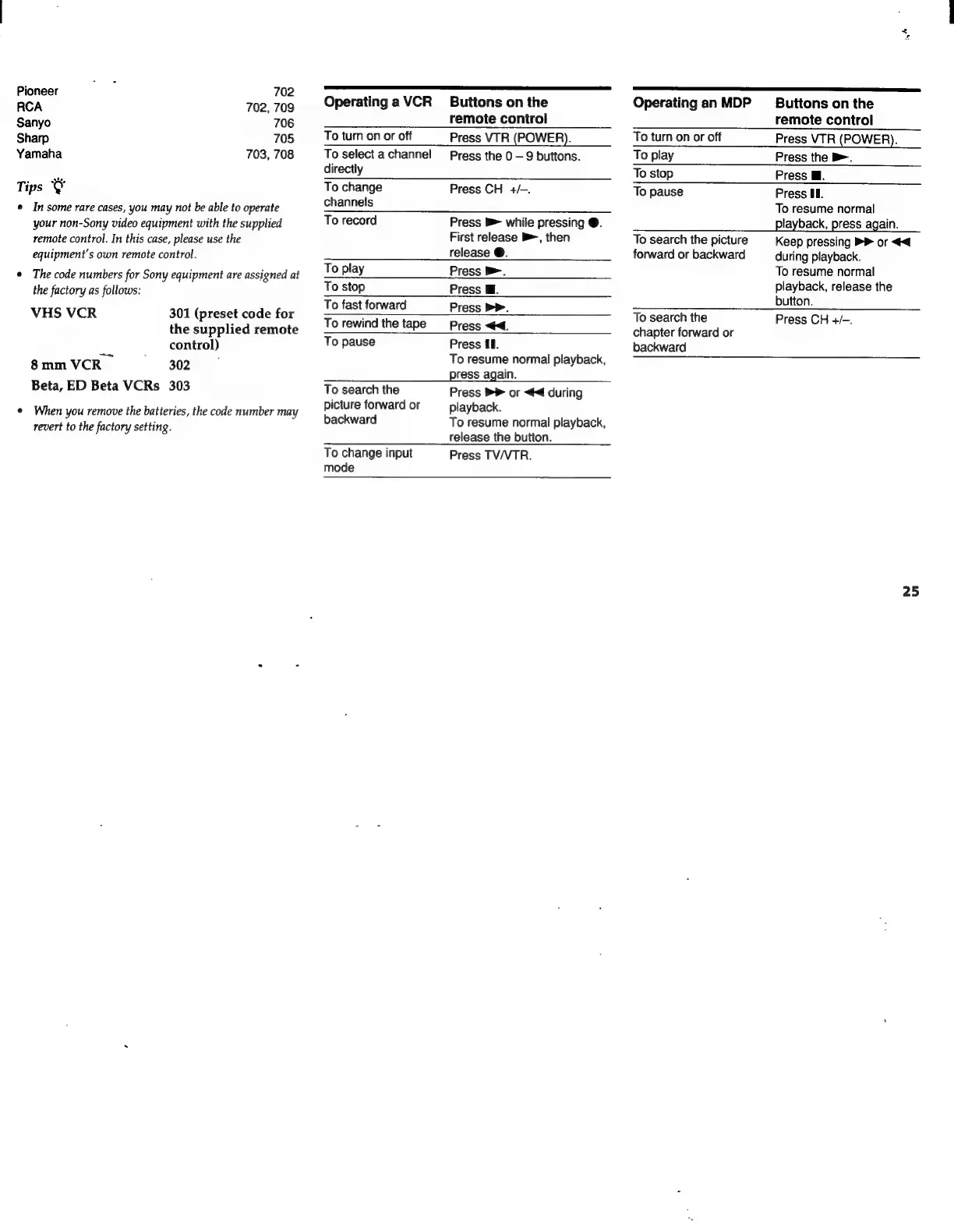
Pioneer
a
702
RCA
702,
709
Sanyo
706
Sharp
705
Yamaha
703,
708
Tips
cay
o
In
some
rare
cases,
you
may
not
be
able
to
operate
your
non-Sony
video
equipment
with
the
supplied
remote
control.
In
this
case,
please
use
the
equipment’s
own
remote
control.
e
The
code
numbers
for
Sony
equipment
are
assigned
at
the
factory
as
follows:
VHS
VCR
301
(preset
code
for
the
supplied
remote
control)
8
mm
VCR
302
Beta,
ED
Beta
VCRs
303
©
When
you
remove
the
batteries,
the
code
number
may
revert
to
the
factory
setting.
Operating
a
VCR
Buttons
on
the
remote
control
To
turn
on
or
off
Press
VTR
(POWER).
To
select
a
channel
Press
the
0
—
9
buttons.
directly
To
change
Press
CH
+/-.
channels
To
record
Press
B>
while
pressing
@.
First
release
B,
then
release
@.
To
play
Press
>.
To
stop
Press W.
To
fast
forward
Press
PP.
To
rewind
the
tape
Press
<4.
To
pause
Press
iI.
To
resume
normal
playback,
—
ess
again,
o
To
search
the
Press
>
or
<<
during
picture
forward
or
playback.
backward
To
resume
normal
playback,
release
the
button.
To
change
input
Press
TV/VTR.
mode
Operating
an
MDP
Buttons
on
the
remote
control
To
turn
on
or
off
Press
VTR
(POWER).
To
play
Press
the
b>.
To
stop
Press
W.
To
pause
Press
II.
To
resume
normal
To
search
the
picture
Keep
pressing
>>
or
<<
forward
or
backward
during
playback.
To
resume
normal
playback,
release
the
button.
To
search
the
Press
CH
+/-.
chapter
forward
or
backward
25